第 27 章 多用户、权限与开放 API
本章目标:读完你能给 mini-n8n 加上用户系统:第一次启动创建 owner,之后登录;每个用户只看得到自己和别人分享给自己的工作流与凭证;并提供一套用 API Key 认证的开放 API,给脚本和其他系统调用。前置:第 9、11、26 章。对应代码:mini-n8n v1.0 的
cli/src/auth/、cli/src/public-api/
1. 问题与概念
到 v0.5 为止,mini-n8n 没有用户:谁都能看到所有工作流、读到所有凭证、调用所有 REST 接口。单机自用没问题,一旦多人共用就不行了。平台化要解决三件事:
- 认证(authentication):你是谁。编辑器用会话 cookie,脚本用 API Key。
- 授权(authorization):你能碰什么。owner 能看一切;普通成员只能看自己的,以及别人分享给他的。
- 开放 API:一套稳定的、给机器用的接口,和编辑器用的内部 REST 接口分开。
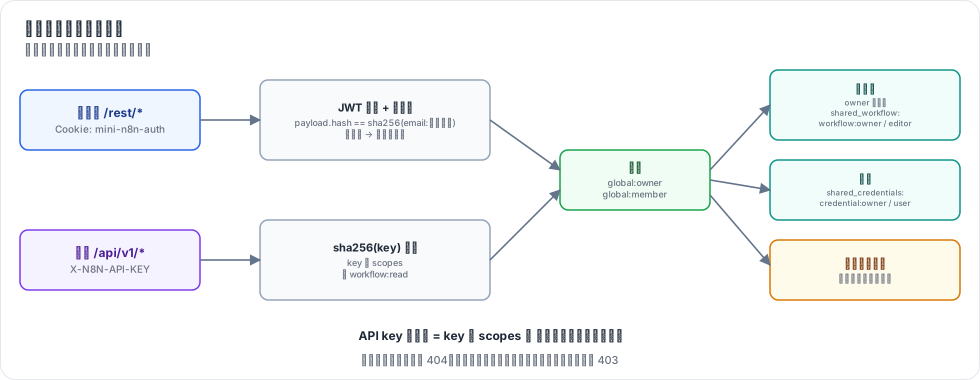
图 27-1:两条认证路径都解析出一个用户;再按全局角色和共享表判断能否访问某个工作流或凭证。
几个概念:
- 全局角色:
global:owner(实例管理员)和global:member。n8n 还有更多角色和基于项目(project)的权限,我们只做这两个。 - 共享(sharing):一个工作流有一个
workflow:owner和若干workflow:editor;一个凭证有credential:owner和若干credential:user。n8n 分享给“项目”,每个用户有一个个人项目;我们直接分享给用户,少一层。 - 会话 cookie:登录后服务器签发一个 httpOnly 的 JWT,放进 cookie。httpOnly 意味着页面脚本读不到它,降低 XSS 窃取风险。
- API Key:一串随机令牌,带若干 scope(如
workflow:read)。只存它的哈希,像存密码一样。
2. n8n 是怎么做的
2.1 会话
登录成功后 issueCookie()(packages/cli/src/auth/auth.service.ts:299)签发 JWT 放进 cookie:httpOnly,一周过期。token 里带一个 hash:
// auth.service.ts:570
createJWTHash({ email, password, mfaEnabled, mfaSecret }: User) {
	const payload = [email, password];
	if (mfaEnabled && mfaSecret) payload.push(mfaSecret.substring(0, 3));
	return this.hash(payload.join(':')).substring(0, 10);
}
password 是数据库里的 bcrypt 哈希。每次请求带着 cookie 进来,resolveJwt() 验签、查出用户,再比对 jwtPayload.hash !== this.createJWTHash(user)(:450):用户一改密码,这个哈希就变了,所有旧会话立刻失效。
JWT 的密钥从加密密钥推导(services/jwt.service.ts):取加密密钥每隔一个字符拼起来再 sha256。所以同一个实例重启后老会话还能用,不同实例之间不行。
2.2 密码
密码用 bcrypt(services/password.utility.ts)。密码规则在 @n8n/api-types 的 passwordSchema:8–64 位,至少一个数字、一个大写字母。错误信息也在那里(Password must contain at least 1 number. 等)。
2.3 授权
n8n 的权限系统基于 scope(@n8n/permissions)。global:owner 拥有全部 scope;global:member 只有自己资源的 scope。列工作流时,成员看到的是“分享给他所在项目的”那些。
保存工作流时有一道关键检查 validateWorkflowCredentialUsage()(workflows/workflow.service.ee.ts:224):工作流里用到的凭证,当前用户必须有权使用,否则报错 You don't have access to the credentials in the '...' node. Ask the owner to share them with you.。不然成员就能新建一个工作流、在里面引用别人的凭证、执行它来“借用”别人的秘密。
2.4 API Key 与开放 API
API Key 存在 user_api_keys 表(@n8n/db/src/entities/api-key.ts),有 scopes 字段。开放 API 用 X-N8N-API-KEY 头认证(services/api-key-auth.strategy.ts):按 key 查出用户,lastUsedAt 记一下,请求以该用户身份运行。开放 API 的 handler 在 public-api/v1/handlers/,按 OpenAPI 规范组织,列表返回 { data, nextCursor } 的游标分页。
3. 从零实现
3.1 自己写一个 JWT
不引第三方库,auth/jwt.ts 手写 HS256:
// :6
export function signJwt(payload, secret, expiresInSeconds): string {
	const head = b64(JSON.stringify({ alg: 'HS256', typ: 'JWT' }));
	const body = b64(JSON.stringify({ ...payload, iat: now, exp: now + expiresInSeconds }));
	const signature = createHmac('sha256', secret).update(`${head}.${body}`).digest('base64url');
	return `${head}.${body}.${signature}`;
}verifyJwt()(:15)用 timingSafeEqual 比签名,再检查 exp。密码用 Node 内置的 scrypt(auth/password.ts),存成 scrypt$<salt>$<hash>,验证时也用 timingSafeEqual——n8n 用 bcrypt,作用一样。
3.2 AuthService
auth/auth.service.ts 的 JWT 密钥推导和 n8n 一样(每隔一个字符 + sha256);createJWTHash()(:62)用 email:密码哈希 的 sha256 前 10 位,改密码即失效。
授权是几个小方法:
// :109
canAccessWorkflow(user, workflowId) {
	return user.role === 'global:owner' || !!this.db.sharing.workflowRole(workflowId, user.id);
}
// :115 看不到的工作流一律 404,不暴露它是否存在
assertWorkflowAccess(user, workflowId) {
	if (!this.db.workflows.get(workflowId) || !this.canAccessWorkflow(user, workflowId)) throw new HttpError(404, 'Workflow not found');
}
还有 assertCredentialUsage()(:130),照搬 n8n 保存工作流时的那道检查。
3.3 认证中间件
// auth/routes.ts:33
app.addHook('onRequest', async (req, reply) => {
	const path = req.url.split('?')[0];
	if (!path.startsWith('/rest/') || PUBLIC_REST.has(`${req.method} ${path}`)) return;
	req.user = auth.userFromCookie(req);
	if (!req.user) return reply.code(401).send({ message: 'Unauthorized' });
});除了三个公开接口(/rest/settings、owner 设置、登录),所有 /rest/* 都要一个有效会话。Webhook(/webhook/*)不走这个 hook,保持公开。
第一次启动时还没有 owner:/rest/settings 返回 showSetupOnFirstLoad: true,编辑器据此显示“设置 owner”页。/rest/owner/setup(:43)创建 owner,并把此前(还没有用户系统时)建的工作流和凭证都归到 owner 名下。
每个写操作都加了检查。比如列工作流只返回有权看的,保存工作流先验证凭证使用权,删除工作流要求是 workflow:owner。
3.4 开放 API
public-api/routes.ts 用自己的 hook 认证:
// :21
const resolved = typeof header === 'string' ? auth.resolveApiKey(header) : undefined;
if (!resolved) return reply.code(401).send({ message: "'X-N8N-API-KEY' header required" });
req.user = resolved.user;
req.apiKey = resolved.key;
每个接口先查 scope,再查访问权:
// :29
const requireScope = (req, scope) => {
	if (!req.apiKey!.scopes.includes(scope)) throw new HttpError(403, `API key is missing the scope "${scope}"`);
	return req.user!;
};关键一点:API Key 的权限 = key 的 scope ∩ 它所属用户能访问的资源。列工作流用 auth.accessibleWorkflowIds(user) 过滤,所以就算 key 有 workflow:read,也只看得到 key 主人看得到的工作流。创建 key 时(AuthService.createApiKey,:90)只把 key 显示一次,数据库里存 sha256(key) 和末 4 位(hint)。
3.5 编辑器
editor/src/components/SignIn.vue 是登录 / owner 设置页:/rest/settings 说要不要设置 owner。api.ts 的请求遇到 401 就派发一个事件,App.vue 把界面切回登录页。顶栏多了用户名和 “Sign out”。
3.6 裁剪了什么
| n8n 有 | mini-n8n |
|---|---|
| 项目(personal / team project),分享给项目 | 直接分享给用户 |
很多角色和细粒度 scope(@n8n/permissions) | owner / member 两个角色 |
| 邀请邮件、密码重置、MFA、SSO/LDAP | owner 直接给成员设密码 |
| 公开 API 按 OpenAPI 规范、游标分页、更多资源 | 工作流和执行两种资源,简单分页 |
4. 运行与验证
npx vitest run packages/cli/test/auth.test.ts --reporter=verbose真实输出:
 ✓ sign-in > asks for an owner first, then requires a session for /rest
 ✓ sign-in > rejects a wrong password, a forged token, and old sessions after a password change
 ✓ sharing > a member sees only own and shared workflows; editors cannot delete
 ✓ sharing > a member cannot use a credential that is not shared with them
 ✓ public API > authenticates with X-N8N-API-KEY and checks the scopes of the key
第二个测试验证了三件事:错误密码返回 401 和 Wrong username or password. Do you have caps lock on?;篡改 token 里的用户 ID 后签名对不上,返回 401;直接改数据库里的密码哈希后,旧 cookie 立刻失效。
第四个测试还原了那个“借用凭证”的攻击:成员创建一个引用 owner 凭证的工作流,被 403 挡下(You don't have access to the credentials in the 'Call API' node. ...);owner 把凭证分享给他之后,他能在工作流里用了,但读凭证详情仍然 403——能用不等于能看。
4.1 编辑器里
e2e/platform.e2e.mjs 走完整个流程:
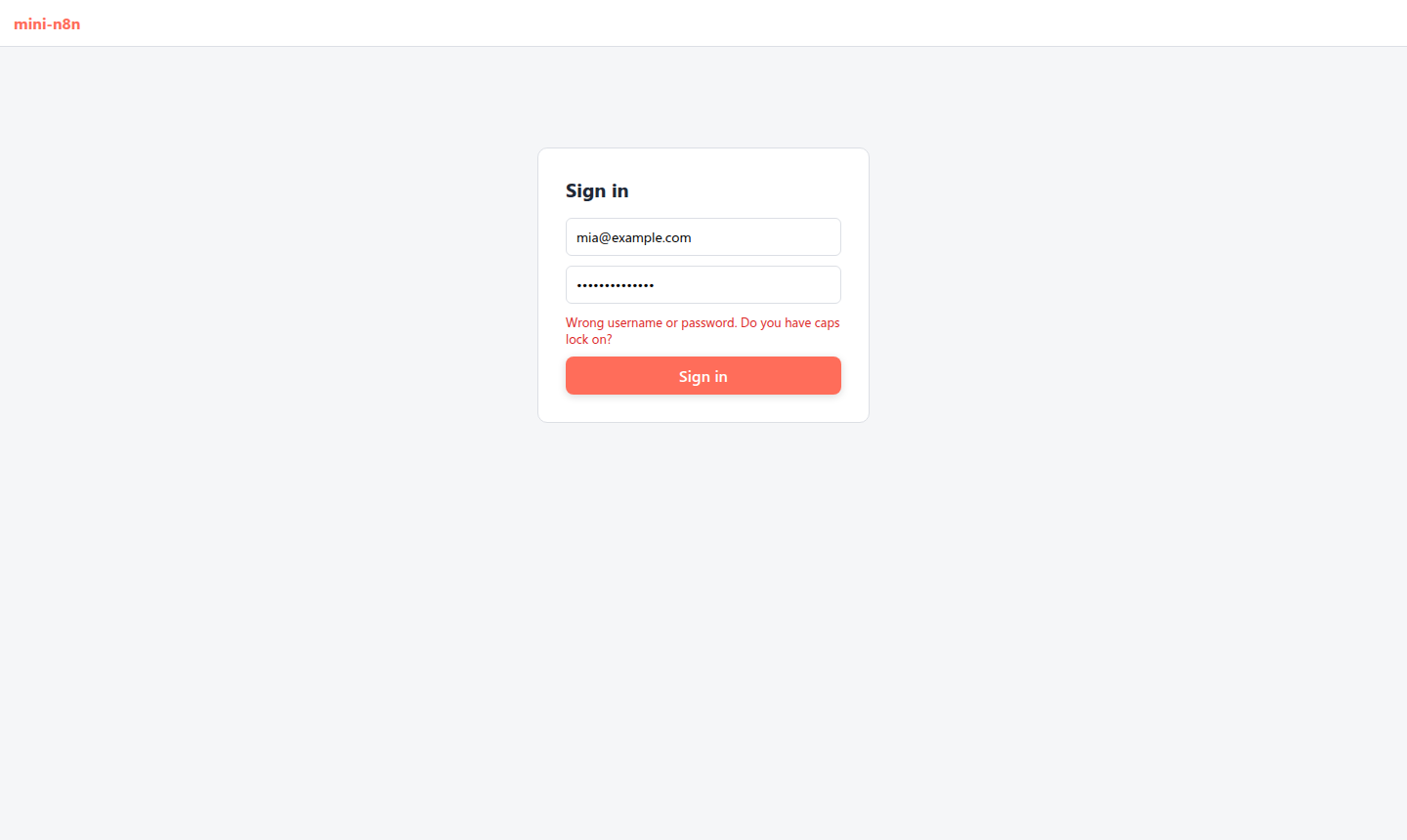
图 27-2:没有会话时编辑器显示登录页;输错密码,显示服务器返回的错误。
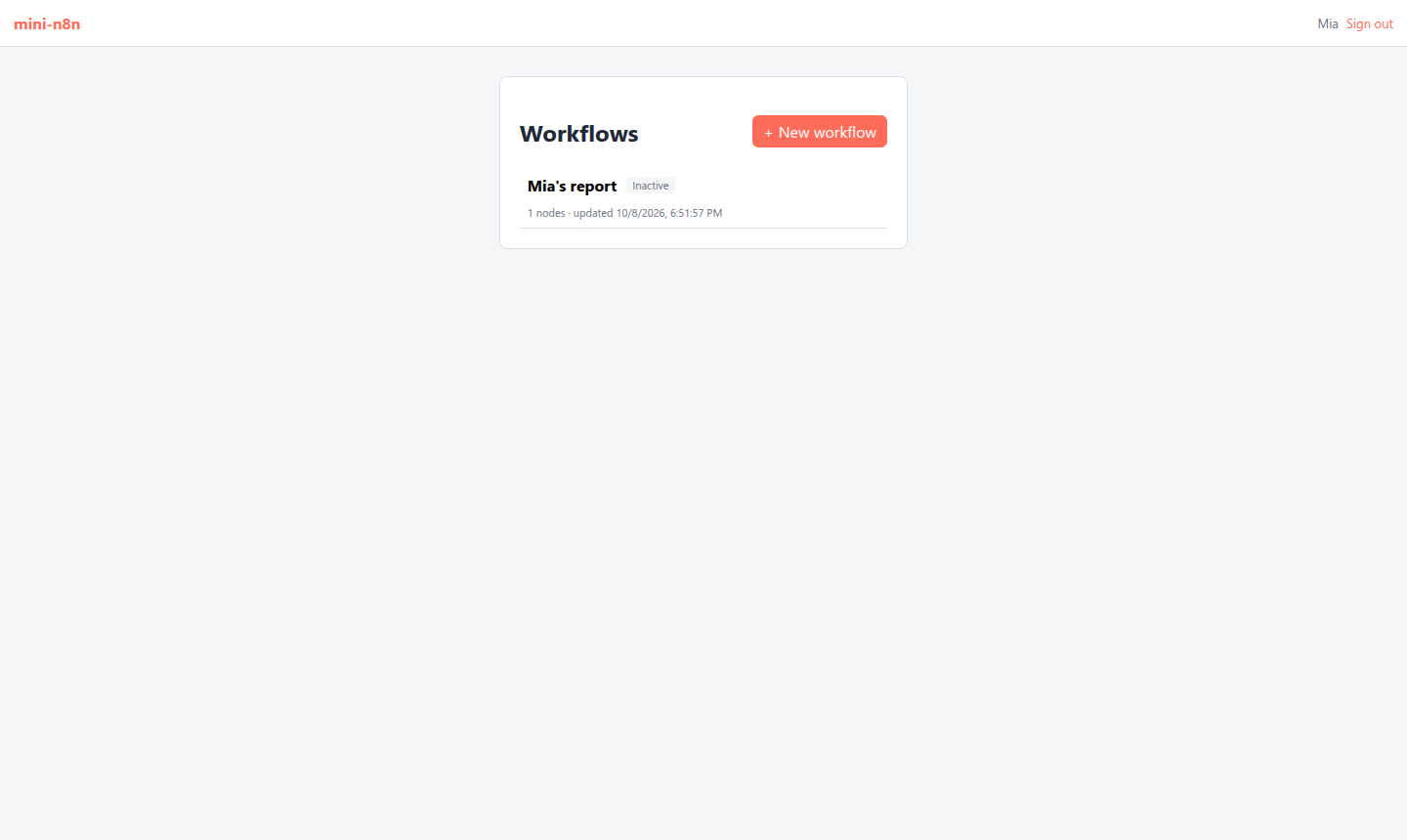
图 27-3:成员 Mia 登录后,工作流列表里只有她自己的 “Mia's report”,owner 的私有工作流不在其中。
真实输出:
✓ without a session the editor shows the sign-in page
✓ a wrong password shows the error from the server
✓ the member sees only own workflows (1: Mia's report)
✓ signing out clears the session cookie
✓ no errors in the browser console
4.2 踩坑记录
- Fastify 拒绝空的 JSON body。所有旧测试都用一个共享的
createTestServer()(会先设置 owner、带上 cookie),改造顺利。但部署端到端脚本(第 28 章)用curl -X POST .../activate -H 'content-type: application/json'且不带 body 时报了 400Body cannot be empty when content-type is set to 'application/json':Fastify 默认的 JSON 解析器不接受空 body,而 n8n 用的 Express 接受。修复:注册一个把空 body 当作undefined、否则再JSON.parse的解析器(server.ts)。这个坑是在第 28 章跑部署脚本时才发现的,但根因在本章。
5. 练习
- 巩固:用 curl 走一遍:
POST /rest/owner/setup拿 cookie →POST /rest/api-keys建 key → 用X-N8N-API-KEY调GET /api/v1/workflows。再创建一个只有workflow:read的 key,用它POST /api/v1/workflows,看看返回什么。 - 扩展:实现“工作流所有权转移”:owner 能把一个工作流的
workflow:owner换成另一个用户。注意别把自己锁在外面。 - 读源码:阅读 n8n 的
@n8n/permissions里global:member的 scope 列表,和workflows/workflow.service.ee.ts的getSharedWorkflowIds。成员在团队项目里看到工作流和在个人项目里有什么不同?
6. 延伸阅读
packages/cli/src/auth/:完整的认证,包括 MFA、浏览器绑定、cookie 续期。packages/@n8n/permissions/:角色和 scope 的定义。packages/cli/src/public-api/:开放 API 的 OpenAPI 规范和所有 handler。