第 20 章 工具体系:节点即工具、$fromAI、Workflow Tool、MCP
本章目标:读完你能把任何一个已有节点变成 Agent 的工具,用
$fromAI()让模型填写参数,把一个子工作流或一整个 MCP 服务器的工具接给 Agent,并理解 n8n 反过来把自己的工作流暴露成 MCP 工具的方式。前置:第 19 章。对应代码:mini-n8n v0.4 的packages/core/src/node-as-tool.ts、node-types.ts、packages/nodes-ai/src/nodes/tools.ts、mcp-client.ts
1. 问题与概念
Agent 有多强,取决于它能用的工具。n8n 有 400 多个集成节点,如果每个都要专门写一个“工具版”,工作量不可想象。n8n 用了四种方式获得工具:
| 方式 | 例子 | 工具定义从哪来 |
|---|---|---|
| 专用工具节点 | Calculator、Code Tool、Wikipedia、Vector Store Tool | 节点自己的 supplyData() |
| 节点即工具 | Gmail Tool、Slack Tool、HTTP Request Tool…… | 从普通节点 自动合成,参数用 $fromAI() 声明 |
| 工作流即工具 | Call n8n Workflow Tool | 子工作流,输入由模型填写 |
| MCP | MCP Client Tool | 外部 MCP 服务器的 tools/list |
反过来,n8n 也能 提供 工具:MCP Server Trigger 把连在它上面的工具暴露成一个 MCP 服务器,供 Claude Desktop、Cursor 等外部 Agent 使用。
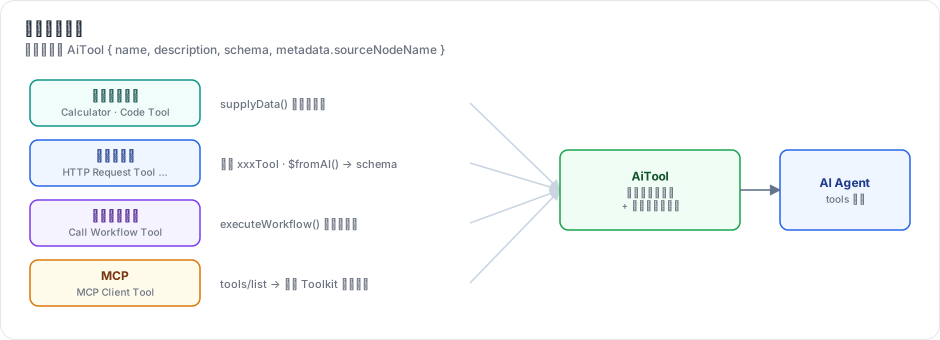
图 20-1:四种工具来源最后都变成同一种东西:一个带名字、描述和参数 schema 的工具定义,加上一个“谁来执行”的节点名(sourceNodeName)。
2. n8n 是怎么做的
2.1 节点即工具:合成 xxxTool 类型
节点描述里写了 usableAsTool: true 的节点(packages/nodes-base/nodes 下有 272 个文件声明了它),在节点列表里会多出一个 “xxx Tool” 版本。这个类型并不存在于任何源文件里,是加载时 合成 的。第 5 章提过 NodeTypes.getByNameAndVersion 里的这段:
// packages/cli/src/node-types.ts:100-158(节选)
getByNameAndVersion(nodeType: string, version?: number): INodeType {
	const origType = nodeType;
	const { baseName, isSyntheticTool } = this.resolveBaseName(nodeType);
	// If an existing node name ends in `Tool`, then return that node, instead of creating a fake Tool node
	if (nodeType.endsWith('Tool') && !isSyntheticTool) {
		const node = this.loadNodesAndCredentials.getNode(nodeType);
		return NodeHelpers.getVersionedNodeType(node.type, version);
	}
	const node = this.loadNodesAndCredentials.getNode(baseName);
	const versionedNodeType = NodeHelpers.getVersionedNodeType(node.type, version);
	...
	// Instead of modifying the existing type, we extend it into a new type object
	const clonedProperties = Object.create(versionedNodeType.description.properties) as INodeTypeDescription['properties'];
	const clonedDescription = Object.create(versionedNodeType.description, { properties: { value: clonedProperties, writable: isHitlTool } }) as INodeTypeDescription;
	const clonedNode = Object.create(versionedNodeType, { description: { value: clonedDescription } }) as INodeType;

	// For HITL tools, use convertNodeToHitlTool; for regular AI tools, use convertNodeToAiTool
	const tool = isHitlTool ? convertNodeToHitlTool(clonedNode) : convertNodeToAiTool(clonedNode);

	loadedNodes[cacheKey] = { sourcePath: '', type: tool };
	return tool;
}
Object.create(原型) 是一个巧妙的写法:新类型 继承 原节点的一切(包括 execute),只覆盖描述。描述的改造在 convertNodeToAiTool:
// packages/cli/src/tool-generation/ai-tools.ts:29-79(节选)
export function convertNodeToAiTool(item) {
	if (isFullDescription(item.description)) {
		item.description.name += 'Tool';
		item.description.inputs = [];
		item.description.outputs = [NodeConnectionTypes.AiTool];
		item.description.displayName += ' Tool';
		delete item.description.usableAsTool;
		...
		if (!item.description.properties.map((prop) => prop.name).includes('toolDescription')) {
			...
			const descProp: INodeProperties = {
				displayName: 'Description',
				name: 'toolDescription',
				type: 'string',
				default: item.description.description,
				required: true,
				typeOptions: { rows: 2 },
				description: 'Explain to the LLM what this tool does, a good, specific description would allow LLMs to produce expected results much more often',
			};
改造只有三点:没有输入、输出改为 ai_tool、增加一个“工具描述”参数(给模型看的)。节点原有的所有参数和 execute() 都保留。
合成的工具节点没有 supplyData。第 16 章提到,getInputConnectionData 遇到这种节点时调用 createNodeAsTool() 当场生成工具定义。
2.2 $fromAI():让模型填参数
工具定义需要参数 schema,但一个 Slack 节点有几十个参数,哪些该由模型填写?n8n 的答案是:用户在参数里写 $fromAI() 表达式。
Channel:  #support                              ← 固定值
Message:  {{ $fromAI('message', 'The text to post', 'string') }}   ← 模型填
createNodeAsTool 扫描节点的所有参数,收集 $fromAI 调用,生成 schema:
// packages/core/src/execution-engine/node-execution-context/utils/create-node-as-tool.ts:43-80(节选)
export function getSchema(node: INode) {
	const collectedArguments: FromAIArgument[] = [];
	try {
		traverseNodeParameters(node.parameters, collectedArguments);
	} catch (error) {
		throw new NodeOperationError(node, error as Error);
	}
	// Validate each collected argument
	const nameValidationRegex = /^[a-zA-Z0-9_-]{1,64}$/;
	const keyMap = new Map<string, FromAIArgument>();
	for (const argument of collectedArguments) {
		if (argument.key.length === 0 || !nameValidationRegex.test(argument.key)) {
			...
		}
		if (keyMap.has(argument.key)) {
			// If the key already exists in the Map
			const existingArg = keyMap.get(argument.key)!;
			// Check if the existing argument has the same description and type
			if (existingArg.description !== argument.description || existingArg.type !== argument.type) {
				throw new NodeOperationError(node, `Duplicate key '${argument.key}' found with different description or type`, ...);
解析 $fromAI('key', 'description', 'type', default) 的四个参数由 packages/workflow/src/from-ai-parse-utils.ts 负责(extractFromAICalls,第 251 行),它要正确处理参数里的引号、转义和嵌套括号——手写过表达式解析器的人都知道这不简单。schema 被转成 Zod(generateZodSchema,第 27 行),再交给 LangChain 的 DynamicStructuredTool。
运行时,引擎执行这个工具节点(第 19 章),输入 item 是模型给的参数;表达式求值时 $fromAI('message') 从输入里取 message 字段。
2.3 工作流即工具
Call n8n Workflow Tool(nodes/tools/ToolWorkflow)让 Agent 调用另一个工作流。它的价值在于:把一段确定性的流程封装成一个原子能力。例如“查询客户订单”可能涉及鉴权、两次 API 调用、数据清洗——与其让 Agent 一步步摸索,不如做成一个工作流,Agent 只需决定“要不要查、查谁”。
子工作流以 Execute Workflow Trigger 开始,执行记录单独保存,并和父执行关联(第 24 章)。
2.4 MCP:一个协议,任意工具
Model Context Protocol 是一个开放协议:工具提供方实现一个 MCP 服务器,任何 MCP 客户端(Claude Desktop、Cursor、n8n……)都能列出并调用它的工具。协议基于 JSON-RPC 2.0,核心方法只有三个:initialize、tools/list、tools/call;传输层目前主流是 “Streamable HTTP”(POST 请求,响应可以是 JSON 或 SSE 流)。
MCP Client Tool 节点连接一个 MCP 服务器,把它的所有工具作为一个 Toolkit 交给 Agent。Toolkit 是“一个节点提供多个工具”:每个工具的 sourceNodeName 都是同一个 MCP 节点,引擎执行这个节点时,输入里带一个 tool 字段说明调用的是哪个工具(第 18 章的 isFromToolkit 分支)。
MCP Server Trigger 反过来:
// packages/@n8n/nodes-langchain/nodes/mcp/McpTrigger/McpTrigger.node.ts:65-112(节选)
description: INodeTypeDescription = {
	...
	description: 'Expose n8n tools as an MCP Server endpoint',
	...
	inputs: [
		{
			type: NodeConnectionTypes.AiTool,
			displayName: 'Tools',
		},
	],
	outputs: [],
它的输入是 ai_tool:任何能接给 Agent 的工具,都能接给它,从而被外部 Agent 使用。McpTrigger/ 目录下有完整的会话管理、SSE / Streamable HTTP 传输实现(见同目录 README.md 的架构图)。
3. 从零实现
3.1 合成工具类型
// code/mini-n8n/packages/core/src/node-types.ts(节选)
getByNameAndVersion(name: string): INodeType {
	const type = this.types[name];
	if (type) return type;
	// "n8n-nodes-base.httpRequestTool": synthesize a tool from the base node (n8n does the same)
	if (name.endsWith('Tool')) {
		const base = this.types[name.slice(0, -4)];
		if (base?.description.usableAsTool && base.execute) {
			const tool = convertNodeToAiTool(base);
			this.types[name] = tool;
			return tool;
		}
	}
	throw new UserError(`Unrecognized node type: ${name}`);
}// code/mini-n8n/packages/core/src/node-as-tool.ts(节选)
export function convertNodeToAiTool(base: INodeType): INodeType {
const { description } = base;
return {
description: {
...description,
name: `${description.name}Tool`,
displayName: `${description.displayName} Tool`,
inputs: [],
outputs: ['ai_tool'],
...
properties: [toolDescriptionProperty, ...description.properties],
},
async supplyData(this: ISupplyDataFunctions): Promise<{ response: AiTool }> {
const node = this.getNode();
const tool: AiTool = {
name: nodeNameToToolName(node.name),
description: (node.parameters.toolDescription as string) || description.description,
schema: extractFromAIParameters(node.parameters),
metadata: { sourceNodeName: node.name },
};
return { response: tool };
},
async execute(this: IExecuteFunctions) {
return await base.execute!.call(this);
},
};
}mini-n8n 直接在合成的类型上实现 supplyData(n8n 是在 getInputConnectionData 里用 createNodeAsTool 现场生成),效果相同。HTTP Request 节点加上 usableAsTool: true,编辑器的节点列表里就出现了 “HTTP Request Tool”。
3.2 $fromAI()
收集 schema 用一个正则扫描所有以 = 开头的参数(extractFromAIParameters)。运行时的取值放在 ExecuteContext.additionalKeys:
// code/mini-n8n/packages/core/src/execute-context.ts(节选)
/** Extra `$variables` for expressions. A tool node run for an Agent gets `$fromAI`. */
protected additionalKeys(itemIndex: number): IDataObject {
	const outputs = normalizeConnectionList(this.nodeType.description.outputs, this.node.parameters);
	if (outputs.some((o) => o.type === 'ai_tool')) return fromAIKeys(this.getInputData()[itemIndex]?.json ?? {});
	return {};
}// code/mini-n8n/packages/core/src/node-as-tool.ts(节选)
export function fromAIKeys(args: IDataObject) {
return {
$fromAI: (key: string, _description?: string, _type?: string, defaultValue?: unknown) => (key in args ? args[key] : defaultValue),
};
}在编辑器里预览时没有模型参数,WorkflowDataProxy 提供一个默认的 $fromAI,返回占位符 [filled by the model: key]。
3.3 Workflow Tool
// code/mini-n8n/packages/nodes-ai/src/nodes/tools.ts(节选)
async execute(this: IExecuteFunctions) {
	const out: INodeExecutionData[] = [];
	for (const [i, item] of this.getInputData().entries()) {
		const workflowId = this.getNodeParameter('workflowId', i) as string;
		const result = await this.executeWorkflow(workflowId, [{ json: toolArgs(this, item, ['query']) }]);
		const values = result.map((r) => r.json);
		out.push({ json: { response: values.length === 1 ? values[0] : values }, pairedItem: { item: i } });
	}
	return [out];
}
this.executeWorkflow 由服务端通过 additionalData.executeWorkflow 提供:WorkflowRunner.runSubWorkflow 从数据库加载工作流,以 integrated 模式启动一次执行并等待它结束,返回最后一个节点的输出(packages/cli/src/workflow-runner.ts)。
3.4 MCP 客户端
不到 80 行的最小客户端:
// code/mini-n8n/packages/nodes-ai/src/mcp-client.ts(节选)
private async rpc(method: string, params?: unknown, notification = false): Promise<unknown> {
	const body = notification ? { jsonrpc: '2.0', method, params } : { jsonrpc: '2.0', id: this.nextId++, method, params };
	const res = await fetch(this.url, {
		method: 'POST',
		headers: {
			'content-type': 'application/json',
			accept: 'application/json, text/event-stream',
			...(this.sessionId ? { 'mcp-session-id': this.sessionId } : {}),
			...this.headers,
		},
		body: JSON.stringify(body),
	});
	this.sessionId = res.headers.get('mcp-session-id') ?? this.sessionId;
	...
	const json = (res.headers.get('content-type') ?? '').includes('text/event-stream')
		? JSON.parse(text.split('\n').filter((l) => l.startsWith('data:')).map((l) => l.slice(5)).at(-1) ?? '{}')
		: JSON.parse(text);
要点:服务器在 initialize 的响应头里给出 mcp-session-id,之后每个请求都要带上;响应可能是 JSON,也可能是 SSE 流(取最后一条 data:)。
MCP Client Tool 节点的 supplyData 列出工具、包装成 Toolkit;execute 再连接一次,按输入里的 tool 字段调用。execute 只把该工具 schema 里声明的字段作为参数传过去,因为引擎给工具的输入里还混着 Agent 的输入字段(chatInput、sessionId……)。
examples/mcp-server.ts 是一个 60 行的 MCP 服务器,提供 get_weather 和 get_time 两个工具,供测试和演示使用。
| 方面 | n8n | mini-n8n |
|---|---|---|
| 节点即工具 | 数百个节点;Object.create 继承原型;资源/操作自动生成描述 | HTTP Request;展开复制描述 |
$fromAI | 完整解析器,Zod schema,校验重复键 | 正则提取,JSON schema |
| Workflow Tool | 选择工作流、映射输入字段(含 $fromAI)、等待子执行 | 固定一个 query 参数 |
| MCP Client | 官方 SDK,SSE / Streamable HTTP,鉴权,工具过滤 | 最小 Streamable HTTP 客户端 |
| MCP Server Trigger | 有 | 无(练习) |
4. 运行与验证
节点即工具(packages/nodes-ai/test/agent.test.ts):一个 HTTP Request Tool 的 URL 写成
={{ "http://127.0.0.1:PORT/forecast?q=" + encodeURIComponent($fromAI("question", "what the user asked", "string")) }}测试断言:工具定义的 schema 里有 question;本地测试服务器收到的请求是 /forecast?q=What%20is%20the%20weather%20like%3F;工具运行记录的 inputOverride 是 { question: 'What is the weather like?' }。
MCP(examples/mcp-agent.ts,在进程内启动示例 MCP 服务器),真实输出:
tools/list -> get_weather(city), get_time()
MCP Client  in={"city":"How is the weather in Paris?","tool":"get_weather"} out={"response":"Sunny, 22°C in Paris"}
answer     : Based on the tools: get_weather returned Sunny, 22°C in Paris.
Workflow Tool 由服务端集成测试覆盖(packages/cli/test/ai.test.ts):子工作流的执行被单独保存,mode 为 integrated。
✓ workflow tool > runs another workflow as a tool and stores it as its own execution5. 练习
- 巩固:在编辑器里给 Agent 接一个 HTTP Request Tool,URL 用
https://httpbin.org/anything?city={{ $fromAI('city', 'the city name', 'string') }},用 Ollama 模型问 “What is the weather in Tokyo?”,在工具节点的 NDV 里看模型填了什么。 - 扩展:实现 MCP Server Trigger:一个 Webhook 类触发器,
inputs是ai_tool;收到tools/list时返回连着的工具定义(通过getInputConnectionData),收到tools/call时执行对应的工具节点并返回结果。 - 读源码:阅读 n8n 的
extractFromAICalls()(packages/workflow/src/from-ai-parse-utils.ts:251),找出它如何处理描述里含有逗号和引号的情况,例如$fromAI('q', 'a "quoted", text')。
6. 延伸阅读
packages/cli/src/tool-generation/:节点即工具的描述改造。packages/@n8n/nodes-langchain/nodes/mcp/:MCP 客户端与服务器。- MCP 规范:https://modelcontextprotocol.io/