第 13 章 画布:Vue Flow 与工作流数据的映射
本章目标:读完你能解释 n8n 画布如何把“按名字索引的连接”映射成 Vue Flow 的节点和边,端口(handle)如何编码,拖拽、连线、删除如何变成对工作流数据的修改,并实现一个能编辑、能实时显示执行状态的画布。前置:第 4、10 章。对应代码:mini-n8n v0.3 的
packages/editor/src/components/Canvas.vue、CanvasNode.vue、composables/useCanvasMapping.ts、stores/workflow.ts
1. 问题与概念
画布是用户每天看得最多的界面,但它其实只是 工作流数据的一个视图。设计画布时最重要的一条原则是:数据只有一份,在 store 里;画布从 store 计算出来,用户的操作(拖动、连线、删除)变成对 store 的修改,再由 store 驱动画布更新。
两边的数据模型并不一样:
| 工作流(n8n-workflow) | Vue Flow | |
|---|---|---|
| 节点标识 | name(连接、表达式都用名字) | id |
| 连接 | connections[源名][类型][输出号] = [{node: 目标名, type, index}] | edges = [{ source, target, sourceHandle, targetHandle }] |
| 端口 | 由节点描述的 inputs/outputs 决定 | 节点组件里渲染的 <Handle id=...> |
| 状态 | 执行数据在另一个 store | 节点 data 里的任意字段 |
映射层负责双向翻译。图 13-1 是 mini-n8n v0.3 执行完订单工作流后的画布:
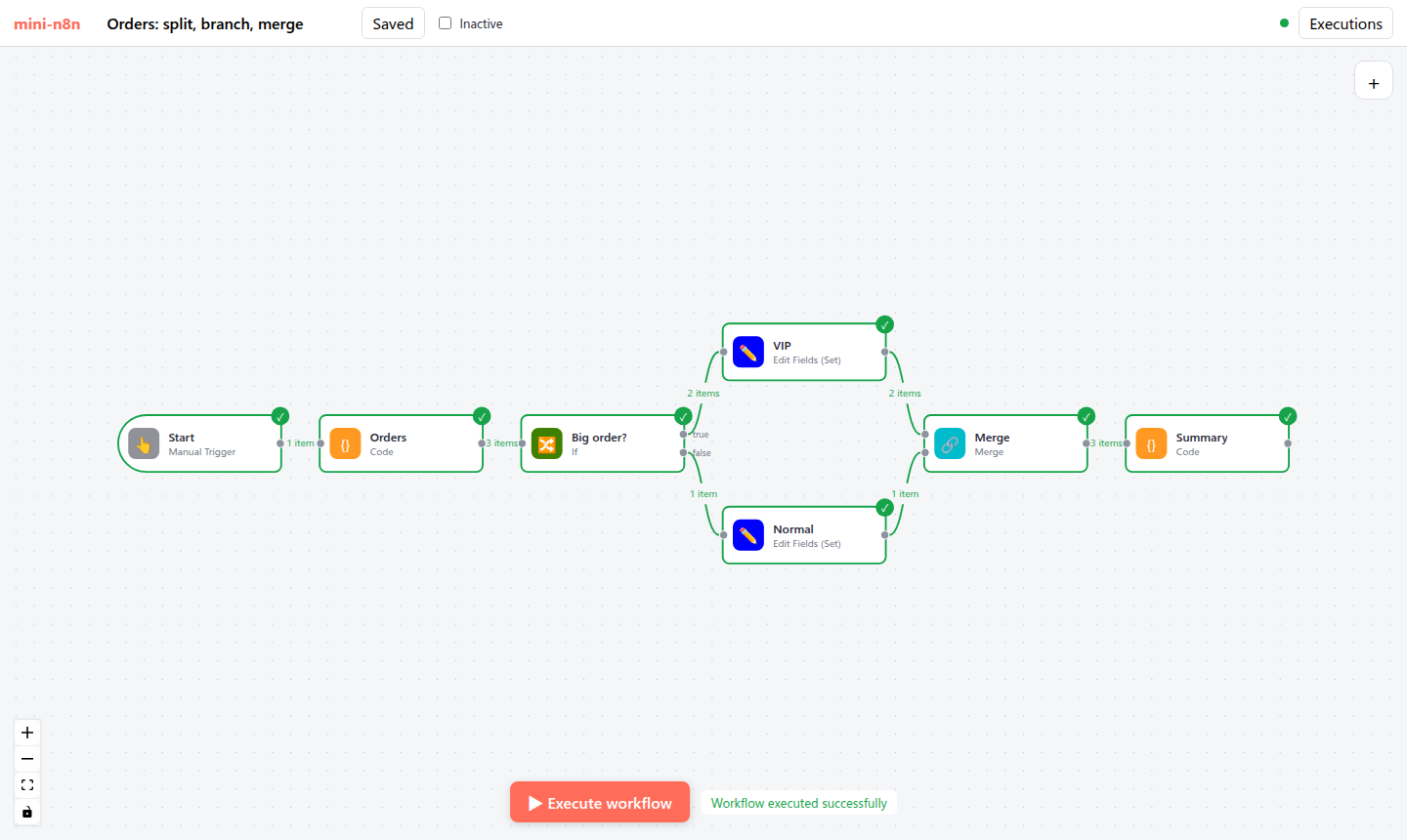
图 13-1:mini-n8n v0.3 画布(headless Chrome 截图)。节点边框变绿表示成功,右上角对勾,边上标注每条连接传了几个 item;If 节点的两个输出标注了 true / false。
2. n8n 是怎么做的
2.1 端口编码:outputs/main/0
n8n 把每个端口编码成一个字符串:
// packages/frontend/editor-ui/src/features/workflows/canvas/canvas.utils.ts:257-267
export function createCanvasConnectionHandleString({
	mode,
	type = NodeConnectionTypes.Main,
	index = 0,
}: {
	mode: 'inputs' | 'outputs';
	type?: NodeConnectionType;
	index?: number;
}) {
	return `${mode}/${type}/${index}`;
}
mode 是 inputs 或 outputs(canvas.types.ts:32-35 的 CanvasConnectionMode),type 是连接类型,index 是同类型端口的序号。有了这个编码,一条 Vue Flow 边的 sourceHandle/targetHandle 就完整描述了 n8n 的一条连接,可以无损地互相转换。
2.2 连接映射
// packages/frontend/editor-ui/src/features/workflows/canvas/canvas.utils.ts:132-177(节选)
export function mapLegacyConnectionsToCanvasConnections(legacyConnections: IConnections, nodes: INodeUi[]): CanvasConnection[] {
	const mappedConnections: CanvasConnection[] = [];
	const nodeIdByName = new Map(nodes.map((n) => [n.name, n.id]));

	Object.keys(legacyConnections).forEach((fromNodeName) => {
		const fromId = nodeIdByName.get(fromNodeName) ?? '';
		...
		fromConnectionTypes.forEach((fromConnectionType) => {
			const fromPorts = legacyConnections[fromNodeName][fromConnectionType];
			fromPorts?.forEach((toPorts, fromIndex) => {
				toPorts?.forEach((toPort) => {
					...
					const sourceHandle = createCanvasConnectionHandleString({ mode: CanvasConnectionMode.Output, type: fromConnectionType, index: fromIndex });
					const targetHandle = createCanvasConnectionHandleString({ mode: CanvasConnectionMode.Input, type: toConnectionType, index: toIndex });
函数名里的 “legacy” 很说明问题:IConnections 这种按名字索引、三层嵌套的格式是 n8n 早期就定下的,保存在数据库里的几十万个工作流都是这个格式,不能改。画布换成 Vue Flow 时,n8n 选择在前端加一层映射,而不是改数据格式。
2.3 节点映射
// packages/frontend/editor-ui/src/features/workflows/canvas/composables/useCanvasMapping.ts:152-208(节选)
const mappedNodes = computed<CanvasNode[]>(() => {
	const connectionsBySourceNode = connections.value;
	const connectionsByDestinationNode = workflowUtils.mapConnectionsByDestination(connectionsBySourceNode);
	...
	return nodes.value.map<CanvasNode>((node) => {
		...
		const data: CanvasNodeData = {
			id: node.id,
			name: node.name,
			subtitle: rd.subtitleByNodeId.get(node.id)?.value ?? '',
			type: node.type,
			disabled: node.disabled,
			connections: { [CanvasConnectionMode.Input]: inputConnections, [CanvasConnectionMode.Output]: outputConnections },
			issues: { validation: ..., visible: ... },
			execution: { status: executionSnapshot.status, waiting: ..., running: executionSnapshot.running },
			runData: { outputMap: ..., iterations: executionSnapshot.iterations, visible: !!runData },
			render: ...,
		};
		...
		return { id: node.id, label: getCanvasNodeLabel(node), type: 'canvas-node', position: applyOffset(node.position, offset), data, ... };
一个 computed 同时读工作流 store 和执行状态 store:节点参数一变、某个节点开始执行、某个节点出错,画布都会自动重算。边的 label(“3 items”)由 getConnectionLabel()(第 288 行)根据运行数据生成。
2.4 端口位置:main 在左右,AI 在上下
// packages/frontend/editor-ui/src/features/workflows/canvas/components/elements/nodes/CanvasNode.vue:225-247
const mainInputsMappingFn = createEndpointMappingFn({ mode: CanvasConnectionMode.Input, position: Position.Left, offsetAxis: 'top' });
const nonMainInputsMappingFn = createEndpointMappingFn({ mode: CanvasConnectionMode.Input, position: Position.Bottom, offsetAxis: 'left' });
const mainOutputsMappingFn = createEndpointMappingFn({ mode: CanvasConnectionMode.Output, position: Position.Right, offsetAxis: 'top' });
const nonMainOutputsMappingFn = createEndpointMappingFn({ mode: CanvasConnectionMode.Output, position: Position.Top, offsetAxis: 'left' });
数据从左往右流;AI 能力(模型、记忆、工具)从下往上“插”进 Agent。这就是第 1 章那张 Agent 图的视觉来源,也是第 16 章 Cluster Node 的画布表现。
2.5 受控画布:事件向上冒泡
<!-- packages/frontend/editor-ui/src/features/workflows/canvas/components/Canvas.vue:2046-2076(节选) -->
<VueFlow
	:id="id"
	:nodes="vueFlowNodes"
	:edges="connections"
	:apply-changes="false"
	...
	:delete-key-code="null"
	@connect="onConnect"
	@node-drag-stop="onNodeDragStop"
	...
>
:apply-changes="false" 让 Vue Flow 不要自己修改 节点和边,只发事件。Canvas.vue 把事件包装后 emit 出去(例如 onConnect 发出 create:connection,第 1419–1424 行),由上层调用 useCanvasOperations(packages/frontend/editor-ui/src/app/composables/useCanvasOperations.ts)修改 store:
// packages/frontend/editor-ui/src/app/composables/useCanvasOperations.ts:2439-2465(节选)
function createConnection(connection: Connection, { trackHistory = false, ... } = {}) {
	const sourceNode = workflowDocumentStore.value.getNodeById(connection.source);
	const targetNode = workflowDocumentStore.value.getNodeById(connection.target);
	...
	const mappedConnection = mapCanvasConnectionToLegacyConnection(sourceNode, targetNode, connection);

	if (!isConnectionAllowed(sourceNode, targetNode, mappedConnection[0], mappedConnection[1])) {
		return;
	}
	if (workflowDocumentStore.value.hasConnection({ connection: mappedConnection })) return;
	...
	if (trackHistory) {
		historyStore.pushCommandToUndo(new AddConnectionCommand(mappedConnection, Date.now()));
	}
所有画布操作都集中在这里,带来两个好处:
- 校验集中:
isConnectionAllowed检查类型是否匹配(ai_tool输出不能连到main输入)、是否超过maxConnections等。 - 撤销/重做:每个操作向
history.store.ts推一个命令对象(AddConnectionCommand、RemoveNodeCommand、RenameNodeCommand……),撤销就是执行它的逆命令。
重命名节点(第 535 行 renameNode)也在这里,它调用 Workflow.renameNode()——不仅改连接,还会改写其他节点表达式里的 $('旧名字')。
3. 从零实现
3.1 工作流 store
// code/mini-n8n/packages/editor/src/stores/workflow.ts(节选)
function addConnection(source: ConnectionEnd, target: ConnectionEnd) {
	const byType = (connections.value[source.node] ??= {});
	const outputs = (byType[source.type] ??= []);
	while (outputs.length <= source.index) outputs.push([]);
	const list = (outputs[source.index] ??= []);
	const connection: IConnection = { node: target.node, type: target.type, index: target.index };
	if (list.some((c) => c.node === connection.node && c.index === connection.index && c.type === connection.type)) return;
	list.push(connection);
	dirty.value = true;
	markNodeDirty(target.node);
}

/** Rename a node and every place that refers to it by name (connections, pin data). */
function renameNode(oldName: string, newName: string) { ... }
store 直接以 n8n 的格式保存 connections,保存时原样 PATCH 给服务端。markNodeDirty 记录“上次运行后改过的节点”,第 15 章的部分执行要用。
3.2 映射
// code/mini-n8n/packages/editor/src/composables/useCanvasMapping.ts(节选)
/** Handle ids follow n8n: "outputs/main/0", "inputs/ai_tool/0" */
export const handleId = (mode: 'inputs' | 'outputs', type: string, index: number) => `${mode}/${type}/${index}`;

const edges = computed<Edge[]>(() => {
	const result: Edge[] = [];
	for (const [sourceName, byType] of Object.entries(workflow.connections)) {
		for (const [type, outputs] of Object.entries(byType)) {
			outputs.forEach((list, outputIndex) => {
				for (const c of list ?? []) {
					...
					const count = type === 'main' ? execution.runData[sourceName]?.at(-1)?.data?.main?.[outputIndex]?.length : undefined;
					result.push({
						id: `${sourceName}|${type}|${outputIndex}|${c.node}|${c.index}`,
						source, target,
						sourceHandle: handleId('outputs', type, outputIndex),
						targetHandle: handleId('inputs', c.type, c.index),
						label: count !== undefined ? `${count} item${count === 1 ? '' : 's'}` : undefined,
						class: type === 'main' ? (count ? 'edge-success' : '') : 'edge-ai',
						data: { sourceName, targetName: c.node, type, outputIndex, inputIndex: c.index },
					});
节点的状态(running / success / error / pinned / waiting)由执行 store 推导。端口列表来自 normalizeConnectionList(description.inputs, node.parameters)——第 5 章那个表达式字符串在浏览器里求值,所以 Agent 的端口会随参数变化(v0.4)。
3.3 节点组件
<!-- code/mini-n8n/packages/editor/src/components/CanvasNode.vue(节选) -->
<Handle v-for="{ item, pct } in mainInputs" :id="handleId('inputs', item.type, item.index)" type="target" :position="Position.Left" :style="{ top: pct }" />
<template v-for="{ item, i, pct } in mainOutputs" :key="`out-${item.index}`">
	<Handle :id="handleId('outputs', item.type, item.index)" type="source" :position="Position.Right" :style="{ top: pct }" />
	<span v-if="outputLabel(item, i)" class="handle-label out" :style="{ top: pct }">{{ outputLabel(item, i) }}</span>
</template>
<Handle v-for="{ item, pct } in aiInputs" ... :position="Position.Bottom" class="ai-handle" :style="{ left: pct }" />
<Handle v-for="{ item, pct } in aiOutputs" ... :position="Position.Top" class="ai-handle" :style="{ left: pct }" />
多个端口按 (i+1)/(n+1) 均匀分布。输出标签来自描述的 outputNames(If 的 true/false),或者 onError: continueErrorOutput 追加的 “Error” 输出。
3.4 画布事件 → store
// code/mini-n8n/packages/editor/src/components/Canvas.vue(节选)
/** Only same-type handles can be connected: main->main, ai_tool->ai_tool ... */
function isValidConnection(c: Connection) {
	if (!c.sourceHandle || !c.targetHandle || c.source === c.target) return false;
	return parseHandleId(c.sourceHandle).type === parseHandleId(c.targetHandle).type;
}

function onConnect(c: Connection) {
	if (!isValidConnection(c)) return;
	const source = parseHandleId(c.sourceHandle!);
	const target = parseHandleId(c.targetHandle!);
	workflow.addConnection(
		{ node: nameOf(c.source)!, type: source.type as NodeConnectionType, index: source.index },
		{ node: nameOf(c.target)!, type: target.type as NodeConnectionType, index: target.index },
	);
}拖动结束(node-drag-stop)写回位置;按 Delete 删除时,Vue Flow 发出 remove 类型的变更,我们翻译成 removeNode / removeConnection。双击节点打开 NDV(第 14 章)。
3.5 添加节点
// code/mini-n8n/packages/editor/src/App.vue(节选)
/** Add a node right of the selected (or right-most) node and connect it, like n8n does */
function addNode(type: string) {
	const from = (selectedNode.value && workflow.nodesByName[selectedNode.value]) || [...workflow.nodes].sort((a, b) => b.position[0] - a.position[0])[0];
	const position: [number, number] = from ? [from.position[0] + 240, from.position[1]] : [0, 0];
	const node = workflow.addNode(type, position);
	if (from) { ...main 输出接 main 输入 }
	showCreator.value = false;
	openNode.value = node.name;
}
n8n 对应的是 createConnectionToLastInteractedWithNode(useCanvasOperations.ts:1459):新节点自动接到“最后交互过的节点”后面,并立刻打开 NDV。新节点的参数由 getNodeParameters(description.properties, {}) 填默认值,名字由 uniqueName 保证唯一(“Edit Fields”、“Edit Fields1”……)。
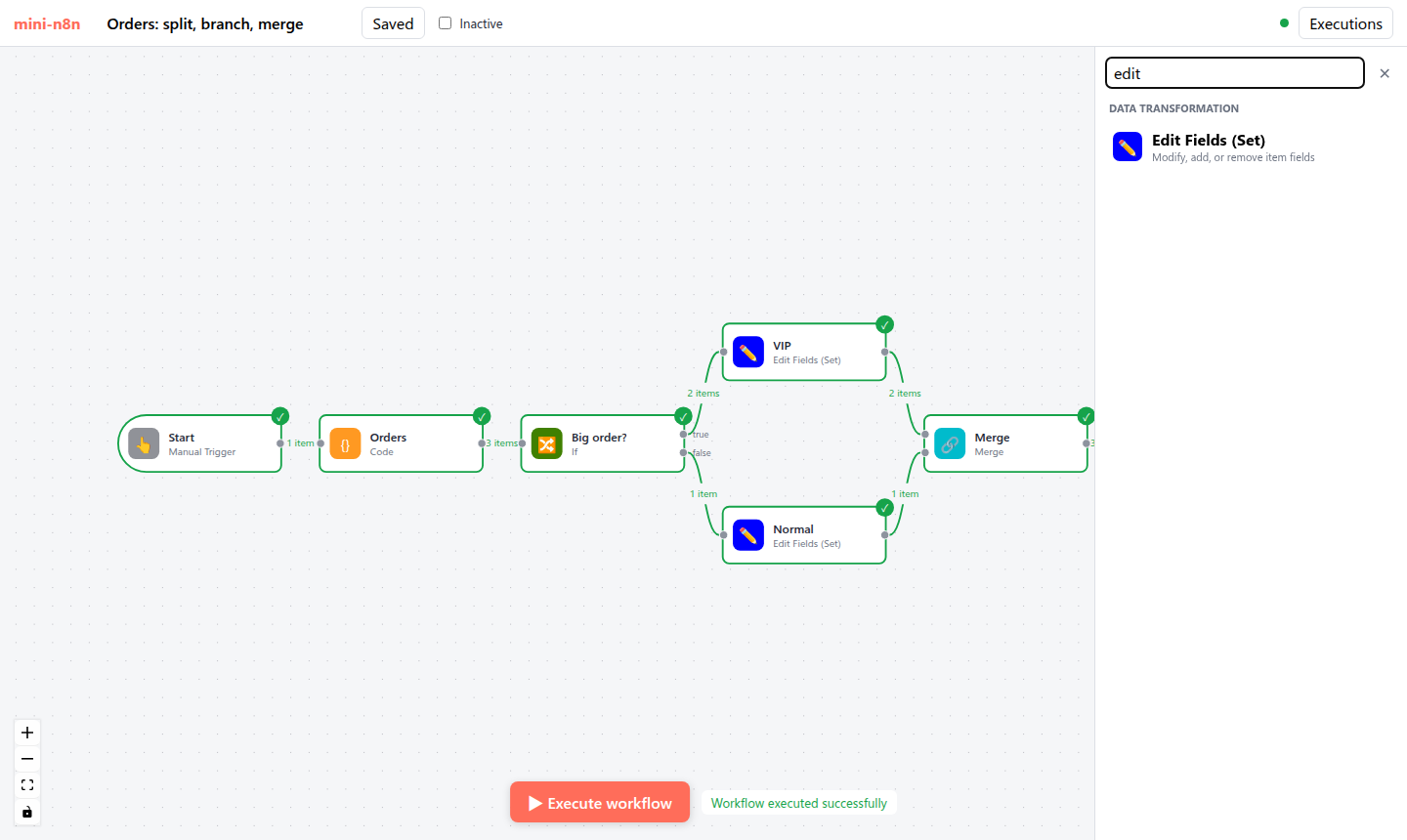
图 13-2:节点创建面板(右侧),按 Triggers / AI / Flow / Data transformation / Actions 分组并支持搜索。
| 方面 | n8n | mini-n8n |
|---|---|---|
| Vue Flow 模式 | 受控(apply-changes=false),事件交给 useCanvasOperations | 默认模式,删除/连线事件翻译成 store 动作 |
| 撤销/重做 | 命令模式 history.store | 无(练习) |
| 重命名 | 同时改写表达式里的 $('旧名') | 只改连接和 pin 数据 |
| 节点渲染 | 按类型渲染(默认节点、Sticky、Agent、配置节点……) | 一个通用组件,按状态换边框 |
| 其它 | 分组、对齐网格、自动布局、拖线时插入节点、复制粘贴 | 无 |
4. 运行与验证
cd code/mini-n8n && git checkout v0.3 && npm install
npm start                      # 构建编辑器并启动,打开 http://localhost:5678
npm run test:e2e               # 另一个终端:用 headless Chrome 操作编辑器
e2e/editor.e2e.mjs 和画布相关的断言(真实输出):
✓ canvas shows the 7 nodes of the workflow
✓ push connection (SSE) is open
✓ all nodes turn green after the run
✓ edges show item counts (1 item, 3 items, 2 items, 1 item, 2 items, 1 item, 3 items)
✓ new node: "Execute step" runs up to it and shows its output
✓ the new node and its connection were saved
最后两条验证了“画布操作 → store → 保存”的链路:脚本选中 Summary、用节点面板添加 Edit Fields,然后检查服务端保存的工作流里 connections.Summary.main[0][0].node === 'Edit Fields'。
5. 练习
- 巩固:在画布上把 If 的 false 输出改连到一个新的 No Operation 节点,保存后用
GET /rest/workflows/:id查看connections的变化。 - 扩展:实现撤销/重做:为
addNode、removeNode、addConnection、removeConnection各写一个命令对象(do()/undo()),用 Ctrl+Z / Ctrl+Shift+Z 触发。 - 读源码:阅读 n8n 的
Workflow.renameNode()(packages/workflow/src/workflow.ts:384)和renameNodeInParameterValue(),说明它如何找出并改写参数里对旧节点名的引用,为什么要特别小心字符串里的引号。
6. 延伸阅读
packages/frontend/editor-ui/src/features/workflows/canvas/:画布的全部组件和映射。packages/frontend/editor-ui/src/app/composables/useCanvasOperations.ts:所有画布操作。- Vue Flow 文档:https://vueflow.dev/(受控流程、自定义节点、Handle)。