第 19 章 EngineRequest:让引擎来调度工具 ★★
本章目标:读完你能解释 n8n Agent V3 最核心的设计——Agent 不自己执行工具,而是请求引擎执行工具节点、再把结果交还给它——并逐步说清这个过程中执行栈、运行数据和元数据的变化。你会在自己的引擎里实现同样的机制。前置:第 7、16、18 章。对应代码:mini-n8n v0.4 的
packages/core/src/workflow-execute.ts(handleEngineRequest、collectSubNodeResults)
1. 问题与概念
最简单的 Agent 实现,是在 Agent 节点的 execute() 里直接调用工具:
const result = await tool.invoke(args); // 工具在 Agent 内部执行n8n 早期版本就是这样做的(LangChain 的 AgentExecutor 自己跑循环、自己调工具)。问题是:工具常常 本身就是一个 n8n 节点(HTTP Request、Gmail、Postgres……),在 Agent 内部调用它,就绕过了引擎:
- 工具节点的执行 不会出现在运行数据里,用户看不到它收到了什么、返回了什么。
- 引擎的 重试、错误处理、超时、取消 对它都不生效。
- 无法 暂停:一个“需要人工批准才执行”的工具,必须让整个执行停下来等几个小时——在
execute()内部await几个小时显然不行。 - 无法 pin 数据、部分执行、在 Worker 上调度……
Agent V3 的回答是 请求–响应:
工具变回了 普通节点,由引擎按普通规则执行;Agent 变成了一个“会暂停的节点”。
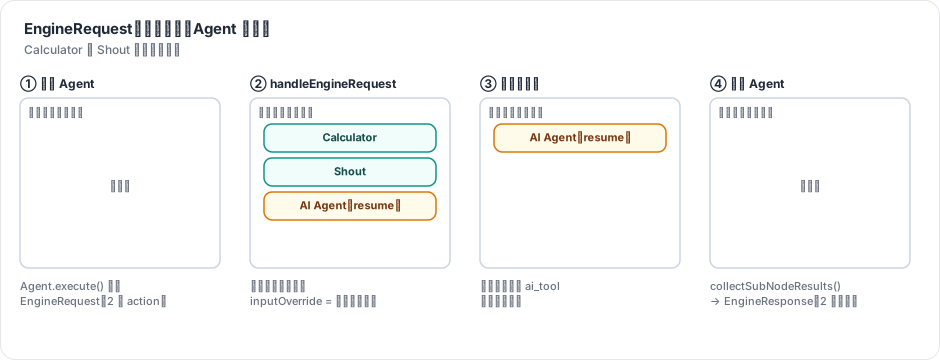
图 19-1:Agent 第一次运行返回 EngineRequest 后,引擎把两个工具节点放到栈顶、把 Agent 放在它们下面(带着“这是一次恢复,结果在哪里”的元数据)。工具依次执行完,Agent 再次被弹出,拿到两条结果。
2. n8n 是怎么做的
2.1 主循环里的分叉
第 7 章读主循环时跳过了一个分支:
// packages/core/src/execution-engine/workflow-execute.ts:2374-2425(节选)
} else {
	this.collectSubNodeResults(executionData, subNodeExecutionResults);
	...
	let runNodeData = await this.runNode(workflow, executionData, this.runExecutionData, runIndex, this.additionalData, this.mode, this.abortController.signal, subNodeExecutionResults);
	...
	// if runNodeData is Request
	if (isEngineRequest(runNodeData)) {
		this.handleEngineRequest({ workflow, currentNode: executionNode, request: runNodeData, runIndex, executionData, runData: this.runExecutionData.resultData.runData });

		continue executionLoop;
	}
三件事:
- 运行节点之前,
collectSubNodeResults检查这个栈项是否是“恢复”的;是的话,从运行数据里取出工具的结果,组装成EngineResponse,作为execute()的第二个参数传进去。 - 节点返回的是请求而不是数据时,交给
handleEngineRequest。 continue executionLoop:不记录运行数据、不调用nodeExecuteAfter、不调度下游。在引擎看来,这次运行“还没结束”。
还有一个小细节在第 2346 行:恢复的栈项跳过 nodeExecuteBefore 钩子,否则前端会收到两次“开始”、一次“结束”,节点上的转圈图标就停不下来了(注释里引用了问题编号 AI-1414)。
2.2 handleRequest:工具压栈,自己压回去
// packages/core/src/execution-engine/requests-response.ts:238-287(节选)
export function handleRequest({ workflow, currentNode, request, runIndex, executionData, runData }) {
	// 1. collect nodes to be put on the stack
	const { nodesToBeExecuted, subNodeExecutionData } = prepareRequestedNodesForExecution(workflow, currentNode, request, runIndex, runData, executionData);

	// 2. create metadata for current node
	const result = prepareRequestingNodeForResuming(workflow, request, executionData);
	...
	// 3. under executionOrder v1 reverse the actions to run the requests in the order the root requested them to run
	if (workflow.settings.executionOrder === 'v1') {
		nodesToBeExecuted.reverse();
	}

	// 4. add current node back to the bottom of the stack
	nodesToBeExecuted.unshift({
		inputConnectionData: result.connectionData,
		parentOutputIndex: 0,
		parentNode: result.parentNode,
		parentOutputData: executionData.data.main as INodeExecutionData[][],
		runIndex,
		nodeRunIndex: runIndex,
		metadata: { nodeWasResumed: true, subNodeExecutionData, ...result.metadata },
	});

	return { nodesToBeExecuted };
}handleEngineRequest(workflow-execute.ts:1612)随后对列表里的每一项调用 addNodeToBeExecuted。v1 顺序下每次都是 unshift(插到栈头),所以先插入的 Agent 最终在最底下,后插入的工具在上面;第 3 步的 reverse() 让工具按模型请求的顺序执行。
prepareRequestedNodesForExecution(第 89 行)为每个 action 做三件事:
- 构造工具的输入:
{ ...Agent 的输入 item, ...action.input, toolCallId: action.id }(第 123–127 行)。工具节点能用$json读到 Agent 的输入字段(例如 sessionId),也能读到模型给的参数。 - 预先创建工具的运行记录(
initializeNodeRunData,第 55 行):把模型给的参数存为inputOverride: { ai_tool: ... },source指向 Agent。画布的日志面板据此把工具调用显示为 Agent 的“子步骤”。 - 设置
rewireOutputLogTo(第 114 行node.rewireOutputLogTo = action.type):工具执行完,引擎会把它的输出记为ai_tool而不是main(rewireOutputLog,第 2189 行),这样它不会被当成主数据流去调度下游节点。
2.3 恢复:collectSubNodeResults
// packages/core/src/execution-engine/workflow-execute.ts:1865-1882
private collectSubNodeResults(executionData: IExecuteData, subNodeExecutionResults: EngineResponse): void {
	const { subNodeExecutionData } = executionData.metadata ?? {};
	if (!subNodeExecutionData) return;

	subNodeExecutionResults.metadata = subNodeExecutionData.metadata;
	for (const subNode of subNodeExecutionData.actions) {
		const nodeRunData = this.runExecutionData.resultData.runData[subNode.nodeName];
		if (nodeRunData?.[subNode.runIndex]) {
			subNodeExecutionResults.actionResponses.push({
				data: nodeRunData[subNode.runIndex],
				action: subNode.action,
			});
		}
	}
}“结果在哪里”早在压栈时就记好了:subNodeExecutionData.actions 里每个 action 对应 (nodeName, runIndex)——工具节点那次运行在 runData 里的位置。恢复时按图索骥取出,连同请求时的 metadata(第 18 章的 previousRequests、iterationCount)一起交给 Agent。
整个过程中,Agent 的“状态”全部在 IRunExecutionData 里:栈项的 metadata 和工具的运行数据。这意味着在工具执行期间,执行可以被暂停、存盘、恢复——第 23 章的人工审批工具正是利用这一点。
2.4 Agent 只有一次运行
恢复的 Agent 栈项带着原来的 runIndex(nodeRunIndex: runIndex),而 computeRunIndex 优先使用栈项上的 runIndex(第 7 章看过)。于是 Agent 最终写入运行数据时覆盖的是同一个位置(upsertTaskData,第 2155 行)——无论循环几轮,Agent 在 runData 里只有 一次 运行,模型节点和工具节点则每次调用一次运行。
2.5 工具出错:默认继续
// packages/core/src/execution-engine/workflow-execute.ts:2099-2110(节选)
// AI tools default to continue-on-fail so the agent receives the
// error as a tool response. Explicit `onError: 'stopWorkflow'`
// still wins.
const isAiToolExecution = executionNode.rewireOutputLogTo === NodeConnectionTypes.AiTool;
const aiToolDefaultsToContinue = isAiToolExecution && executionData.node.onError !== 'stopWorkflow';

if (this.continuesOnError(executionData.node) || aiToolDefaultsToContinue) {
	// Workflow should continue running even if node errors
	if (isAiToolExecution) {
		// Surface the error on the ai_tool channel so the agent receives it
		nodeSuccessData = [[{ json: { error: executionError.message } }]];
一个工具调用失败(参数错误、接口超时),整个工作流就失败,这对 Agent 来说太脆弱了。默认把错误作为工具结果交给模型,模型可以换个参数重试,或者告诉用户“查询失败”。第 8 章讲 onError 时提过这一点,现在可以看到它的完整上下文。
2.6 工具节点的两张脸
引擎执行工具节点时调用的是它的 execute(),而 Agent 构造工具列表时调用的是它的 supplyData()。所以每个工具节点 两个方法都要实现:
// packages/@n8n/nodes-langchain/nodes/tools/ToolCalculator/ToolCalculator.node.ts:55-79(节选)
async supplyData(this: ISupplyDataFunctions): Promise<SupplyData> {
	return {
		response: logWrapper(getTool(this), this),
	};
}

async execute(this: IExecuteFunctions): Promise<INodeExecutionData[][]> {
	const calculator = getTool(this);
	const input = this.getInputData();
	const response: INodeExecutionData[] = [];
	for (let i = 0; i < input.length; i++) {
		const inputItem = input[i];
		const result = await calculator.invoke(inputItem.json);
		response.push({ json: { response: result }, pairedItem: { item: i } });
	}
	return [response];
}
supplyData 给模型看“我是谁、要什么参数”;execute 是引擎真正运行的代码,输入 item 就是模型给的参数。工具节点在 Agent 之外也能单独执行和测试。
3. 从零实现
3.1 主循环的改动
// code/mini-n8n/packages/core/src/workflow-execute.ts(节选)
// tools and resumed Agents carry their run index; everything else appends a run
const runIndex = executionData.runIndex ?? runData[node.name]?.length ?? 0;
const executedAsTool = executionData.metadata?.executedAsTool === true;
...
// a resumed Agent already announced itself the first time
if (!executionData.metadata?.nodeWasResumed) await hooks.runHook('nodeExecuteBefore', [node.name, taskStarted]);
...
const result = pinned && !node.disabled ? [pinned] : await this.runNode(workflow, executionData, runIndex, this.collectSubNodeResults(executionData));
if (isEngineRequest(result)) {
	this.handleEngineRequest(workflow, executionData, result, runIndex);
	continue executionLoop;
}
写运行数据时,工具的输出记为 ai_tool,并保留预先写好的 inputOverride:
if (executedAsTool) {
	// the output belongs to the Agent, not to the main flow (n8n: rewireOutputLogTo)
	taskData.data = { ai_tool: nodeSuccessData ?? [] };
	taskData.inputOverride = runData[node.name]?.[runIndex]?.inputOverride;
	taskData.source = runData[node.name]?.[runIndex]?.source ?? taskData.source;
} else {
	taskData.data = { main: nodeSuccessData ?? [] };
}
(runData[node.name] ??= [])[runIndex] = taskData;
runData[name][runIndex] = taskData(而不是 push)统一了三种情况:普通节点(runIndex 等于当前长度,相当于追加)、工具(覆盖预留的记录)、恢复的 Agent(写到原来的位置)。
3.2 handleEngineRequest
// code/mini-n8n/packages/core/src/workflow-execute.ts(节选)
private handleEngineRequest(workflow: Workflow, executionData: IExecuteData, request: EngineRequest, runIndex: number) {
	const { node } = executionData;
	if (request.actions.length === 0) throw new WorkflowOperationError(`Node "${node.name}" sent an empty engine request`);
	...
	for (const action of request.actions) {
		const toolNode = workflow.getNode(action.nodeName);
		...
		// Reserve the tool's run record now: it shows the arguments the LLM chose (n8n: inputOverride)
		const runs = (runData[toolNode.name] ??= []);
		const nodeRunIndex = runs.length;
		runs.push({
			startTime: Date.now(), executionTime: 0, executionIndex: this.executionIndex++, executionStatus: 'running',
			source: [{ previousNode: node.name, previousNodeRun: runIndex }],
			inputOverride: { ai_tool: [[{ json: action.input }]] },
		});
		const itemIndex = action.metadata.itemIndex ?? 0;
		entries.push({
			node: toolNode,
			// the tool sees the Agent's input item + the arguments, like in n8n
			data: { main: [[{ json: { ...(agentInput[itemIndex]?.json ?? {}), ...action.input, toolCallId: action.id }, pairedItem: { item: itemIndex } }]] },
			source: executionData.source,
			runIndex: nodeRunIndex,
			metadata: { executedAsTool: true },
		});
		subNodeExecutionData.actions.push({ action, nodeName: toolNode.name, runIndex: nodeRunIndex });
	}

	this.runExecutionData.executionData.nodeExecutionStack.unshift(...entries, {
		...executionData,
		runIndex,
		metadata: { ...executionData.metadata, nodeWasResumed: true, subNodeExecutionData },
	});
}
和 n8n 的差别:n8n 通过 addNodeToBeExecuted(一次插一个)实现,所以需要 reverse();mini-n8n 一次性 unshift(...entries, agent),顺序天然正确。另外,工具栈项的 source 用的是 Agent 的 source:这样工具里的 $('Chat Trigger').item 能沿着 Agent 的输入链回溯(n8n 用 sourceOverwrite 达到同样效果)。
空请求会导致死循环(Agent 不断请求、引擎什么也不做),所以直接报错。
3.3 工具出错
// AI tools default to "continue": the Agent gets the error as the tool result
if (executedAsTool && node.onError !== 'stopWorkflow') {
	nodeSuccessData = [[{ json: { error: nodeError.message } }]];
}| 方面 | n8n | mini-n8n |
|---|---|---|
| 压栈 | addNodeToBeExecuted × N,v1 下 reverse() | 一次 unshift(...) |
| 工具输出重定向 | 节点上的 rewireOutputLogTo 字段 | 栈项 metadata 的 executedAsTool |
| 工具里的 paired item | sourceOverwrite / preservedSourceOverwrite | 工具栈项继承 Agent 的 source |
| 子 Agent(Agent 作为工具) | resolveSubAgentRequest 就地执行 | v0.5(第 23 章) |
| HITL 工具(执行前要人批准) | isHitlToolType 特殊路径 | v0.5(第 23 章) |
4. 运行与验证
examples/agent-stack-trace.ts 让 Agent 同时调用两个工具,在每个钩子里打印执行栈(resume: 2 results 表示带着两个待收集结果的 Agent 栈项)。真实输出:
▶ Start      stack after pop: []
✓ Start      output as main             stack: [Question]
▶ Question   stack after pop: []
✓ Question   output as main             stack: [AI Agent]
▶ AI Agent   stack after pop: []
▶ Model      stack after pop: []
✓ Model      output as ai_languageModel stack: []
▶ Calculator stack after pop: [Shout, AI Agent(resume: 2 results)]
✓ Calculator output as ai_tool          stack: [Shout, AI Agent(resume: 2 results)]
▶ Shout      stack after pop: [AI Agent(resume: 2 results)]
✓ Shout      output as ai_tool          stack: [AI Agent(resume: 2 results)]
▶ Model      stack after pop: []
✓ Model      output as ai_languageModel stack: []
✓ AI Agent   output as main             stack: []

answer: Based on the tools: Calculator returned 42; Shout returned SHOUT HI AND COMPUTE 6 * 7.
runs  : Start=1 Question=1 Model=2 Calculator=1 Shout=1 AI Agent=1
逐行对照图 19-1:
- 第 5–7 行:Agent 被弹出,调用模型(模型是子节点,所以它的开始/结束发生在 Agent 的
execute()内部)。模型返回两个工具调用,Agent 返回 EngineRequest——注意这里 没有 “✓ AI Agent”。 - 第 8 行:栈里出现了
[Calculator, Shout, AI Agent(resume)],Calculator 已被弹出,所以打印的是剩下的Shout, AI Agent(...)。 - 第 12 行:Agent 恢复,没有第二次 “▶ AI Agent”,直接再次调用模型。
- 最后一行:Agent 只有 1 次运行,模型 2 次,两个工具各 1 次。
5. 练习
- 巩固:在
agent-stack-trace.ts里把 Workflow 的executionOrder改成v0,预测工具的执行顺序会不会变,然后运行验证。 - 扩展:给工具调用加上超时:如果某个工具节点设置了 “Timeout (ms)”,引擎在超时后把
Error: timed out作为工具结果交给 Agent,而不是让整个执行超时。 - 读源码:阅读 n8n
requests-response.ts的prepareRequestedNodesForExecution,说明actionMetadata.parentNodeName存在时(子 Agent 的工具),parentRunIndex是怎么计算的,为什么。
6. 延伸阅读
packages/core/src/execution-engine/requests-response.ts:请求–响应机制的全部代码(约 300 行)。packages/workflow/src/interfaces.ts:EngineRequest、EngineResponse、EngineResult的类型定义。packages/@n8n/nodes-langchain/nodes/tools/:所有工具节点,注意它们都同时实现了supplyData和execute。