第 12 章 触发器:Webhook、Schedule 与激活
本章目标:读完你能说清“激活一个工作流”在服务端做了什么,Webhook 的测试模式和生产模式有何不同,三种响应模式如何决定 HTTP 请求何时返回,定时触发器如何在进程内、乃至集群里可靠地运行。前置:第 7、10 章。对应代码:mini-n8n v0.2 的
webhooks/、active-workflow-manager.ts、Webhook.node.ts、ScheduleTrigger.node.ts
1. 问题与概念
到目前为止,执行都是“点按钮”触发的。自动化平台真正的价值在于 无人值守:收到请求就跑、每天早上九点跑、新邮件到达就跑。
n8n 把“谁来启动执行”分成三类节点,对应 INodeType 的三个方法:
| 类型 | 方法 | 例子 | 激活时做什么 |
|---|---|---|---|
| Webhook 触发器 | webhook() | Webhook、Form、Chat Trigger、各种 SaaS 回调 | 在路由表里登记 (path, method) |
| 通用触发器 | trigger() | Schedule、MQTT、RabbitMQ、IMAP | 调用 trigger(),它注册定时器或监听器,通过 emit 启动执行 |
| 轮询触发器 | poll() | Gmail、Google Sheets 的“新行” | 按间隔调用 poll(),有新数据就启动执行 |
“激活”(n8n 2.x 的界面上叫“发布”)就是把这些都打开;“停用”就是全部关掉。
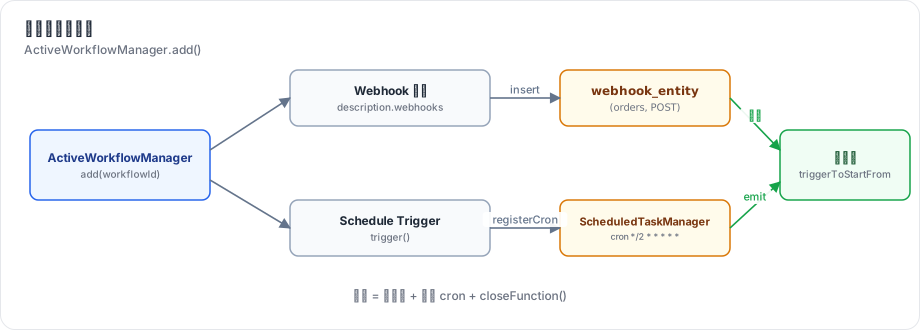
图 12-1:激活时,Webhook 节点被写入 webhook_entity;trigger 节点的 trigger() 被调用,注册 cron 任务;之后每个请求或每次 emit 都启动一次新执行,起始数据就是请求内容或 emit 的数据。
Webhook 还有两个特殊问题:
- 测试。用户在编辑器里搭 Webhook 工作流时,需要先“听”一个真实请求,看看数据长什么样。但工作流还没激活。n8n 的答案是 测试 Webhook:点“执行”后临时注册一个
/webhook-test/<path>,只响应一次、2 分钟过期,执行进度推送到当前标签页。 - 响应时机。调用方在等 HTTP 响应。是收到就回“已启动”?还是等工作流跑完把结果回给它?还是由工作流中间某个节点决定回什么?这就是 响应模式。
2. n8n 是怎么做的
2.1 Webhook 节点:只负责把请求变成 item
// packages/nodes-base/nodes/Webhook/Webhook.node.ts:324-364(节选)
const response: INodeExecutionData = {
	json: {
		headers: req.headers,
		params: req.params,
		query: req.query,
		body: req.body,
	},
	...
};
...
return {
	webhookResponse: options.responseData,
	workflowData: prepareOutput(response),
};
webhook() 返回的 workflowData 就是执行的起始数据。返回 {}(没有 workflowData)则不启动执行——例如认证失败、“仅当表达式为真时运行”不满足时(第 287–300 行)。节点 没有 execute:执行开始后,引擎在 runNode 里看到它是 webhook 节点,直接把输入(也就是请求数据)原样传出(workflow-execute.ts:1495-1500)。
节点的 description.webhooks 声明它需要的端点,httpMethod、path、responseMode 都是读参数的表达式。
2.2 三种响应模式
// packages/nodes-base/nodes/Webhook/description.ts:199-215
const responseModeOptions = [
	{ name: 'Immediately', value: 'onReceived', description: 'As soon as this node executes' },
	{ name: 'When Last Node Finishes', value: 'lastNode', description: 'Returns data of the last-executed node' },
	{ name: "Using 'Respond to Webhook' Node", value: 'responseNode', description: 'Response defined in that node' },
];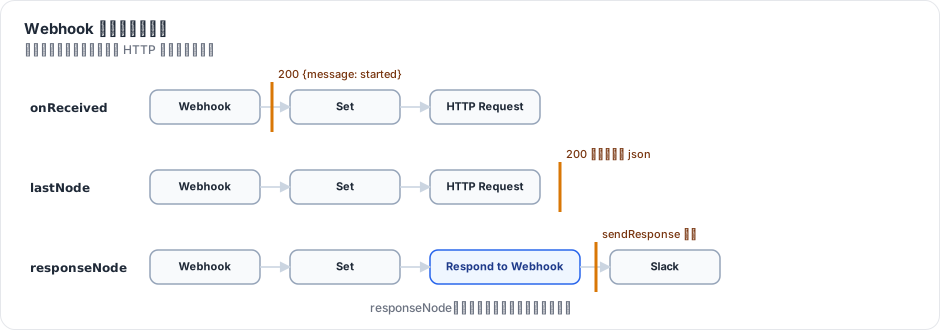
图 12-2:onReceived 在执行开始时就回复;lastNode 等执行结束,用最后一个节点的输出回复;responseNode 在执行中途由 Respond to Webhook 节点通过 sendResponse 钩子回复,之后的节点继续运行。新版本还有第四种 streaming(第 21 章)。
实现集中在 executeWebhook()(packages/cli/src/webhooks/webhook-helpers.ts:958)。responseNode 模式的关键是第 10 章的 sendResponse 钩子:WorkflowRunner.runMainProcess 挂上处理函数,把回复交给 ActiveExecutions 里等待的 Promise(packages/cli/src/workflow-runner.ts:629-631):
lifecycleHooks.addHandler('sendResponse', (response) => {
	this.activeExecutions.resolveResponsePromise(executionId, response);
});
2.3 生产 Webhook:查表
// packages/cli/src/webhooks/live-webhooks.ts:88-117(节选)
async executeWebhook(request: WebhookRequest, response: Response, expectedNodeType?): Promise<IWebhookResponseCallbackData> {
	const httpMethod = request.method;
	const path = request.params.path;
	...
	const webhook = await this.findWebhook(path, httpMethod);
	...
	if (webhook.isDynamic) {
		const pathElements = path.split('/').slice(1);
		// extracting params from path
		webhook.webhookPath.split('/').forEach((ele, index) => {
			if (ele.startsWith(':')) {
				request.params[ele.slice(1)] = pathElements[index];
			}
		});
	}
	const { workflow: workflowData, publishedVersion } = await this.loadWebhookExecutionData(webhook.workflowId);
	const { nodes, connections, versionId } = publishedVersion;
几个要点:
- 路由表是数据库表
webhook_entity(主键(webhookPath, method),第 9 章),而不是进程内存。所以在队列模式下,任何一个 webhook 进程 都能处理请求,无需知道是哪个 main 激活了它。 - 支持动态路径:
user/:id/posts,参数写进request.params。 - 加载的是 已发布版本(
publishedVersion)的节点和连接,而不是编辑器里正在改的草稿。
2.4 测试 Webhook
TestWebhooks.needsWebhook()(packages/cli/src/webhooks/test-webhooks.ts:396)在内存(以及多 main 时的 Redis)里登记注册信息,带上 pushRef、destinationNode 等,过期时间 TEST_WEBHOOK_TIMEOUT:
// packages/cli/src/constants.ts:129
export const TEST_WEBHOOK_TIMEOUT = 2 * Time.minutes.toMilliseconds;
请求到达 /webhook-test/<path> 后,执行模式是 manual,进度推到登记时的 pushRef,然后注销——每次点击只响应一次。第 3 章的 executeManually 返回 { waitingForWebhook: true } 就是在这里登记的。
2.5 激活:ActiveWorkflowManager
packages/cli/src/active-workflow-manager.ts 的 add()(第 540 行)做两件事:
// packages/cli/src/active-workflow-manager.ts:150-187(节选)
async addWebhooks(workflow, additionalData, mode, activation, nodeIds?) {
	let webhooks = WebhookHelpers.getWorkflowWebhooks(workflow, additionalData, undefined, true);
	...
	for (const webhookData of webhooks) {
		...
		const webhook = this.webhookService.createWebhook({ workflowId: webhookData.workflowId, webhookPath: webhookData.path, node: node.name, method: webhookData.httpMethod }, node.webhookId);
		try {
			// `storeWebhook` registers the webhook atomically on the
			// (webhookPath, method) primary key and rejects a path already owned
			// by another workflow. ...
			await this.webhookService.storeWebhook(webhook);
await this.webhookService.createWebhookIfNotExists(workflow, webhookData, mode, activation);- Webhook:写入路由表;利用主键冲突检测“路径已被另一个工作流占用”(失败时抛
WebhookPathTakenError)。createWebhookIfNotExists调用节点的webhookMethods:很多 SaaS 触发器(如 GitHub Trigger)要在 第三方 那边注册回调地址,激活时创建、停用时删除。 - 触发器和轮询:
addTriggersAndPollers为每个 trigger/poll 节点调用trigger()/ 启动轮询,并把emit接到“启动一次执行”上(第 1110 行起)。
停用(remove(),第 985 行)反过来:删路由、关闭触发器(调用 trigger() 返回的 closeFunction)、删除第三方回调。
启动时 init()(第 103 行)重新激活所有已激活的工作流。
这个类的注释里有一句值得注意:“This legacy manager is slated for removal”。n8n 正在把激活迁移到基于“发布”的新路径(packages/cli/src/workflows/publication/)。
2.6 定时触发器
// packages/nodes-base/nodes/Schedule/ScheduleTrigger.node.ts:569-610(节选)
if (this.getMode() !== 'manual') {
	...
	for (const { interval, cronExpression, recurrence } of rules) {
		...
		this.helpers.registerCron(cron, (scheduledTime: Date) =>
			executeTrigger(recurrence, /* skipRecurrenceCheck= */ false, scheduledTime),
		);
	}
	return {};
} else {
	const manualTriggerFunction = async () => {
		...
		executeTrigger(recurrence, true);
	};
	return { manualTriggerFunction };
}
同一个 trigger(),激活时注册 cron,手动运行时返回 manualTriggerFunction(立即 emit 一次)。引擎手动运行触发器时,会调用 trigger(),再调用 manualTriggerFunction,等待第一次 emit 的数据作为节点输出(packages/core/src/execution-engine/triggers-and-pollers.ts:98-122)。
registerCron 背后是 ScheduledTaskManager。进程内的定时器有两个问题:进程重启时丢失;多 main 部署时每个 main 都会触发一次。前者由 init() 重新激活解决;后者 n8n 只让 leader main 运行触发器。更彻底的方案是新的 @n8n/scheduler 包,它的 README 开宗明义:
Most schedulers keep their timers in memory ... This package takes a different approach: write the work down before running it.
先把每一次即将发生的运行写进共享的持久化存储,再从存储里取出执行,从而做到重启不丢、集群里“尽量只执行一次”。ScheduleTrigger 的 emit 第四个参数 deduplicationKey(${workflowId}:${nodeId}:${scheduledTime})也是为此服务的:同一个计划时间只能产生一个执行。
3. 从零实现
3.1 节点
// code/mini-n8n/packages/nodes-base/src/nodes/Webhook.node.ts(节选)
webhooks: [
	{
		name: 'default',
		httpMethod: '={{$parameter["httpMethod"]}}',
		path: '={{$parameter["path"]}}',
		responseMode: '={{$parameter["responseMode"]}}',
	},
],
...
async webhook(this: IWebhookFunctions): Promise<IWebhookResponseData> {
	const req = this.getRequestObject();
	const responseData = this.getNodeParameter('responseData', '') as string;
	return {
		webhookResponse: responseData || undefined,
		workflowData: [[{ json: { headers: req.headers, params: req.params, query: req.query, body: req.body } }]],
	};
},
Schedule Trigger 把“每 N 秒/分/时”转成 6 段 cron 表达式,用 croner 库调度;Respond to Webhook 调用 this.sendResponse(...)。
3.2 读取 webhooks 描述
// code/mini-n8n/packages/cli/src/webhooks/webhook-helpers.ts(节选)
export function getWorkflowWebhooks(workflowData: IWorkflowDb, nodeTypes: NodeTypes): IWebhookData[] {
	...
	for (const hook of description.webhooks ?? []) {
		const evaluate = (v: string | undefined, fallback: string) =>
			String(v?.startsWith('=') ? evaluateDescriptionExpression(v, node.parameters) : (v ?? fallback));
		const path = evaluate(hook.path, '').replace(/^\/+|\/+$/g, '') || (node.webhookId ?? node.id);
		result.push({ node: node.name, httpMethod: evaluate(hook.httpMethod, 'GET').toUpperCase(), path, responseMode: ... });
	}
}
第 5 章为 inputs 引入的 evaluateDescriptionExpression 在这里又用上了。
3.3 executeWebhook:何时回复
// code/mini-n8n/packages/cli/src/webhooks/webhook-helpers.ts(节选)
const result = await nodeType.webhook!.call(context);
if (!result.workflowData) {
	return { reply: { statusCode: 200, body: result.webhookResponse ?? {} } };
}

const executionId = await deps.executionService.runWorkflow(workflowData, node.name, result.workflowData[0], mode, pushRef);
onExecutionStarted?.(executionId);
const responsePromise = webhook.responseMode === 'responseNode' ? deps.activeExecutions.attachResponsePromise(executionId) : undefined;

if (webhook.responseMode === 'onReceived') {
	return { executionId, reply: { statusCode: 200, body: result.webhookResponse ?? { message: 'Workflow was started' } } };
}

if (webhook.responseMode === 'responseNode') {
	const finished = deps.activeExecutions.getPostExecutePromise(executionId).then(() => undefined);
	const response = await Promise.race([responsePromise!, finished]);
	if (response) return { executionId, reply: toReply(response) };
	return { executionId, reply: { statusCode: 500, body: { message: 'Workflow finished without a "Respond to Webhook" node responding' } } };
}

// lastNode: wait for the end, answer with the first item of the last node
const run = await deps.activeExecutions.getPostExecutePromise(executionId);
...
Promise.race 处理了一个边界情况:工作流走了一条不经过 Respond to Webhook 的分支,执行结束了却没人回复——不能让调用方永远挂着。
3.4 激活
// code/mini-n8n/packages/cli/src/active-workflow-manager.ts(节选)
for (const webhook of webhooks) {
	const existing = db.webhooks.find(webhook.path, webhook.httpMethod);
	if (existing && existing.workflowId !== workflowId) {
		throw new UserError(`The URL path "${webhook.path}" (${webhook.httpMethod}) is already used by another active workflow`);
	}
	db.webhooks.insert({ workflowId, webhookPath: webhook.path, method: webhook.httpMethod, node: webhook.node });
}

for (const node of triggerNodes) {
	const response = await runTrigger(workflow, node, { executionId: '', credentialsHelper }, 'trigger', {
		scheduler: this.scheduler,
		emit: (data) => {
			// every emit = a new execution, started from this trigger with this data
			void executionService.runWorkflow({ ...workflowData, staticData: workflow.staticData }, node.name, data[0], 'trigger');
		},
		...
	});
	responses.push(response);
}runTrigger(packages/core/src/triggers-and-pollers.ts)在手动模式下返回 manualTriggerResponse(第一次 emit 的数据),在激活模式下把 emit 接到“启动执行”上,和 n8n 的 runTriggerFunction 一致。
| 方面 | n8n | mini-n8n |
|---|---|---|
| 响应模式 | onReceived / lastNode / responseNode / streaming | 前三种(streaming 在 v0.4) |
动态路径 :id | 支持 | 不支持 |
第三方回调注册 webhookMethods | 支持 | 不支持 |
轮询触发器 poll() | 支持 | 不支持(练习) |
| 激活的版本 | 已发布版本,编辑不影响生产 | 当前版本;保存即重新激活 |
| 定时器 | 进程内 cron(leader)/ 持久化调度器 @n8n/scheduler | 进程内 cron |
| 测试 Webhook 注册 | 内存 + Redis(多 main) | 内存 |
4. 运行与验证
examples/server-demo.sh 依次:打开推送连接、创建 Webhook 工作流、手动运行(等待测试请求)、调用测试 Webhook、激活、调用生产 Webhook。真实输出:
== 1. open a push connection (SSE) for tab "demo-tab"
== 2. create a workflow: Webhook -> Set
workflow id: oXP3CHFfIR1J7XYa
== 3. manual run: the editor would show "waiting for trigger event"
{"waitingForWebhook":true}
== 4. call the TEST webhook once
{"total":42}
== 5. activate, then call the PRODUCTION webhook
true
{"total":21}
== 6. executions of this workflow
2 webhook  success
1 manual   success
错误的 HTTP 方法(真实输出):
$ curl -s $B/webhook/orders
{"message":"This webhook is not registered for GET requests. Did you mean to make a POST request?"}
定时触发器由集成测试覆盖:激活一个“每秒”的工作流,等 2.3 秒,断言至少有 2 次 mode: trigger 的执行;停用后再等 1.2 秒,断言执行数不再增加。
npx vitest run packages/cli ✓ packages/cli/test/server.test.ts (9 tests) 3769ms
✓ schedule trigger > starts executions on its own while the workflow is active 3517ms5. 练习
- 巩固:搭一个 Webhook(responseNode)→ If → 两个 Respond to Webhook 的工作流,根据请求体里的
vip字段返回不同状态码。 - 扩展:实现
poll()支持:description.polling = true的节点,激活时按pollInterval参数定时调用poll(),返回非空数据时启动执行;用getWorkflowStaticData('node')记住“上次的游标”。 - 读源码:阅读
packages/cli/src/webhooks/webhook-helpers.ts的executeWebhook,找出 lastNode 模式下“响应哪个节点、哪个 item、哪个字段”可以由哪些参数配置。
6. 延伸阅读
packages/cli/src/webhooks/:生产、测试、等待中(waiting)三类 Webhook。packages/cli/src/active-workflow-manager.ts、packages/cli/src/workflows/publication/:激活与发布。packages/@n8n/scheduler/README.md:持久化、集群安全的调度器设计。