第 22 章 RAG:Embeddings、向量存储与检索工具
本章目标:读完你能给 Agent 接上一个“知识库”:把文档切块、向量化、存进向量库,再让 Agent 把检索当成一个工具来调用;并理解 n8n 怎样用 一个节点、多种模式 覆盖写入和检索。前置:第 16、18、19 章。对应代码:mini-n8n v0.5 的
nodes-ai/src/rag/、nodes-ai/src/nodes/rag.ts
1. 问题与概念
模型只知道训练时见过的东西。你店铺的退货政策、内部文档、昨天才更新的价格表,它都不知道。直接把所有文档塞进提示词又太长、太贵。
RAG(Retrieval-Augmented Generation,检索增强生成) 的做法是:先从知识库里找出和问题最相关的几段文字,只把这几段交给模型。“找出最相关”靠的是 向量相似度:
- Embedding(向量化):一个模型把一段文字变成一个固定长度的数字数组(比如 768 维)。意思相近的文字,向量的方向也相近。
- 向量库:保存“文本块 + 向量 + 元数据”。查询时把问题也向量化,按 余弦相似度 排序,取前 k 个。
- 切块(chunking):一篇长文档要切成几百字的小块再向量化。块太大,检索不准;块太小,丢失上下文。相邻块之间通常重叠一部分。
RAG 由两条流水线组成:
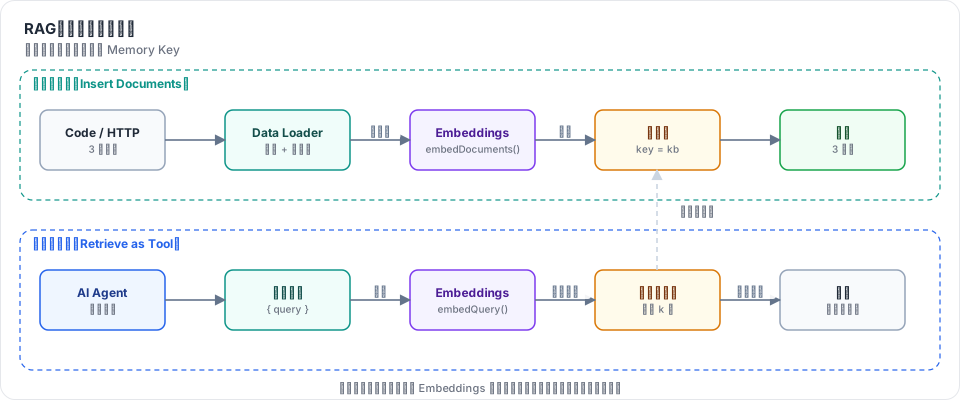
图 22-1:写入工作流把条目切块、向量化后存入向量库;提问工作流里,Agent 调用检索工具,工具把问题向量化,在同一个库里取前 k 块,作为工具结果交给模型。
在 n8n 里,这些都是 Cluster Node 的子节点(第 16 章):
| 角色 | 连接类型 | n8n 节点举例 | mini-n8n |
|---|---|---|---|
| 向量化 | ai_embedding | Embeddings OpenAI、Embeddings Ollama | Mock Embeddings、Embeddings Ollama |
| 文档加载 + 切块 | ai_document(+ ai_textSplitter) | Default Data Loader + Recursive Character Text Splitter | Default Data Loader(内置切块) |
| 向量库 | main / ai_tool / ai_vectorStore | Simple Vector Store、PGVector、Qdrant、Pinecone… | Simple Vector Store |
2. n8n 是怎么做的
2.1 一个工厂函数,几十个向量库
n8n 支持十几种向量库(PGVector、Qdrant、Pinecone、Supabase、Milvus……),但每个节点的代码都很短:新版向量库节点都由 createVectorStoreNode() 生成(旧版的 …Insert / …Load 节点除外)。Simple Vector Store 的定义:
// packages/@n8n/nodes-langchain/nodes/vector_store/VectorStoreInMemory/VectorStoreInMemory.node.ts:54
export class VectorStoreInMemory extends createVectorStoreNode<MemoryVectorStore>({
	meta: {
		displayName: 'Simple Vector Store',
		name: 'vectorStoreInMemory',
...每种向量库只需要提供几个函数:getVectorStoreClient(拿到一个 LangChain VectorStore)、populateVectorStore(写入)等。模式切换、参数、端口、日志都由工厂处理。工厂在 packages/@n8n/ai-utilities/src/utils/vector-store/createVectorStoreNode/createVectorStoreNode.ts,各模式的实现在同目录的 operations/ 下。
2.2 端口由模式决定
同一个节点有 5 种模式:load(Get Many)、insert、update、retrieve(作为 Vector Store 给 Retriever 用)、retrieve-as-tool(作为 Agent 的工具)。不同模式需要不同的连接,所以 inputs 和 outputs 不是数组,而是一个以 $parameter 求值的表达式:
// packages/@n8n/ai-utilities/src/utils/vector-store/createVectorStoreNode/createVectorStoreNode.ts:234
inputs: `={{
((parameters) => {
	const mode = parameters?.mode;
	const useReranker = parameters?.useReranker;
	const inputs = [{ displayName: "Embedding", type: "${NodeConnectionTypes.AiEmbedding}", required: true, maxConnections: 1}]
	...
	if (mode === 'retrieve-as-tool') {
		return inputs;
	}
	if (['insert', 'load', 'update'].includes(mode)) {
		inputs.push({ displayName: "", type: "${NodeConnectionTypes.Main}"})
	}
	if (['insert'].includes(mode)) {
		inputs.push({ displayName: "Document", type: "${NodeConnectionTypes.AiDocument}", required: true, maxConnections: 1})
	}
	return inputs
})($parameter)
}}`,outputs(同文件 :258)也一样:retrieve-as-tool 输出 ai_tool,retrieve 输出 ai_vectorStore,其余输出 main。第 16 章已经见过这个机制:AI Agent 用它在勾选 “Require Specific Output Format” 时多出一个 Output Parser 端口。
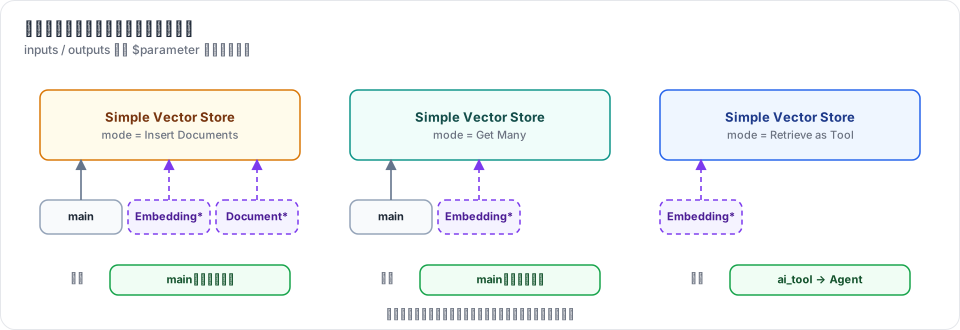
图 22-2:mini-n8n 实现的三种模式。编辑器在参数变化时重新求值表达式,画布上的端口随之变化。
2.3 execute 与 supplyData 各管几种模式
一个节点既可以是普通节点(有 main 输入,被引擎调用 execute),也可以是子节点(被父节点通过 supplyData 拉取)。工厂按模式分派:
// createVectorStoreNode.ts:417
async execute(this: IExecuteFunctions): Promise<INodeExecutionData[][]> {
	const mode = this.getNodeParameter('mode', 0) as NodeOperationMode;
	const embeddings = (await this.getInputConnectionData(NodeConnectionTypes.AiEmbedding, 0)) as Embeddings;
	if (mode === 'load') { ... }
	if (mode === 'insert') { ... }
	if (mode === 'update') { ... }
	if (mode === 'retrieve-as-tool') { ... handleRetrieveAsToolExecuteOperation(...) }
	...
}

// createVectorStoreNode.ts:479
async supplyData(this: ISupplyDataFunctions, itemIndex: number): Promise<SupplyData> {
	...
	if (mode === 'retrieve') return await handleRetrieveOperation(...);
	if (mode === 'retrieve-as-tool') return await handleRetrieveAsToolOperation(...);
}
注意 retrieve-as-tool 两边都有。这正是第 19 章讲的两代工具执行方式:
supplyData版本(operations/retrieveAsToolOperation.ts:16)返回一个带func的 LangChain 工具,旧版 Agent 在自己内部调用func。execute版本(operations/retrieveAsToolExecuteOperation.ts:16)供 Agent V3 使用:Agent 返回 EngineRequest,引擎把模型给的参数作为输入条目,调用这个节点的execute。查询从item.json.input读取(同文件:35)。
2.4 写入:先收集,再分批向量化
// operations/insertOperation.ts:17 起(节选)
const documentInput = await context.getInputConnectionData(NodeConnectionTypes.AiDocument, 0);
for (let itemIndex = 0; itemIndex < items.length; itemIndex++) {
	const processedDocuments = await processDocument(documentInput, itemData, itemIndex);
	resultData.push(...processedDocuments.serializedDocuments);
	documentsForEmbedding.push(...processedDocuments.processedDocuments);
	...
}
// :70
const embeddingBatchSize = (context.getNodeParameter('embeddingBatchSize', 0, 200) as number) ?? 200;
for (let i = 0; i < documentsForEmbedding.length; i += embeddingBatchSize) {
	const nextBatch = documentsForEmbedding.slice(i, i + embeddingBatchSize);
	await args.populateVectorStore(context, embeddings, nextBatch, 0);
}
先让文档加载器把所有条目变成文本块,再每 200 块调用一次 Embeddings。批量调用比逐块调用快得多,也更省 API 请求次数。
Default Data Loader 的 “Simple” 切块模式固定使用 RecursiveCharacterTextSplitter({ chunkSize: 1000, chunkOverlap: 200 })(DocumentDefaultDataLoader.node.ts:341)。选 “Custom” 时才多出一个 Text Splitter 子节点端口。
2.5 Simple Vector Store 存在哪里
MemoryVectorStoreManager(packages/@n8n/ai-utilities/src/utils/vector-store/MemoryManager/MemoryVectorStoreManager.ts:15)是进程内单例,用 Map<memoryKey, MemoryVectorStore> 保存所有库,getInstance() 在 :69。两个节点只要 Memory Key 相同就共享同一个库——写入工作流和提问工作流就是这样连通的。
单例意味着:n8n 重启后数据丢失;多个实例(队列模式)之间不共享。节点上有一条警告说明这一点。为了防止内存被撑爆,可以用环境变量 N8N_VECTOR_STORE_MAX_MEMORY(MB)和 N8N_VECTOR_STORE_TTL_HOURS 限制大小和闲置时间(MemoryManager/config.ts:13、:22),默认都是 -1(不限制)。生产环境应该换成 PGVector、Qdrant 这样的外部向量库。
3. 从零实现
3.1 三个接口
// packages/nodes-ai/src/rag/embeddings.ts
export interface Embeddings {
	modelName: string;
	embedDocuments(texts: string[]): Promise<number[][]>;
	embedQuery(text: string): Promise<number[]>;
}

// packages/nodes-ai/src/rag/documents.ts
export interface Document { pageContent: string; metadata: IDataObject }
export interface DocumentLoader { load(items: INodeExecutionData[]): Promise<Document[]> }
和 LangChain 的接口同名同义,只保留了用到的方法。
3.2 离线的 Mock Embeddings:哈希技巧
测试和 e2e 不能依赖真实模型,于是需要一个确定的、离线的向量化方法。MockEmbeddings(rag/embeddings.ts:27)用“哈希技巧”:每个词(和相邻词对)哈希到 256 个桶之一,桶的计数加一,最后归一化。
private embed(text: string): number[] {
	const v = new Array<number>(DIMENSIONS).fill(0);
	const t = tokens(text);
	t.forEach((tok, i) => {
		v[hash(tok) % DIMENSIONS] += 1;
		if (i > 0) v[hash(`${t[i - 1]} ${tok}`) % DIMENSIONS] += 0.5;
	});
	const norm = Math.hypot(...v) || 1;
	return v.map((x) => x / norm);
}
它不懂语义(“refund” 和 “money back” 毫无关系),但共享词语的文本方向相近,足够演示检索。真实向量化用 OpenAICompatibleEmbeddings(:51),调用 POST {baseUrl}/embeddings,OpenAI 和 Ollama 的 /v1 都支持。
3.3 切块
splitText(text, size, overlap)(rag/documents.ts:18)是一个简化的递归切块器:每次取 size 个字符,尽量在段落、句号或空格处断开,下一块从 end - overlap 开始。DefaultDataLoader(:41)把每个条目的 textField 字段切块,其余字段放进元数据,并记下 itemIndex、chunkIndex:
const { [this.options.textField]: text, ...rest } = item.json;
splitText(String(text ?? ''), this.options.chunkSize, this.options.chunkOverlap).forEach((chunk, chunkIndex) => {
	docs.push({ pageContent: chunk, metadata: { ...rest, itemIndex, chunkIndex } });
});
我们把 n8n 的 Text Splitter 子节点合并进了加载器,少一个节点。
3.4 向量库
rag/memory-vector-store.ts 只有 57 行:一个 Map<string, InMemoryVectorStore>,每个库是一个 { vector, document } 数组;search()(:31)对所有条目算余弦相似度、排序、取前 k。这是暴力搜索,几千块以内足够快。真正的向量库用 HNSW 等近似最近邻索引,把查询从 O(n) 降到接近 O(log n)。
3.5 一个节点,三种模式
VectorStoreInMemory(nodes/rag.ts:82)照搬 n8n 的动态端口:
inputs: `={{ (() => {
	const mode = $parameter.mode;
	const inputs = [{ displayName: 'Embedding', type: 'ai_embedding', required: true, maxConnections: 1 }];
	if (mode === 'retrieve-as-tool') return inputs;
	return ['main', ...inputs, ...(mode === 'insert' ? [{ displayName: 'Document', type: 'ai_document', required: true, maxConnections: 1 }] : [])];
})() }}`,
outputs: `={{ $parameter.mode === 'retrieve-as-tool' ? [{ displayName: 'Tool', type: 'ai_tool' }] : ['main'] }}`,
Workflow.getNodeInputs() 在 v0.4 就会对字符串形式的 inputs 求值(packages/workflow/src/workflow.ts:29),所以引擎、getInputConnectionData 和编辑器都不用改。
supplyData(:120)只在 retrieve-as-tool 模式下被 Agent 调用,返回工具定义:名字由节点名生成(Shop Docs → Shop_Docs),参数只有一个 query。
execute(:129)处理其余情况:
if (mode === 'insert') {
	if (this.getNodeParameter('clearStore', 0)) store.clear();
	const loader = (await this.getInputConnectionData('ai_document', 0)) as DocumentLoader;
	const documents = await loader.load(items);
	store.add(await embeddings.embedDocuments(documents.map((d) => d.pageContent)), documents);
	return [documents.map((d) => ({ json: { pageContent: d.pageContent, metadata: d.metadata }, pairedItem: { item: Number(d.metadata.itemIndex ?? 0) } }))];
}
// load / retrieve-as-tool:每个输入条目做一次相似度搜索
...
	// 工具结果:模型读到的是匹配的文本块
	out.push({ json: { response: results.map((r) => ({ score: r.score, text: r.document.pageContent, ...r.document.metadata })) }, pairedItem: { item: i } });
在 retrieve-as-tool 模式下,这个 execute 由引擎通过 EngineRequest 调用(第 19 章),输入条目就是模型给的参数 { query }。n8n 用的字段名是 input,我们用 query,和其他工具保持一致。
写入时每个块的 pairedItem 指回它来自的条目(第 4 章)。这样在 NDV 里点一个块,能高亮它的源条目。
3.6 子节点的运行记录
Embeddings 和 Default Data Loader 都是子节点,它们不会被引擎直接执行。为了让画布显示它们“执行过”、让 NDV 能看到输入输出,logEmbeddings()(rag/embeddings.ts)和加载器的包装(nodes/rag.ts:58 起)在每次调用时执行 addInputData / addOutputData,和第 17 章的 logModel 一样。
3.7 裁剪了什么
| n8n 有 | mini-n8n | 原因 |
|---|---|---|
5 种模式(含 update、retrieve) | 3 种 | retrieve 需要 Retriever / QA Chain 节点;update 需要按 ID 更新 |
| 元数据过滤、Reranker | 无 | 不影响理解主流程 |
| 分批向量化(200 一批) | 一次性 | 文档少 |
| 二进制文件加载(PDF 等) | 只支持 JSON 字段 | 需要 PDF 解析库 |
| 内存上限和 TTL | 无 | 同上 |
4. 运行与验证
4.1 单元测试
npx vitest run packages/nodes-ai/test/advanced.test.ts --reporter=verbose真实输出(RAG 部分):
 ✓ packages/nodes-ai/test/advanced.test.ts > RAG > splits long text into overlapping chunks 1ms
 ✓ packages/nodes-ai/test/advanced.test.ts > RAG > inserts documents with their metadata 15ms
 ✓ packages/nodes-ai/test/advanced.test.ts > RAG > finds the right chunk with a prompt (Get Many) 1ms
 ✓ packages/nodes-ai/test/advanced.test.ts > RAG > lets an Agent search the store as a tool 3ms
第三个测试用 Mock Embeddings 搜索 “How long is the warranty on devices?”,取第 1 名,断言它是 Warranty 那块。第四个测试让 Agent 通过工具检索,断言回答里包含退款政策原文和它的标题元数据。
4.2 在编辑器里
e2e/advanced.e2e.mjs 先创建并执行写入工作流:
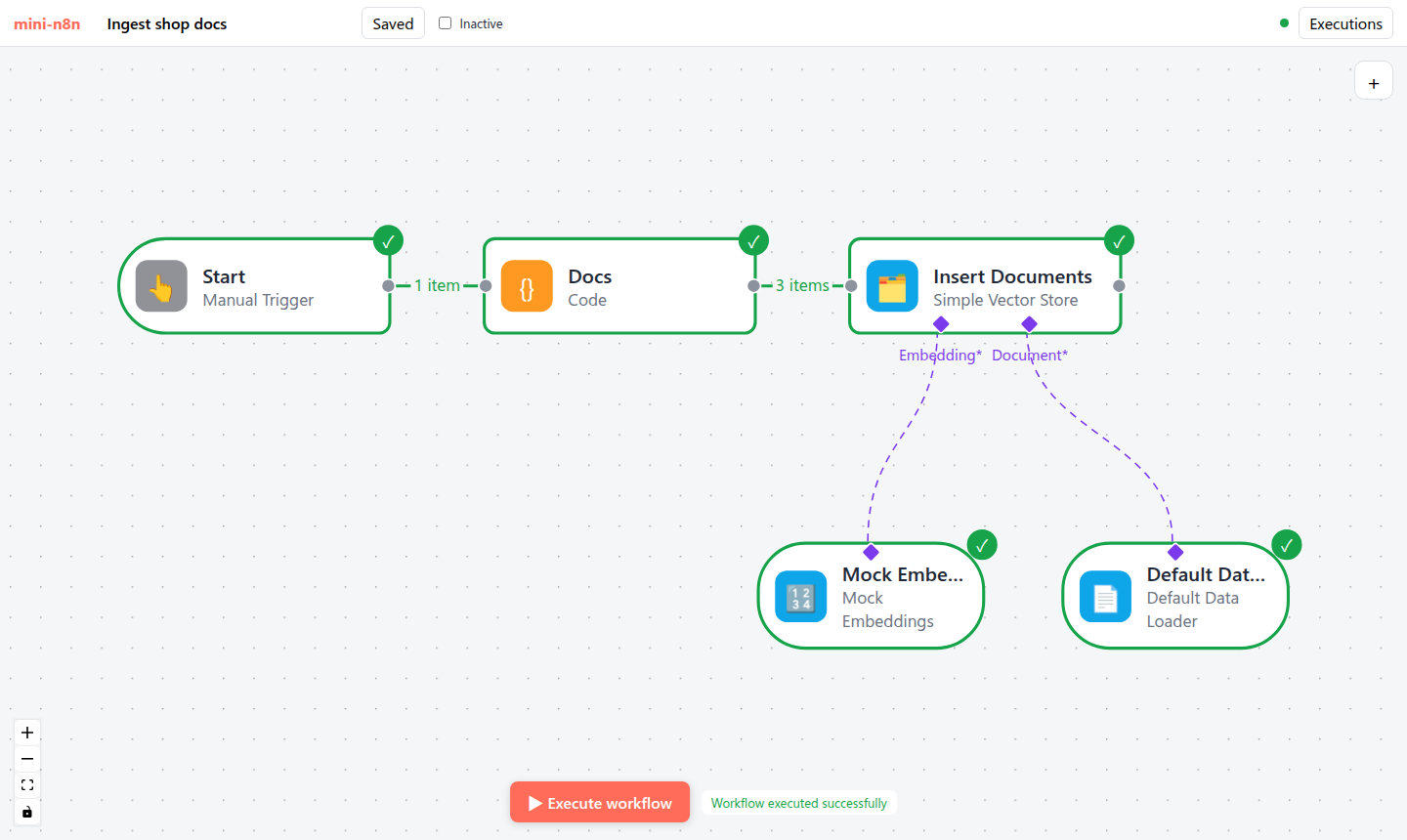
图 22-3:写入工作流执行后。Code 节点输出 3 个条目,Insert Documents 输出 3 个块;两个子节点都显示为已执行。
然后在客服工作流的聊天面板里提问:
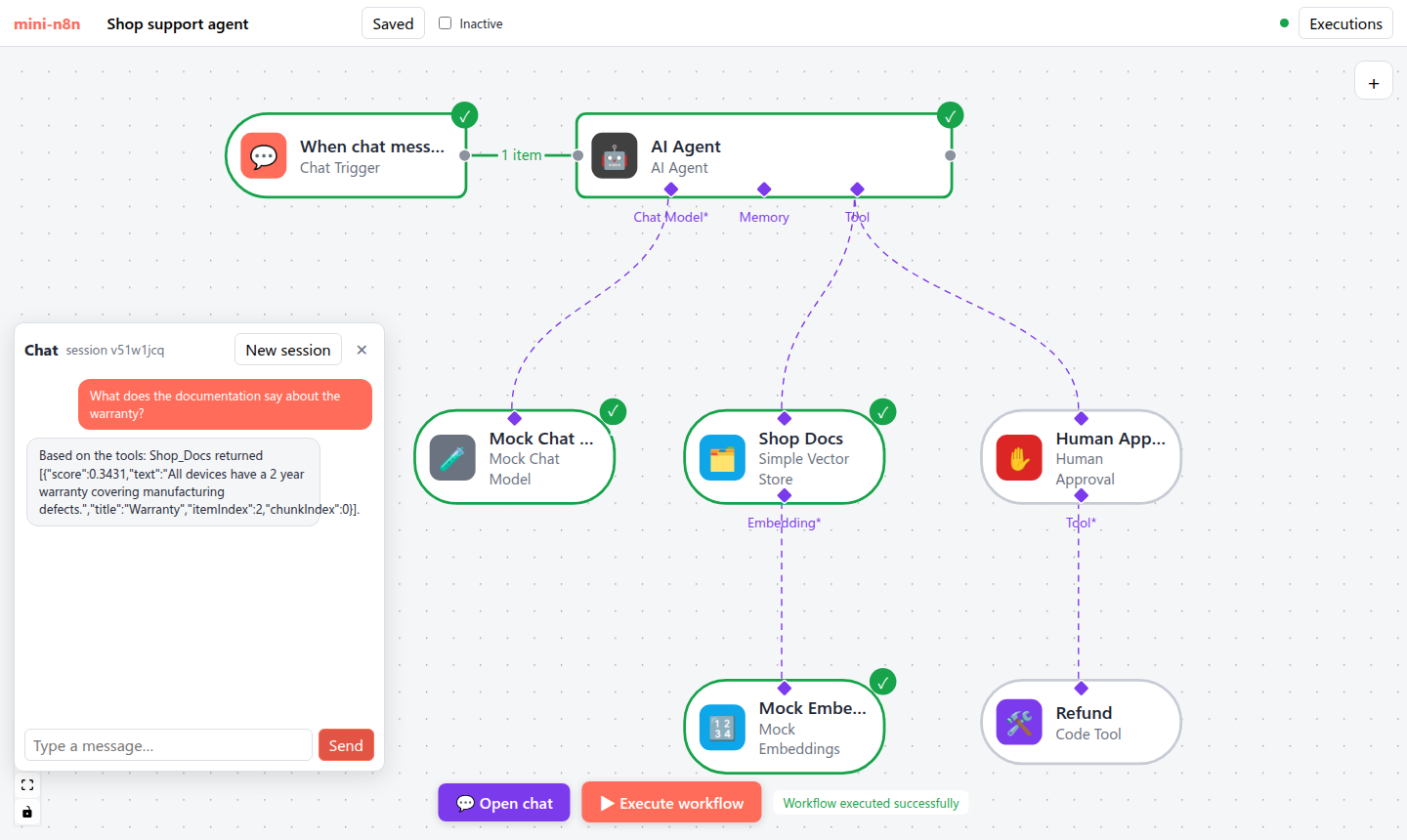
图 22-4:问 “What does the documentation say about the warranty?”。Mock 模型发现问题里有工具描述中的 “documentation”,于是调用 Shop Docs;工具返回相似度最高的 Warranty 块(score 0.3431);Mock 模型把工具结果原样写进回答。
e2e 的前两项真实输出:
✓ ingest: the vector store stored and returned 3 chunks (1 item, 3 items)
✓ RAG: the answer is grounded in the retrieved Warranty chunk
4.3 真实模型
ollama pull nomic-embed-text
npx tsx examples/rag-ollama.ts                                   # 聊天模型默认 qwen2.5:0.5b
OLLAMA_MODEL=qwen2.5:3b npx tsx examples/rag-ollama.ts
脚本先写入三段店铺政策,再让 Agent(Ollama 聊天模型 + Simple Vector Store 作为工具,topK: 1)回答问题。三次真实运行:
qwen2.5:0.5b,问 “How many days do I have to ask for a refund?”:
ingest: success, 3 chunks, vector size {"action":"embedDocuments","count":3,"dimensions":768}
answer: success -> To determine the number of days you have to ask for a refund, I need to know the current date and the status of your order. Could you please provide me with the current date and the status of your order?
没有 tool : 这一行——0.5B 的模型 根本没有调用检索工具,系统提示词里明确写了 “Always search the knowledge base first” 也没用。
qwen2.5:3b,同一个问题:
tool  : in={"query":"refund days"} out={"response":[{"score":0.7424,"text":"Customers can request a refund within 30 days of purchase. Refunds go back to the original payment method.","title":"Refund policy","itemIndex"
answer: success -> The refund policy states that customers can request a refund within 30 days of purchase. Refunds will be processed and returned to the original payment method.
模型把问题改写成了检索词 refund days,检索到了正确的块(相似度 0.7424),回答完全基于原文。
qwen2.5:3b 与 qwen2.5:7b,问一个需要推理的问题 “Is my laptop covered if the screen breaks by itself after 18 months?”。两者都检索到了 Warranty 块(3b:0.6113,7b:0.6016),但结论不同:
3b: ... your laptop is covered by a 2-year warranty for manufacturing defects. However, the question specifically asks about a screen that breaks by itself after 18 months. The knowledge base does not provide specific information about partial coverage or defects that occur after the initial warranty period. ...
7b: ... your laptop is covered under a 2-year warranty for manufacturing defects. Since the screen breaking by itself occurred after 18 months, it falls within the coverage period. ...
3b 没有意识到 18 个月在 2 年之内。检索对了,不等于回答对了:RAG 只负责把对的材料放到模型面前,推理还要靠模型本身。
4.4 踩坑记录
用聊天模型做 Embeddings,每个问题都检索到同一块。v0.5 第一版的 Embeddings Ollama 节点默认模型是
qwen2.5:0.5b(一个聊天模型,Ollama 也能用它输出 896 维向量)。用它跑三个不同的问题,真实结果:texttool : in={"query":"refund days"} out={"response":[{"score":0.3214,"text":"All devices have a 2 year warranty ...","title":"Warranty",... tool : in={"query":"international shipping"} out={"response":[{"score":0.4917,"text":"All devices have a 2 year warranty ...","title":"Warranty",... tool : in={"query":"warranty"} out={"response":[{"score":0.1908,"text":"All devices have a 2 year warranty ...","title":"Warranty",...三个问题都返回 Warranty,而且问 “warranty” 时相似度反而最低(0.1908)。聊天模型的隐藏状态不是为“语义相近 → 向量相近”训练的。换成专门的 Embedding 模型
nomic-embed-text(768 维)后检索正确。修复:把节点默认值改为nomic-embed-text,并在参数说明里写明 “Chat models give poor embeddings”(commit8e836ef)。Default Data Loader 在画布上一直是灰色。写入成功了,但加载器节点没有绿色对勾:它是子节点,引擎不执行它,而我们只给 Embeddings 包了日志。对照 n8n 发现
logWrapper也会记录加载器的processAll/processItem(packages/@n8n/ai-utilities/src/utils/log-wrapper.ts:354、:373)。补上包装后,图 22-3 里两个子节点都显示为已执行(commitdbc7f0e)。
5. 练习
- 巩固:在写入工作流里把 Chunk Size 改成 40,重新执行。Insert Documents 输出多少块?每块的
chunkIndex和itemIndex是什么?再问同样的问题,检索结果有什么变化? - 扩展:实现
update模式,或者实现元数据过滤:给retrieve-as-tool加一个 “Metadata Filter” 参数(比如title = Shipping),搜索时先过滤再排序。写一个测试。 - 读源码:阅读 n8n 的
operations/retrieveOperation.ts和nodes/retrievers/RetrieverVectorStore/,说明retrieve模式输出的ai_vectorStore是怎样被 Question and Answer Chain 使用的,它和retrieve-as-tool有什么不同(提示:谁决定什么时候检索)。
6. 延伸阅读
packages/@n8n/ai-utilities/src/utils/vector-store/createVectorStoreNode/README.md:向量库工厂的说明。packages/@n8n/nodes-langchain/nodes/vector_store/:所有向量库节点,比较VectorStorePGVector和VectorStoreInMemory需要实现的函数。packages/@n8n/nodes-langchain/nodes/embeddings/、nodes/document_loaders/、nodes/text_splitters/:其他 RAG 子节点。