第 15 章 运行与调试:实时状态、Pin 数据与部分执行
本章目标:读完你能说清编辑器里“点执行 → 节点逐个变绿”背后的状态流转,理解 Pin 数据为什么能让开发不依赖外部系统,并实现 n8n 的部分执行(只重跑改过的节点)和 “Debug in editor”(把一次生产执行的真实输入搬进编辑器重放)。前置:第 7、10、14 章。对应代码:mini-n8n v0.3 的
stores/execution.ts、stores/push.ts、packages/core/src/partial-execution.ts
1. 问题与概念
搭工作流的过程其实是不断地“改一点、跑一下、看结果”。好的调试体验要解决几个问题:
- 看得见:哪个节点在跑、跑完输出了几条、哪个节点失败了、失败原因是什么。
- 跑得快:工作流前面有一个慢 API 调用(或者要花钱的 LLM 调用),只改了最后一个节点,不应该从头再跑一遍。
- 不依赖外部:Webhook 触发的工作流,每次调试都要真的发一个请求吗?上游 API 今天挂了,还能继续开发下游吗?
- 能复现:生产环境凌晨三点失败了一次,能不能拿那次的真实输入在编辑器里重现?
n8n 的四个答案:推送驱动的执行状态、部分执行、Pin 数据、Debug in editor。
2. n8n 是怎么做的
2.1 执行状态在前端怎么流转
第 3、10 章已经看过推送消息的来源。前端每个处理函数只做一件小事,例如 nodeExecuteAfter 先用 item 数量填占位数据,让节点立即变绿、边上立即显示 “3 items”;nodeExecuteAfterData 再换成真实数据(packages/frontend/editor-ui/src/app/composables/usePushConnection/handlers/nodeExecuteAfter.ts)。所有状态集中在 workflowExecutionState.store.ts,画布的 useCanvasMapping 和 NDV 都只读这个 store。
处理函数开头都有一个检查:
// packages/frontend/editor-ui/src/app/composables/usePushConnection/handlers/nodeExecuteAfter.ts:23-30(节选)
// Ignore node events that don't belong to the execution this document is
// tracking — a concurrent execution's node must not write into this
// document's data or fire its side effects (form popups, tracking, assistant).
const activeExecutionId = workflowExecutionStateStore.activeExecutionId;
if (activeExecutionId !== pushData.executionId) {
	return;
}
同一个标签页可能有多个执行的消息到达(例如上一次执行还没结束就又点了执行),只处理当前跟踪的那个。
2.2 Pin 数据
Pin 数据是 保存在工作流里的、某个节点的固定输出(workflow.pinData[节点名] = items)。引擎遇到被 pin 的节点,不执行它,直接用 pin 的数据作为输出:
// packages/core/src/execution-engine/workflow-execute.ts:1852-1860(节选)
/** The pinned output of a node, or undefined if the node has none. */
private getPinnedOutput(node: INode): INodeExecutionData[][] | undefined {
	const { pinData } = this.runExecutionData.resultData;
	if (!pinData || node.disabled || pinData[node.name] === undefined) {
		return undefined;
	}
	return [pinData[node.name]]; // always zeroth runIndex
}
几个约束:
- 只在手动执行时生效。
WorkflowRunner只给手动执行传pinData,生产执行永远真实运行。所以 pin 数据可以放心地留在工作流里。 - 有大小上限。前端
usePinnedData.isValidSize()(packages/frontend/editor-ui/src/app/composables/usePinnedData.ts:175)检查MAX_PINNED_DATA_SIZE,因为 pin 数据跟着工作流一起保存、一起加载。 - Webhook 被 pin 后不再等待请求。第 3 章的
executeManually里有triggerHasNoPinnedData(...)的判断:有 pin 数据就直接执行。
2.3 部分执行
用户点某个节点的 “Execute step”,前端发送 destinationNode、上次的 runData 和 dirtyNodeNames(改过的节点,useRunWorkflow.ts:406)。后端走 runPartialWorkflow2:
// packages/core/src/execution-engine/workflow-execute.ts:282-339(节选)
// 1. Find the Trigger
let trigger = findTriggerForPartialExecution(workflow, destinationNode.nodeName, runData);
...
// 2. Find the Subgraph
const filteredGraph = filterDisabledNodes(graph);
...
graph = findSubgraph({ graph: filteredGraph, destination, trigger });
const filteredNodes = graph.getNodes();

// 3. Find the Start Nodes
const dirtyNodes = graph.getNodesByNames(dirtyNodeNames);
runData = cleanRunData(runData, graph, dirtyNodes);
let startNodes = findStartNodes({ graph, trigger, destination, runData, pinData });

// 4. Detect Cycles
// 5. Handle Cycles
startNodes = handleCycles(graph, startNodes, trigger);

// 6. Clean Run Data
runData = cleanRunData(runData, graph, startNodes);

// 7. Recreate Execution Stack
const { nodeExecutionStack, waitingExecution, waitingExecutionSource } =
	recreateNodeExecutionStack(graph, startNodes, runData, pinData ?? {});

// 8. Execute
代码里的编号注释把算法写得很清楚:
- 找触发器:目标节点依赖哪个触发器。
- 找子图:触发器到目标节点之间的所有节点(
DirectedGraph是专门为部分执行写的图结构,partial-execution-utils/directed-graph.ts)。 - 找起始节点:从触发器往前走,每条路径上遇到的 第一个“脏”节点 就是起始节点。“脏”的定义在
find-start-nodes.ts的isDirty():参数改过、没有运行数据也没有 pin 数据、上次运行出错。 - 处理环:起始节点在循环里时,要从循环入口开始跑(
handle-cycles.ts)。 - 清理运行数据:起始节点及其下游的旧数据作废;子图之外的数据也去掉(
clean-run-data.ts)。 - 重建执行栈:每个起始节点放进栈,输入取自它父节点 上次 的输出;多输入节点数据不全时放进等待区(
recreate-node-execution-stack.ts)。 - 交给普通的主循环执行。
第 4 章强调过“执行状态是可序列化的”,这里就是收获:部分执行只是 人为构造一个执行中途的状态,然后让引擎从那里继续。
2.4 Debug in editor
在执行列表里打开一次(通常是失败的生产)执行,点 “Debug in editor”:
// packages/frontend/editor-ui/src/features/execution/executions/composables/useExecutionDebugging.ts:133-171(节选)
// Set execution data
useWorkflowExecutionStateStore(...).setWorkflowExecutionData(execution);

// Pin data of all nodes which do not have a parent node
let pinnableNodes = workflowNodes.filter((node: INodeUi) => !workflowDocumentStore.value.getParentNodes(node.name).length);
...
pinnableNodes.forEach((node: INodeUi) => {
	const taskData = runData[node.name]?.[0];
	if (taskData?.data?.main) {
		// Get the first main output that has data, preserving all execution data including binary
		const nodeData = taskData.data.main.find((output) => output && output.length > 0);
		if (nodeData) {
			...
			workflowDocumentStore.value.pinNodeData(node.name, nodeData);
把那次执行的运行数据载入编辑器,并 把所有没有父节点的节点(触发器)的输出 pin 住。之后点执行,工作流就用那次的真实输入重跑——不需要重新触发 Webhook,也不需要等定时器。如果这些节点上已有 pin 数据,会先弹窗确认是否覆盖(第 98–129 行)。
3. 从零实现
3.1 执行状态 store
// code/mini-n8n/packages/editor/src/stores/execution.ts(节选)
function onNodeExecuteAfter(executionId: string, nodeName: string, taskData: ITaskData) {
	if (executionId !== activeExecutionId.value) return;
	const next = new Set(runningNodes.value);
	next.delete(nodeName);
	runningNodes.value = next;
	const previous = seenInExecution.has(nodeName) ? (runData.value[nodeName] ?? []) : [];
	seenInExecution.add(nodeName);
	runData.value = { ...runData.value, [nodeName]: [...previous, taskData] };
}

async function onExecutionFinished(executionId: string, finalStatus: string) {
	if (executionId !== activeExecutionId.value) return;
	runningNodes.value = new Set();
	status.value = finalStatus as ExecutionUiStatus;
	// fetch the whole execution: authoritative data for previews and error messages
	const execution = await api.getExecution(executionId);
	lastExecutionData.value = execution.data;
	runData.value = { ...partialBase, ...execution.data.resultData.runData };
	...
}
两个细节:
seenInExecution:一个节点在本次执行里第一次上报时,替换 它的旧运行记录;之后(循环里的第二、三次运行)才追加。否则部分执行时,没被重跑的节点会和重跑的节点混在一起。- 结束时拉取完整执行数据,作为表达式预览的数据源。部分执行时合并上一次的运行数据(
partialBase),子图之外的节点继续显示上次的输出。
push store 只负责把 SSE 消息分发给这几个处理函数。
3.2 部分执行
前端在 store 里记录脏节点(markNodeDirty:改参数、改设置、改连接、新增节点),点 Execute step 时一起发出:
// code/mini-n8n/packages/editor/src/stores/execution.ts(节选)
// "Execute step" with data of a previous run = partial execution: send what we have
const previousRunData = destinationNode && Object.keys(runData.value).length ? JSON.parse(JSON.stringify(runData.value)) : undefined;
const dirtyNodeNames = [...workflow.dirtyNodeNames];
...
const result = await api.run(workflow.id, { destinationNode, runData: previousRunData, dirtyNodeNames }, pushRef);
后端的实现照着 n8n 的步骤,但每一步都更简单:
// code/mini-n8n/packages/core/src/workflow-execute.ts(节选)
async runPartialWorkflow(workflow, runData, pinData, dirtyNodeNames, destinationNode): Promise<IRun> {
	const subgraph = findSubgraph(workflow, destinationNode);                       // 2. 子图
	const trigger = findTrigger(workflow, destinationNode);                          // 1. 触发器
	const dirty = new Set(dirtyNodeNames);
	const startNodes = findStartNodes(workflow, subgraph, trigger, runData, pinData, dirty); // 3. 起始节点
	// nothing is dirty: run the destination again with its old input
	if (startNodes.length === 0) startNodes.push(destinationNode);
	const cleaned = cleanRunData(workflow, runData, startNodes, subgraph);           // 6. 清理
	const executionData = recreateNodeExecutionStack(workflow, startNodes, cleaned, pinData); // 7. 重建栈

	this.runExecutionData = createRunExecutionData({
		startData: { destinationNode, runNodeFilter: [...subgraph] },
		resultData: { runData: cleaned, pinData },
		executionData,
	});
	return await this.processRunExecutionData(workflow);                           // 8. 执行
}// code/mini-n8n/packages/core/src/partial-execution.ts(节选)
export function findStartNodes(workflow, subgraph, trigger, runData, pinData, dirtyNodeNames): string[] {
const start = new Set<string>();
const seen = new Set<string>();
const visit = (name: string) => {
if (seen.has(name) || !subgraph.has(name)) return;
seen.add(name);
if (isDirty(workflow.getNode(name)!, runData, pinData, dirtyNodeNames)) {
start.add(name);
return;
}
for (const child of workflow.getChildNodes(name, 'main', 1)) visit(child);
};
visit(trigger);
return [...start];
}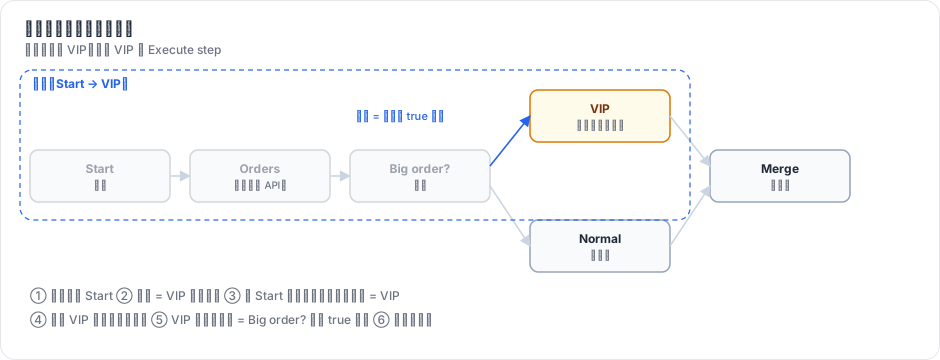
图 15-1:用户只改了 VIP 节点。子图是 Start → Orders → Big order? → VIP;从 Start 往前走,第一个脏节点是 VIP,于是它是唯一的起始节点,输入取自 Big order? 上次的 true 输出。Orders(可能是一个慢 API)不会重跑。
3.3 Pin 与 Debug in editor
NDV 右栏的 “Pin” 按钮调用 workflow.setPinData(nodeName, items),保存后进入 workflow_entity.pinData。引擎早在 v0.1 就支持 pin 数据(第 7 章的测试 uses pinned data instead of running the node);服务端只在手动执行时传入(WorkflowExecutionService.executeManually 和 runWorkflow 里的 pinData: mode === 'manual' ? ... : undefined)。
// code/mini-n8n/packages/editor/src/stores/execution.ts(节选)
async function debugInEditor(executionId: string) {
	const workflow = useWorkflowStore();
	await openExecution(executionId);
	for (const node of workflow.nodes) {
		const hasParent = ...有连接指向它;
		if (hasParent) continue;
		const items = runData.value[node.name]?.[0]?.data?.main?.find((o) => o && o.length > 0);
		if (items) workflow.setPinData(node.name, items);
	}
}| 方面 | n8n | mini-n8n |
|---|---|---|
| 部分执行 | 8 步,DirectedGraph,处理环、子节点、工具节点重接线 | 6 步,不处理环 |
| 脏节点 | 参数修改时间戳、无数据、出错、父节点被禁用 | 改过、无数据、出错 |
| Pin 数据 | 大小限制、可在 JSON 视图编辑、二进制、覆盖确认 | 一键 pin/unpin |
| Debug in editor | 覆盖确认、AI 模拟数据保护 | 直接 pin |
| 停止 | 停止执行、取消测试 Webhook | 相同 |
4. 运行与验证
npm run test:e2e 的完整真实输出(17 项):
✓ canvas shows the 7 nodes of the workflow
✓ push connection (SSE) is open
✓ all nodes turn green after the run
✓ edges show item counts (1 item, 3 items, 2 items, 1 item, 2 items, 1 item, 3 items)
✓ expression preview uses the input of the last run: "Result: Thanks Ada, you spent 120!"
✓ preview updates while typing: "Result: Hi ADA (240)"
✓ "Execute step" created execution #24
✓ partial execution: "Orders" was reused from the previous run, only "VIP" ran again
✓ drag & drop mapping wrote "{{ $json.total }}" (preview: Result: 715)
✓ new node: "Execute step" runs up to it and shows its output
✓ the new node and its connection were saved
✓ executions panel lists past runs
✓ webhook workflow: the editor waits for a test request
✓ test request answered with the last node: {"total":100}
✓ canvas updated live from the pushed execution
✓ Debug in editor: the pinned webhook data was replayed without a new request
✓ no errors in the browser console
“partial execution” 这一条的验证方法:比较前后两次执行的运行数据,Orders 的 startTime 完全相同(数据是从上一次带过来的),VIP 的 startTime 更新了(重跑了)。
引擎层的部分执行有独立的单元测试,用一个会计数的节点证明上游没有重跑:
npx vitest run packages/core/test/partial-execution.test.ts ✓ packages/core/test/partial-execution.test.ts (3 tests)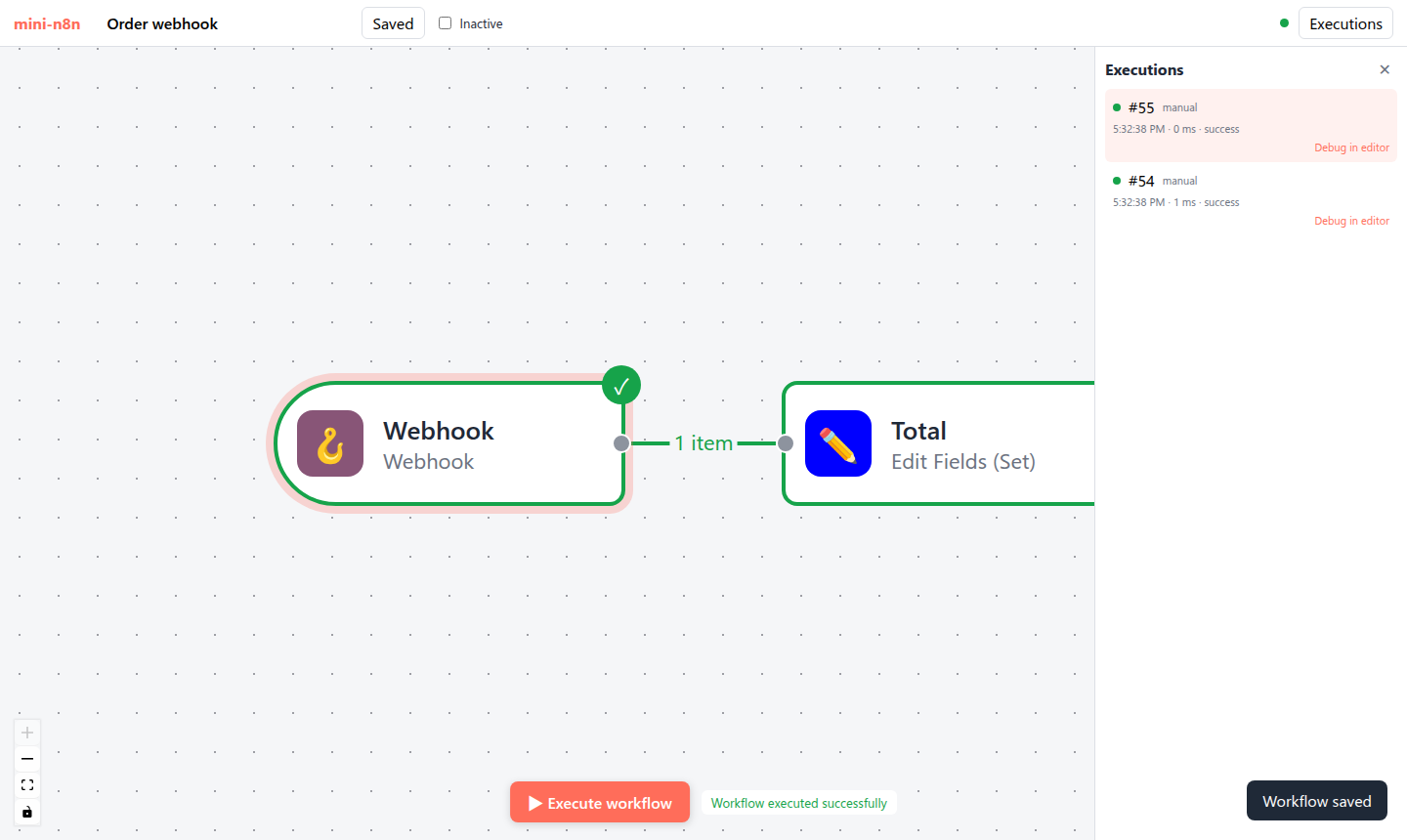
图 15-2:在执行列表点 “Debug in editor” 后,Webhook 节点的输出被 pin 住;再点执行,工作流用那次请求的数据立即重跑,不再等待新请求。
5. 练习
- 巩固:在订单工作流里 pin 住 Orders 节点的输出,然后把 Orders 的代码改成抛异常,再执行整个工作流,观察结果并解释。
- 扩展:让部分执行处理 Loop Over Items 里的环:如果起始节点在循环体内,就把起始节点改成循环入口(Loop 节点)。参考 n8n 的
handle-cycles.ts。 - 读源码:阅读
packages/core/src/execution-engine/partial-execution-utils/recreate-node-execution-stack.ts,说明当一个起始节点有两个输入、只有一个父节点有运行数据时,它被放到了哪里。
6. 延伸阅读
packages/core/src/execution-engine/partial-execution-utils/:部分执行的全部算法,每个文件都有对应测试。packages/frontend/editor-ui/src/app/composables/useRunWorkflow.ts:前端如何决定发送完整执行还是部分执行。- n8n 文档:Data pinning、Debug and re-run past executions。