第 23 章 多 Agent、人工审批与结构化输出
本章目标:读完你能搭出三种“生产级”Agent 模式:一个 Agent 把任务交给另一个 Agent;危险的工具调用先停下来等人批准,批准后再继续;Agent 的回答必须是固定格式的 JSON。三者都建立在第 19 章的 EngineRequest 之上,你会看到引擎本身几乎不用改。前置:第 10、12、19 章。对应代码:mini-n8n v0.5 的
nodes/agent-tool.ts、nodes/approval-tool.ts、nodes/output-parser.ts、cli/src/webhooks/waiting-webhooks.ts
1. 问题与概念
第 18–21 章的 Agent 能调工具、有记忆、能流式回答。放到生产环境,还会遇到三个问题:
| 问题 | 例子 | 模式 |
|---|---|---|
| 一个 Agent 的提示词和工具太多,效果变差 | 客服 Agent 既要查订单,又要写报告,又要算账 | 多 Agent:拆成几个专职 Agent,主 Agent 把它们当工具调用 |
| 有些动作不能让模型自己决定 | 退款、发邮件给客户、删除数据 | 人工审批(Human in the Loop,HITL):调用前停下来,等人批准 |
| 下游节点需要确定的字段 | 把回答写进表格、按 priority 字段分支 | 结构化输出:回答必须符合一个 JSON Schema |
它们的共同点:都不需要引擎知道“Agent”是什么。引擎只认识第 19 章的 EngineRequest:节点返回“请帮我执行这些节点”,引擎执行完再带着结果调用它一次。
- 多 Agent:子 Agent 也是一个节点,它被调用时又可以返回 EngineRequest → 请求嵌套请求。
- HITL:审批节点在 EngineRequest 里被执行,它让整个执行进入
waiting状态(第 8 章的 Wait 机制),人批准后执行从数据库恢复。 - 结构化输出:不涉及引擎,只是 Agent 多给模型一个“格式化工具”。
2. n8n 是怎么做的
2.1 AI Agent Tool:Agent 也是工具
n8n 的 “AI Agent Tool” 节点(AgentToolV3)和 AI Agent 用的是同一个执行函数:
// packages/@n8n/nodes-langchain/nodes/agents/Agent/V3/AgentToolV3.node.ts:101
async execute(
	this: IExecuteFunctions | ISupplyDataFunctions,
	response?: EngineResponse<RequestResponseMetadata>,
): Promise<INodeExecutionData[][] | EngineRequest<RequestResponseMetadata>> {
	return await toolsAgentExecute.call(this, response);
}
它没有 supplyData,输出是 ai_tool。第 20 章讲过:这样的节点会被“节点即工具”机制自动包装。当顶层 Agent 请求它时,引擎把它压栈,像执行普通节点一样调用 execute(packages/core/src/execution-engine/requests-response.ts:114 起,给节点设置 rewireOutputLogTo,把模型给的参数并进输入条目)。这时 this 是 IExecuteFunctions,子 Agent 需要调用自己的工具时,也直接把 EngineRequest 交给引擎:
// packages/@n8n/nodes-langchain/nodes/agents/Agent/agents/ToolsAgent/V3/execute.ts:127
if (request) {
	if (isExecuteFunctions(this)) {
		// Top-level execution — hand the request to the engine, which
		// schedules the requested tool nodes and resumes us with an
		// EngineResponse.
		return request;
	}
	// Sub-agent execution (running through `makeHandleToolInvocation`):
	// the engine can't fulfil EngineRequests from inside a tool callback,
	// so resolve the sub-agent's tools inline ...
	return await resolveSubAgentRequest(this, request, { ... });
}
第二个分支用于另一种调用方式:子 Agent 在一个工具回调里运行(ISupplyDataFunctions),比如被旧版 Agent 调用。那时引擎不在调用链上,resolveSubAgentRequest()(helpers/resolveSubAgentRequest.ts:25)就在原地循环执行工具。这条路径不支持人工审批,assertNoHitlActions()(同文件 :49)会报错:“Human-in-the-Loop nodes cannot be used inside a sub-agent”。
2.2 结构化输出:多给模型一个工具
AI Agent 勾选 “Require Specific Output Format” 后,多出一个 ai_outputParser 端口(第 16 章的动态端口)。接上 Structured Output Parser,Agent 会做两件事。
第一,多加一个工具:
// packages/@n8n/nodes-langchain/nodes/agents/Agent/agents/ToolsAgent/common.ts:542 起
if (outputParser) {
	const schema = getOutputParserSchema(outputParser);
	const structuredOutputParserTool = new DynamicStructuredTool({
		schema,
		name: 'format_final_json_response',
		description: 'Use this tool to format your final response to the user in a structured JSON format. ...',
		// We do not use a function here because we intercept the output with the parser.
		func: async () => '',
	});
	tools.push(structuredOutputParserTool);
}第二,在系统提示词后面追加一段指令(V3/helpers/runAgent.ts:87):“IMPORTANT: For your response to user, you MUST use the format_final_json_response tool ...”。
模型调用这个工具时,参数就是结构化的回答。Agent 拦截这次调用,不去“执行”它,而是交给解析器校验(common.ts:419),校验通过就作为最终输出。为什么不直接让模型输出 JSON 文本?因为工具调用的参数本来就是按 JSON Schema 生成的,主流模型对它做过专门训练,比“请输出 JSON”可靠得多。
Structured Output Parser 可以写一个 JSON 示例,由 generateSchemaFromExample() 推出 Schema(utils/schemaParsing.ts:53,基于 generate-schema 库);也可以直接写 JSON Schema。从 1.3 版开始,示例里的字段全部是必填的(OutputParserStructured.node.ts:207)。注意:从示例推出的 Schema 只有类型,示例里的值(比如 "currency": "USD")不会告诉模型。要限制取值,应该手写 JSON Schema,用 enum 或 description。
2.3 人工审批:被保护的工具
n8n 的 HITL 节点不是手写的,而是合成出来的。所有带 “Send and Wait” 操作的节点(Slack、Gmail、Telegram……)在加载时会多生成一个 xxxHitlTool 类型:
// packages/cli/src/tool-generation/hitl-tools.ts:245
export function createHitlTools(types: Types, known: KnownNodesAndCredentials): void {
	const sendAndWaitNodes = types.nodes.filter(hasSendAndWaitOperation);
	for (const sendAndWaitNode of sendAndWaitNodes) {
		const description = deepCopy(sendAndWaitNode);
		const wrapped = convertNodeToHitlTool({ description }).description;
		types.nodes.push(wrapped);
...convertNodeToHitlTool()(同文件 :162)把名字加上 HitlTool 后缀,输入改成 “Tool”(要保护的工具接在这里),输出改成 ai_tool(连到 Agent)。引擎靠后缀识别它:isHitlToolType()(packages/workflow/src/node-helpers.ts:2026)。
Agent 拉取工具时,HITL 节点的处理很巧妙(packages/core/src/execution-engine/node-execution-context/utils/get-input-connection-data.ts:64,createHitlToolkit):Agent 看到的是 被保护工具本身(同样的名字、描述),但每个工具的 metadata.sourceNodeName 指向 HITL 节点,另外记下 gatedToolNodeName:
return new DynamicStructuredTool({
	name: tool.name,
	description: tool.description,
	schema,                                  // { toolParameters, hitlParameters }
	func: async () => await Promise.resolve(''),
	metadata: {
		sourceNodeName: hitlNode.name,           // EngineRequest 会执行 HITL 节点
		gatedToolNodeName: tool.metadata?.sourceNodeName as string | undefined,
		originalSchema: tool.schema,
	},
});
同文件 :105 起的注释写明了完整流程:
- Agent 调用被保护的工具 → EngineRequest 路由到 HITL 节点。
- HITL 节点执行 sendAndWait(比如发一条带 “Approve / Decline” 按钮的 Slack 消息),然后
putExecutionToWait→ 执行进入waiting状态,存入数据库。 - 审批人点按钮,打开
/webhook-waiting/<executionId>?approved=true&signature=...。 - 批准:Agent 生成一个新的 EngineRequest,执行被保护的工具,结果交回 Agent。
- 拒绝:Agent 收到一条拒绝消息,知道不要再试。
第 3 步的服务器端在 packages/cli/src/webhooks/waiting-webhooks.ts。它先校验 URL 里的令牌,用的是常数时间比较 timingSafeEqual(:190,validateToken)。然后 禁用 栈顶的 HITL 节点(:366),调用节点的 webhook() 方法。sendAndWait 的 webhook() 返回 { data: { approved } }(packages/nodes-base/utils/sendAndWait/utils.ts:488),这就是 HITL 节点这次运行的输出。执行恢复时,被禁用的节点直接把这份数据传下去,不会再发一次消息。
第 4、5 步在 Agent 里:恢复后的 Agent 拿到 EngineResponse,processHitlResponses()(packages/@n8n/nodes-langchain/utils/agent-execution/processHitlResponses.ts:106)逐个检查 HITL 的响应。批准的,按 gatedToolNodeName 生成新的 action(:141);拒绝的,把工具结果改写成 “User rejected the tool call to ... STOP what you are doing ...”。
3. 从零实现
3.1 AI Agent Tool
AgentTool(packages/nodes-ai/src/nodes/agent-tool.ts)有三个输入(模型、记忆、工具),一个 ai_tool 输出。supplyData 给出工具定义(参数只有 query),execute 复用 AI Agent 的执行函数:
async execute(this: IExecuteFunctions, response?: EngineResponse) {
	const result = await agentExecute.call(this, response as EngineResponse<AgentRequestMetadata> | undefined);
	if (!Array.isArray(result)) return result; // 嵌套的 EngineRequest:让引擎执行我们的工具
	// 工具用 { response } 回答
	return [result[0].map((item) => ({ json: { response: item.json.output ?? item.json }, pairedItem: item.pairedItem }))];
}
“Prompt” 参数默认是 ={{ $json.query }}:引擎把模型给的参数 { query } 作为输入条目,子 Agent 用表达式读出来作为自己的用户消息。
引擎一行都没改。第 19 章的 handleEngineRequest 把工具节点压在 Agent 上面;如果工具节点自己也返回 EngineRequest,就再压一层。下图是测试里的真实运行:
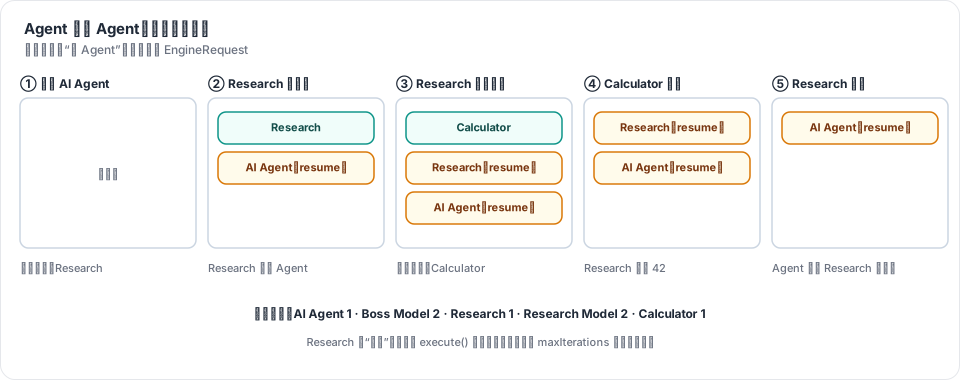
图 23-1:外层 AI Agent 请求 Research(一个 AI Agent Tool);Research 请求 Calculator;引擎先执行 Calculator,恢复 Research,再恢复外层 Agent。
3.2 结构化输出
OutputParserStructured(nodes/output-parser.ts)从 JSON 示例推出 Schema(所有字段必填),返回一个 { schema, parse } 对象。parse 检查必填字段,缺字段时抛出 “Model output doesn't fit required format: missing ...”。
Agent 这边(packages/nodes-ai/src/agent/execute.ts)和 n8n 一样,加一个工具、追加一段指令:
const formatTool: AiTool | undefined = outputParser && {
	name: FORMAT_TOOL_NAME,                         // 'format_final_json_response'
	description: 'Use this tool to give the final answer to the user in the required format',
	schema: outputParser.schema,
	metadata: { sourceNodeName: node.name },
};
...
if (formatTool) tools.push(formatTool);
const systemMessage = String(this.getNodeParameter('options.systemMessage', i, DEFAULT_SYSTEM_MESSAGE)) + (formatTool ? `\n\n${FORMATTING_INSTRUCTIONS}` : '');
...
// 模型通过格式工具回答:这就是最终的结构化回答
const formatCall = formatTool && answer.toolCalls.find((c) => c.name === FORMAT_TOOL_NAME);
if (formatCall) {
	const output = outputParser!.parse(formatCall.args);
	if (memory) await memory.saveContext(prompt, JSON.stringify(output));
	finishedItems[i] = { output };
	...
	continue;
}
finishedItems 放进 EngineRequest 的元数据。有多个输入条目时,已经完成的条目在下一轮不会再调用模型。
3.3 人工审批
我们的 Human Approval 节点(nodes/approval-tool.ts)是一个手写的工具“包装器”:它的 Tool 输入接被保护的工具,输出连到 Agent。supplyData 把被保护工具的定义转交给 Agent,但把 sourceNodeName 换成自己:
async supplyData(this: ISupplyDataFunctions) {
	const gated = (await this.getInputConnectionData('ai_tool', 0)) as AiTool;
	const tool: AiTool = {
		...gated,
		description: `${gated.description} (a human must approve each call)`,
		// 引擎为这次调用执行的是本节点;由本节点决定真正的工具是否运行
		metadata: { ...gated.metadata, sourceNodeName: this.getNode().name, gatedNode: gated.metadata.sourceNodeName },
	};
	return { response: tool };
},
execute 被调用三次,用节点的 getContext('node') 保存状态(第 7 章:它保存在 IRunExecutionData.executionData.contextData 里,随执行一起存库):
async execute(this: IExecuteFunctions, response?: EngineResponse) {
	const item = this.getInputData()[0];
	const state = this.getContext('node') as IDataObject & { token?: string; decision?: string };

	// 3b. 真正的工具执行完了:它的结果就是我们的结果
	if (response) { ... return [[{ json, pairedItem: { item: 0 } }]]; }

	// 1. 第一次运行:等人
	if (!state.decision) {
		state.token = randomBytes(8).toString('hex');
		const url = `${this.getResumeUrl()}?token=${state.token}`;
		await this.putExecutionToWait(new Date('3000-01-01T00:00:00Z'));
		return [[{ json: { waitingForApproval: true, message: ..., tool: gated.name, args, approveUrl: `${url}&decision=approve`, rejectUrl: `${url}&decision=reject` }, ... }]];
	}

	// 2. 带着决定恢复
	const decision = state.decision;
	delete state.decision;
	delete state.token;
	if (decision === 'reject') {
		return [[{ json: { response: `A human rejected the call to ${gated.name}. Do not retry it; tell the user.` }, ... }]];
	}
	// 3a. 批准:请引擎执行真正的工具,然后带着结果再调用我们
	return {
		actions: [{ actionType: 'ExecutionNodeAction', nodeName: String(gated.metadata.sourceNodeName), input: args, type: 'ai_tool', ... }],
		metadata: {},
	};
},
恢复执行的入口是新的路由 /webhook-waiting/:executionId(cli/src/webhooks/waiting-webhooks.ts:25,executeWebhook):
const execution = this.deps.db.executions.getWithData(executionId);
if (!execution) return { statusCode: 404, ... };
if (execution.status !== 'waiting') return { statusCode: 409, ... };   // 链接只能用一次

const data = execution.data;
const head = data.executionData.nodeExecutionStack[0];
const state = data.executionData.contextData?.[`node:${head?.node.name}`] as IDataObject | undefined;
if (!state?.token || !sameToken(state.token, query.token)) return { statusCode: 403, ... };

state.decision = String(query.decision ?? '');                // 把决定交给等待中的节点
data.waitReason = 'resume-node';
const { finished } = this.runner.start({ executionMode: execution.mode, workflowData: ..., executionData: data }, executionId);
最后一个问题:第 8 章的 Wait 节点恢复时,引擎会 禁用 栈顶节点,让它直接把上次的输出传下去(core/src/workflow-execute.ts:416,handleWaitingState)。Human Approval 恰恰需要 再运行一次。于是给 IRunExecutionData 加一个字段 waitReason:
private handleWaitingState() {
	if (!this.runExecutionData.waitTill) return;
	this.runExecutionData.waitTill = undefined;
	// 等待中的节点要再运行一次,自己处理恢复(Human Approval)
	if (this.runExecutionData.waitReason === 'resume-node') {
		this.runExecutionData.waitReason = undefined;
		return;
	}
	... // 原来的逻辑:禁用栈顶节点
}
n8n 也有 waitReason,但只有一个值 'suspended'(packages/core/src/execution-engine/workflow-execute.ts:1536),用于引擎在节点边界被挂起、栈顶节点还没执行的情况。它的 HITL 节点走的是另一条路:节点被禁用,审批结果来自 webhook() 的返回值。
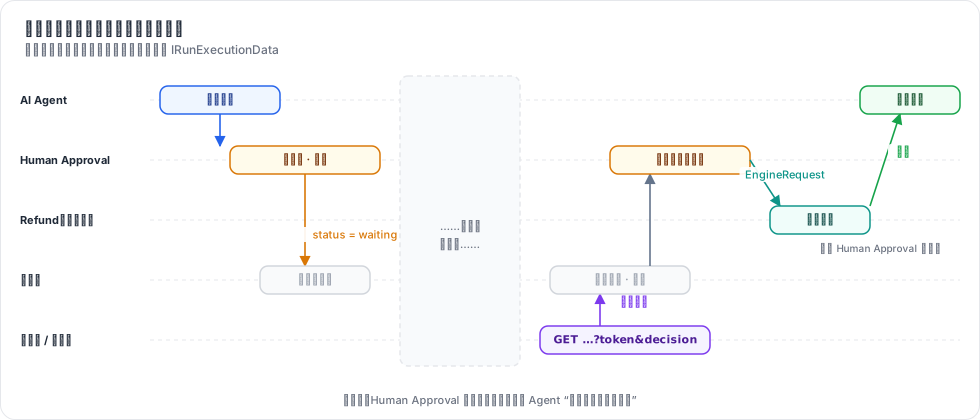
图 23-2:一次审批跨两段执行。两段之间可以隔几天,所有状态(执行栈、Human Approval 的令牌、Agent 的 EngineRequest 元数据)都在数据库里的 IRunExecutionData 中。
3.4 和 n8n 的差异
| n8n | mini-n8n | 说明 | |
|---|---|---|---|
| HITL 节点 | 由 Send and Wait 节点合成(Slack、Gmail……) | 一个手写的 Human Approval 节点,审批链接显示在 NDV 和聊天面板里 | 不需要接 Slack |
| 批准后谁请求被保护的工具 | Agent(processHitlResponses) | Human Approval 自己返回 EngineRequest | 我们复用了嵌套请求,Agent 不用知道 HITL |
| 恢复方式 | 禁用 HITL 节点,结果来自 webhook() | waitReason: 'resume-node',HITL 节点再运行一次 | 少一个“节点 webhook 方法”的概念 |
| 令牌 | 执行级 resumeToken 或 HMAC 签名 | 节点 context 里的一次性令牌 | 都用常数时间比较 |
| 子 Agent 里的 HITL | 工具回调路径下报错 | 能用(嵌套请求) | 没有测试覆盖,见练习 2 |
| 结构化输出 | Zod Schema、可选 Auto-fix(再调一次模型修正) | 只检查必填字段 | 够演示原理 |
4. 运行与验证
4.1 单元测试
npx vitest run packages/nodes-ai/test/advanced.test.ts --reporter=verbose真实输出(本章部分):
 ✓ packages/nodes-ai/test/advanced.test.ts > multi-agent > an Agent hands a task to another Agent (nested engine requests) 2ms
 ✓ packages/nodes-ai/test/advanced.test.ts > structured output > returns an object in the format of the output parser 1ms
 ✓ packages/nodes-ai/test/advanced.test.ts > human in the loop > waits for a human, then runs the tool when approved 2ms
 ✓ packages/nodes-ai/test/advanced.test.ts > human in the loop > tells the Agent when the human rejects 1ms
多 Agent 测试断言了最终输出 Based on the tools: Research returned Based on the tools: Calculator returned 42..(两层 Mock 模型的回答套在一起),以及每个节点的运行次数 { 'AI Agent': 1, 'Boss Model': 2, Research: 1, 'Research Model': 2, Calculator: 1 }。结构化输出测试断言第二次模型调用看到的工具是 ['Calculator', 'format_final_json_response'],系统消息里有格式指令,最终输出是 { answer: 'Based on the tools: Calculator returned 42.', result: 42 }。
packages/cli/test/ai.test.ts 里还有一个服务器级测试:执行进入 waiting 并存库;错误令牌(长度不同、长度相同但内容不同)返回 403;正确链接返回 “✅ Approved”,执行变为 success;同一个链接再打开一次返回 409。
4.2 在编辑器里
e2e/advanced.e2e.mjs 在聊天面板里发 “Please refund order 42”。Mock 模型从工具描述 “Refund an order” 里找到了 “refund”,调用 Refund——实际执行的是 Human Approval。执行停下,聊天面板显示 “Waiting for a human”。双击 Human Approval:
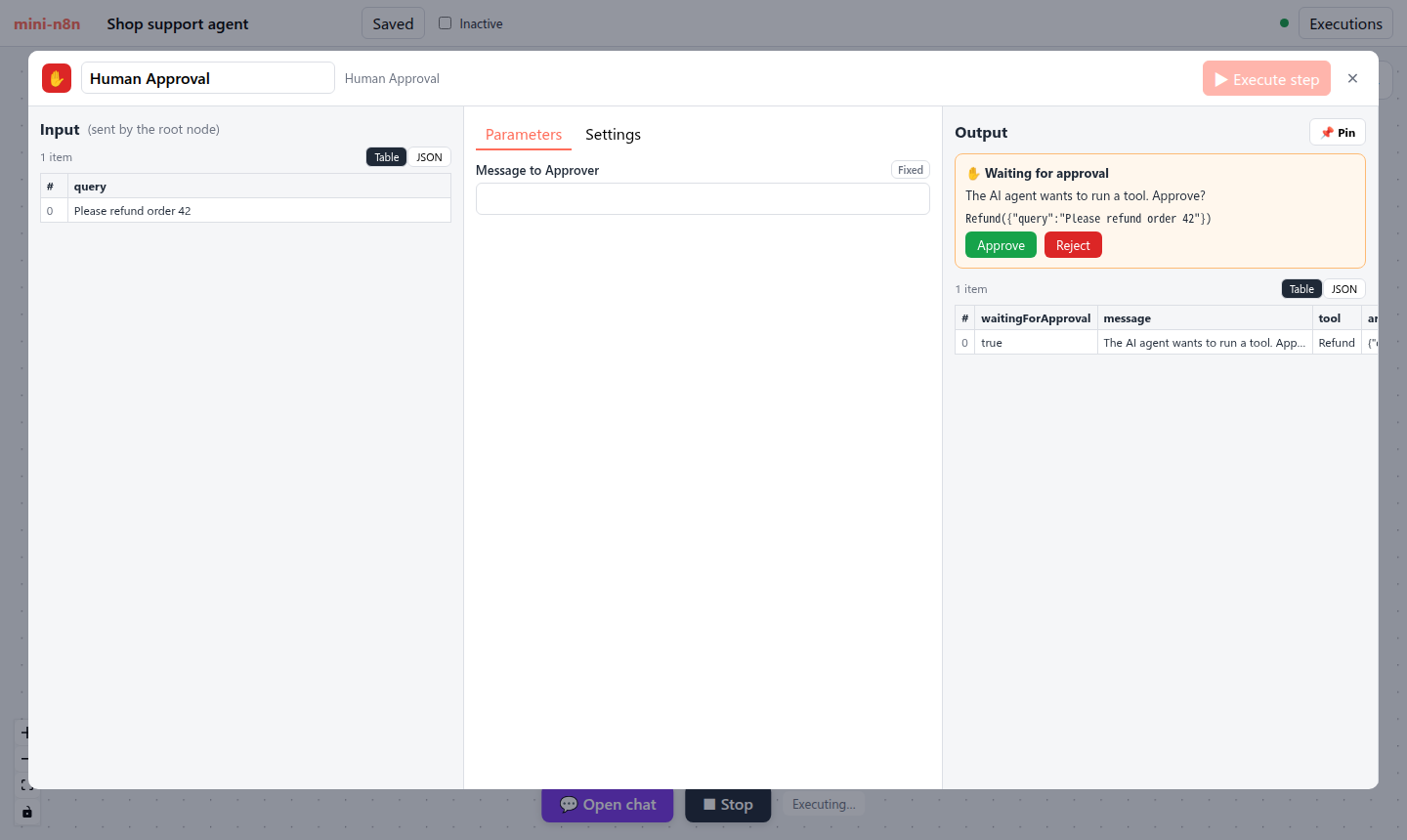
图 23-3:Human Approval 的 NDV。输入是模型给的参数,输出区显示要调用的工具、参数和两个按钮。底部仍是 “Executing…”:执行在等待。
e2e 读出 Approve 按钮的链接,在新标签页打开,然后在执行列表里打开这次执行:
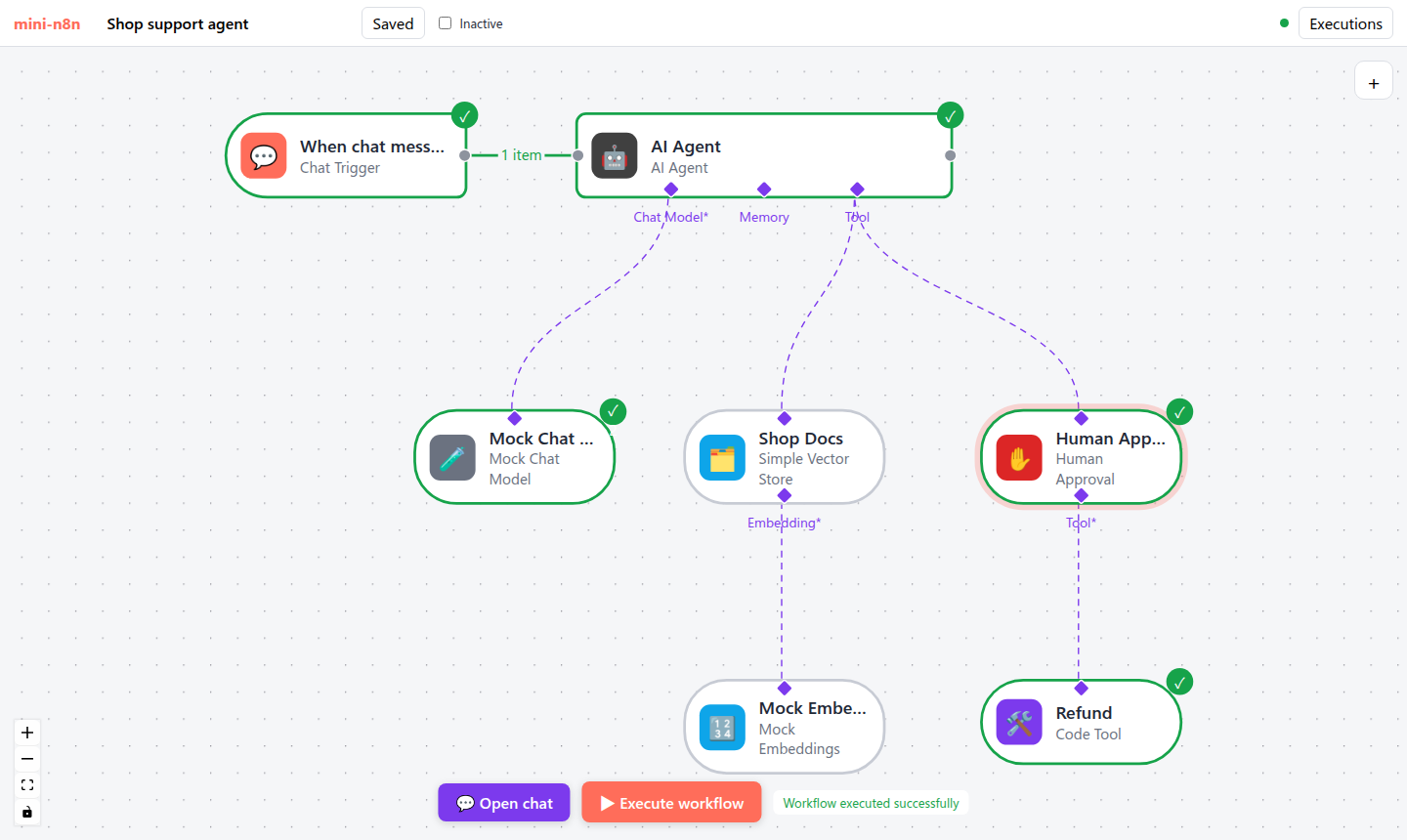
图 23-4:批准后恢复的执行。触发器、Agent、模型、Human Approval、Refund 都执行了;这次没有检索文档,所以 Shop Docs 和 Mock Embeddings 是灰色的。
e2e 后五项的真实输出:
✓ HITL: the chat shows that the execution waits for approval
✓ opening the approve link resumes the execution
✓ after approval the agent finished: "Based on the tools: Refund returned refunded: Please refund order 42."
✓ the resumed execution shows trigger, Agent, model, approval and the refund tool as executed
✓ no errors in the browser console
4.3 真实模型的结构化输出
OLLAMA_MODEL=qwen2.5:7b npx tsx examples/structured-ollama.ts工作流:Agent + Ollama + Calculator + Structured Output Parser,示例是 { "answer": "a short sentence", "total": 0, "currency": "USD" },问题是 “A shirt costs 25 dollars. How much do 17 shirts cost?”。三个模型的真实输出:
== qwen2.5:0.5b
model call 1: format_final_json_response({"expression":"(25 * 17) * 100","total_currency":"USD","answer total currency":"USD","total":42500})
status: error (Model output doesn't fit required format: missing answer, currency)
output: undefined
== qwen2.5:3b
model call 1: Calculator({"expression":"25 * 17"}), format_final_json_response({"answer":"425","total":425,"currency":""})
status: success
output: {"answer":"425","total":425,"currency":""}
== qwen2.5:7b
model call 1: Calculator({"expression":"25 * 17"})
model call 2: format_final_json_response({"answer":"425","currency":"dollars","total":425})
status: success
output: {"answer":"425","currency":"dollars","total":425}
三个值得注意的地方:
- 解析器拦住了胡编的输出。0.5b 编造了字段名(
"answer total currency"),数字也错了(42500)。执行以错误结束,而不是把错误数据交给下游。在 n8n 里,这时可以打开 Auto-fix,让另一个模型修正格式。 - 3b 在同一次回复里同时调用了计算器和格式工具。它没有等计算器的结果就给出了最终答案(碰巧算对了)。我们的 Agent 和 n8n 一样:只要看到格式工具的调用,就把它当作最终答案,同时请求的其他工具不再执行。
- 示例里的值不会传给模型。7b 把
currency填成了"dollars",3b 填了空字符串,都不是示例里的"USD"——从示例推出的 Schema 只有{ "type": "string" }。n8n 也一样(见 2.2 节)。要固定取值,需要在 JSON Schema 里写enum。
4.4 踩坑记录
结构化输出的
result是 7,不是 42。第一版 Mock 模型填格式工具的数字字段时,从用户问题里取数字。测试 “What is 6 * 7?” 的真实失败:textAssertionError: expected { …(2) } to deeply equal { …(2) } - "result": 42, + "result": 7,Mock 应该像真实模型那样“用工具算出来的数”。修复:先从工具结果里取数字,再从问题里取(
models/mock.ts第 84–85 行)。审批页显示 “Rejected”,但链接是 approve。服务器级测试的真实失败:
expected '<!doctype html>…' to contain '✅ Approved'。原因:等待 Webhook 在执行 结束后 读state.decision来决定页面文字,而 Human Approval 运行时已经把state.decision删掉了(防止下次误用),于是读到undefined,走了 “Rejected” 分支。修复:在启动执行 之前 就把决定保存到局部变量decision。(对照 n8n 发现)令牌比较不是常数时间。写 2.3 节时读到 n8n 用
timingSafeEqual比较恢复令牌,而我们用的是!==。字符串比较遇到第一个不同字符就返回,理论上可以通过响应时间逐位猜出令牌。改为sameToken()(长度不同直接拒绝,否则timingSafeEqual),并补了“长度相同但内容不同”的测试(commit8a3afc9)。同一次对照还发现interfaces.ts里“n8n has a similar waitReason”的注释说得不准确,一并修正。
5. 练习
- 巩固:在 e2e 的客服工作流里点 Reject 链接。Agent 的最终回答是什么?Refund 节点有没有运行?再打开一次同一个链接,返回什么状态码?
- 扩展:把 Human Approval 放到 Research 子 Agent 下面(保护子 Agent 的工具),写一个测试:执行进入
waiting,批准后外层 Agent 拿到正确结果。执行栈在等待时有几层? - 读源码:阅读 n8n 的
processHitlResponses.ts的getDenialMessage()和getChatInput()。当审批人不是点 “Decline”,而是输入了一段反馈时,Agent 收到的消息有什么不同?在我们的实现里加上这个功能需要改哪些地方?
6. 延伸阅读
packages/@n8n/nodes-langchain/nodes/agents/Agent/agents/ToolsAgent/V3/:V3 Agent 的执行、批处理、HITL 和子 Agent 处理。packages/cli/src/tool-generation/:xxxTool和xxxHitlTool两种合成节点类型。packages/nodes-base/utils/sendAndWait/:发送并等待(审批按钮、表单、自由文本)的公共实现。packages/@n8n/nodes-langchain/nodes/output_parser/:结构化、列表、Auto-fixing 三种输出解析器。