第 6 章 表达式引擎:{{ $json }}、数据代理与沙箱
本章目标:读完你能解释一个表达式从字符串到值的全过程,实现
$json、$('Node').item等变量,并知道为什么表达式必须放进沙箱、n8n 用了几层防护。前置:第 4、5 章。对应代码:mini-n8n v0.1 的packages/workflow/src/expression*.ts、workflow-data-proxy.ts
1. 问题与概念
表达式是 n8n 的“胶水”。几乎每个参数都可以写成表达式,用上游节点的数据动态计算:
=Hello {{ $json.name }}, your order #{{ $('Webhook').item.json.body.orderId }} has shipped.一个表达式引擎要解决三件事:
- 解析:
=开头表示这是表达式;{{ }}之间是 JavaScript,之外是普通文本。 - 上下文:
$json、$input、$('Node')这些变量从哪里来?“当前 item”是哪一个? - 安全:表达式是用户写的 JavaScript,运行在服务器上。必须防止它读环境变量、读文件、执行命令。
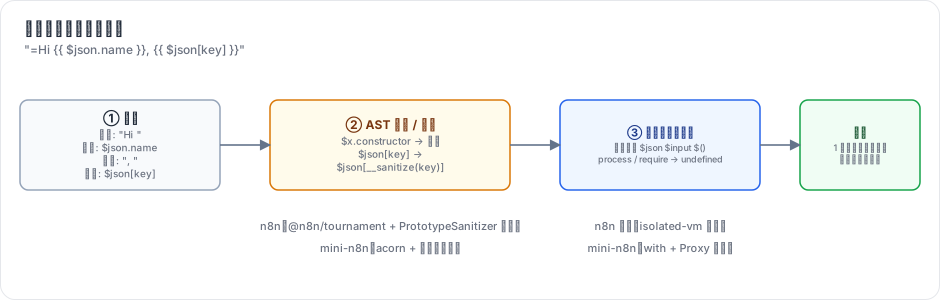
图 6-1:字符串先被拆成文本和代码块;代码块经过 AST 检查和改写;最后在一个只能看到数据代理变量的作用域里执行。只有一个代码块时保留原始类型,否则拼成字符串。
2. n8n 是怎么做的
2.1 入口:resolveSimpleParameterValue
第 5 章看到,getNodeParameter() 取到原始值后调用 workflow.expression.getParameterValue(...)。它递归遍历参数树,对每个字符串调用 resolveSimpleParameterValue:
// packages/workflow/src/expression.ts:621-641(节选)
resolveSimpleParameterValue(parameterValue, data, returnObjectAsString = false) {
	// Check if it is an expression
	if (!isExpression(parameterValue)) {
		// Is no expression so return value
		return parameterValue;
	}
	// Remove the equal sign
	parameterValue = parameterValue.substr(1);

	// An expression that fits the native subset grammar is interpreted
	// in-process, skipping the global-context setup, extendSyntax, and the
	// engine (isolate). Everything else takes the regular pipeline below.
	if (Expression.nativeEvaluation) {
		const native = evaluateNatively(parameterValue, data);
		if (native.handled) return this.finalizeResolvedValue(native.value, returnObjectAsString);
	}
后面依次是:准备全局上下文(第 660 行 initializeGlobalContext)、挂上 __sanitize 函数(第 690 行)、一个针对 .constructor 的正则检查(第 698 行)、extendSyntax(把 'abc'.toTitleCase() 这类扩展方法改写成 extend('abc', 'toTitleCase', [])),最后 renderExpression。
{{ }} 模板的拆分由 n8n 自己维护的 @n8n/tournament 包完成:它把模板解析成 AST(基于 recast/esprima),在 AST 上执行一组“钩子”做安全检查和改写,再生成代码。
2.2 数据代理:$json 从哪里来
所有 $ 变量由 WorkflowDataProxy(packages/workflow/src/workflow-data-proxy.ts,1700 多行)生成。它接收的上下文就是 getParameterValue 的那一长串参数:runExecutionData、runIndex、itemIndex、当前节点名、connectionInputData(当前节点 0 号输入的 item 数组)、executeData(含 source)……
常用变量:
| 变量 | 含义 |
|---|---|
$json | 当前 item 的 json(= connectionInputData[itemIndex].json) |
$input.item / .all() / .first() / .last() | 当前节点的输入 |
$('Name').item | 与当前 item 配对的 那个节点的 item(沿 pairedItem 回溯) |
$('Name').all() / .first() | 那个节点的全部输出 |
$node["Name"].json | 旧语法,取同下标的 item |
$now / $today | Luxon DateTime |
$workflow / $execution | 工作流 id/name/active,执行 id/mode/resumeUrl |
$vars / $env | 变量 / 环境变量(默认禁止访问) |
$fromAI() | 工具参数由模型填写(第 20 章) |
2.3 Paired item:$('Name').item 是怎么找到的
这是表达式里最“聪明”的部分。考虑:
在 Greet 节点,当前 item 只有 { id: 2 }。要拿到它对应的用户名,必须回溯:Greet 的输入 item 0 ← If 的 true 输出 item 0,其 pairedItem.item = 1 ← Set 的输出 item 1,其 pairedItem.item = 1 ← Webhook 的输出 item 1。
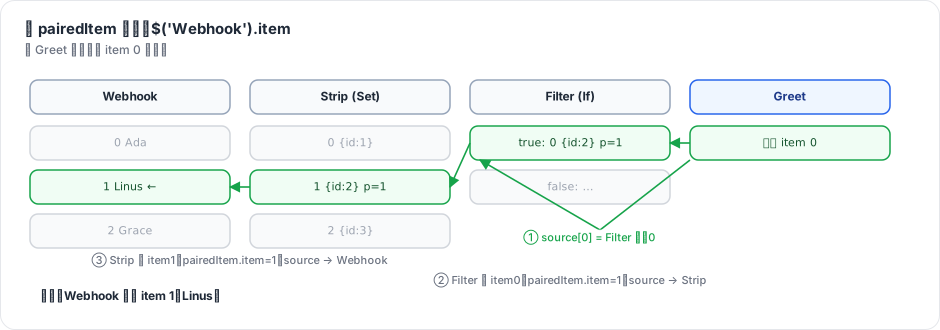
图 6-2:每一步用两条信息:item 上的 pairedItem(我来自输入的第几个 item、哪个输入)和该节点运行记录的 source(那个输入来自哪个节点的哪个输出、哪次运行)。
n8n 的实现是 getPairedItem / resolvePairedItem:
// packages/workflow/src/workflow-data-proxy.ts:1033-1048
const getPairedItem = (
	destinationNodeName: string,
	incomingSourceData: ISourceData | null,
	initialPairedItem: IPairedItemData,
	usedMethodName: PairedItemMethod = PAIRED_ITEM_METHOD.$GET_PAIRED_ITEM,
): INodeExecutionData =>
	resolvePairedItem(
		destinationNodeName,
		incomingSourceData,
		initialPairedItem,
		usedMethodName,
		undefined,
		// Ancestry is a DAG: branches recombine on shared ancestors (e.g. an
		// Aggregate output pairing to all its inputs), so without memoization
		// the walk revisits the same item exponentially often.
		new PairedItemMemo(),
	);
注释点出了一个工程细节:一个 item 可以有多个 pairedItem(Aggregate 把 N 个 item 合成 1 个,就配对到全部 N 个输入),回溯就变成了 DAG 搜索,需要记忆化,否则会指数爆炸。如果多条路径找到了 不同的 item,n8n 会报错,提示用户改用 .first() 或 .all()。
这也解释了为什么节点作者必须认真设置 pairedItem。引擎会尽量自动补上(输入只有 1 个 item,或输出与输入一样多时,见 workflow-execute.ts:3146 的 assignPairedItems),其余情况由节点负责。
2.4 沙箱:三层防护
表达式是不可信代码。n8n 的防护分三层:
第一层:AST 检查与改写(packages/workflow/src/expression-sandboxing.ts)。PrototypeSanitizer 遍历 AST,静态属性名在黑名单里直接报错,动态属性名包一层运行时检查:
// packages/workflow/src/expression-sandboxing.ts:497-530(节选)
visitMemberExpression(path) {
	this.traverse(path);
	const node = path.node;
	if (!node.computed) {
		...
		if (!isSafeObjectProperty(node.property.name)) {
			throw new ExpressionError(`Cannot access "${node.property.name}" due to security concerns`);
		}
	} else if (node.property.type === 'StringLiteral' || node.property.type === 'Literal') {
		// Check any static strings against our forbidden list
		if (!isSafeObjectProperty(node.property.value as string)) { throw ... }
	} else {
		path.replace(
			b.memberExpression(
				node.object,
				b.callExpression(b.memberExpression(dataNode, sanitizerIdentifier), [node.property]),
				true,
黑名单在 packages/workflow/src/utils.ts:356 的 unsafeObjectProperties:__proto__、prototype、constructor、getPrototypeOf、defineProperty、caller、mainModule、binding……都是从数据对象“爬回”宿主环境的常见路径(x.constructor.constructor('return process')() 就能拿到 Function 构造器)。同一文件里还有 ThisSanitizer(替换 this)、禁止 with 语句、禁止某些解构等钩子。
第二层:遮蔽全局变量(legacy 引擎)。执行前把一大串危险全局名在数据对象上覆盖成空对象:
// packages/workflow/src/expression.ts:414-445(节选)
static initializeGlobalContext(data: IDataObject) {
	/**
	 * Denylist
	 */
	data.document = {};
	data.global = {};
	data.window = {};
	data.globalThis = {};
	...
	// Prevent Remote Code Execution
	data.eval = {};
	data.setTimeout = {};
	data.Function = {};
	// Prevent Node.js module access
	data.require = {};
	data.module = {};
data.Buffer = {};第三层:隔离执行。从这个版本开始,后端默认的表达式引擎是 vm:表达式运行在 isolated-vm 创建的 独立 V8 isolate 里,有内存上限和超时:
// packages/@n8n/config/src/configs/expression-engine.config.ts:16-23(节选)
/**
 * Which expression engine to use.
 * - `vm` (default) runs expressions in a V8 isolate (isolated-vm).
 * - `legacy` runs expressions without isolation. Less secure and soon to be deprecated.
 * - `quickjs` runs expressions in a QuickJS WASM sandbox. Experimental.
 */
@Env('N8N_EXPRESSION_ENGINE', expressionEngineSchema)
engine: 'legacy' | 'vm' | 'quickjs' = 'vm';
默认内存上限 128 MB(bridgeMemoryLimit)、超时 5000 ms(bridgeTimeout)。实现在 packages/@n8n/expression-runtime:数据不是一次性拷进 isolate,而是通过“懒代理 + 桥接”按需读取,避免每次求值都序列化整个执行数据。浏览器里不能用原生模块,所以前端可以选用 QuickJS(WASM)引擎,默认仍是 legacy。
前两层是“黑名单”思路:堵住已知的路。第三层是“隔离”思路:就算有没堵住的路,也只能走到一个空的 isolate 里。n8n 从前两层演进到第三层,本身就是一个很好的安全工程案例。
3. 从零实现
3.1 拆分模板
// code/mini-n8n/packages/workflow/src/expression-parser.ts(节选)
export function splitExpression(template: string): ExpressionChunk[] {
	...
	if (template.startsWith('{{', i)) {
		const end = findCodeEnd(template, i + 2);   // 跟踪引号和花括号深度
		...
		chunks.push({ type: 'code', text: template.slice(i + 2, end).trim() });
findCodeEnd 记录引号状态和 { 深度,所以 {{ {a: "}}"}.a }} 能正确切出 {a: "}}"}.a。
3.2 求值:单个代码块保留类型
// code/mini-n8n/packages/workflow/src/expression.ts(节选)
resolveSimpleParameterValue(value: string, ctx: IExpressionContext): unknown {
	if (!isExpression(value)) return value;
	const chunks = splitExpression(value.slice(1));
	const data = new WorkflowDataProxy(this.workflow, ctx).getDataProxy();
	...
	if (chunks.length === 1 && chunks[0].type === 'code') return run(chunks[0].text);
	return chunks.map((c) => (c.type === 'text' ? c.text : stringify(run(c.text)))).join('');
}
={{ $json.tags }} 返回数组本身;=Tags: {{ $json.tags }} 返回字符串。
3.3 沙箱:AST 检查 + 白名单作用域
mini-n8n 用 acorn 解析,实现第一层(和 n8n 的 PrototypeSanitizer 同样的三种情况),黑名单与 n8n 的 unsafeObjectProperties 保持一致:
// code/mini-n8n/packages/workflow/src/expression-sandbox.ts(节选)
simple(ast as unknown as AcornNode, {
	MemberExpression(n) {
		const node = asAny(n);
		const property = node.property as AnyNode;
		if (!node.computed) {
			checkName(property.name);                         // $json.constructor → 报错
		} else if (property.type === 'Literal') {
			checkName((property as { value?: unknown }).value); // $json["constructor"] → 报错
		} else {
			edits.push({ start: property.start, end: property.end }); // $json[key] → $json[__sanitize(key)]
		}
	},
	...
第二层没有用“黑名单遮蔽”,而是反过来用 白名单:
// code/mini-n8n/packages/workflow/src/expression-sandbox.ts(节选)
fn = new Function('__data', SANITIZER_NAME, `with (__data) { return (${prepared}); }`);
...
const scope = new Proxy(data, {
	has: (_target, key) => typeof key === 'string' && key !== SANITIZER_NAME && !ALLOWED_GLOBALS.has(key),
	get: (target, key) => (key === Symbol.unscopables ? undefined : Reflect.get(target, key)),
});
// `this` is an empty object, not globalThis
return fn!.call(Object.create(null), scope, sanitize);
with 语句会先问作用域对象“你有没有这个名字”(has)。Proxy 对 所有 名字都回答“有”(白名单里的 Math、JSON、Date 等除外),于是 process、require、globalThis、fetch 统统解析到数据对象上,得到 undefined。黑名单可能漏掉新出现的全局变量,白名单不会。
诚实地说:这仍然是同进程执行,不是安全边界。Function.prototype 上的方法、白名单里的 Object 都留下了攻击面。mini-n8n 没有实现第三层(isolate),第 26 章在 Code 节点上实现进程级隔离,并讨论如何把同样的思路用在表达式上。
3.4 数据代理与 paired item 回溯
// code/mini-n8n/packages/workflow/src/workflow-data-proxy.ts(节选)
pairedItem(targetNode: string): INodeExecutionData {
	const source = this.ctx.executeData?.source?.main?.[0];
	...
	let node = source.previousNode;
	let output = source.previousNodeOutput ?? 0;
	let run = source.previousNodeRun ?? 0;
	let item = this.ctx.itemIndex;

	for (let guard = 0; guard < 1000; guard++) {
		const taskData = this.runData[node]?.[run];
		const items = taskData?.data?.main?.[output] ?? this.workflow.pinData?.[node];
		const current = items?.[item];
		...
		if (node === targetNode) return current;

		const paired = normalizePairedItem(current.pairedItem)[0];
		const previous = paired ? taskData?.source?.[paired.input ?? 0] : undefined;
		...
		node = previous.previousNode;
		output = previous.previousNodeOutput ?? 0;
		run = previous.previousNodeRun ?? 0;
		item = paired.item;
	}
每走一步就是图 6-2 中的一个箭头。和 n8n 相比,mini-n8n 只沿第一个 pairedItem 走(不做多路径搜索和歧义检测)。
| 方面 | n8n | mini-n8n |
|---|---|---|
| 模板解析 | @n8n/tournament(recast AST) | 手写拆分 + acorn |
| 求值引擎 | native 子集 / legacy / vm(isolated-vm,默认) / quickjs | 同进程 new Function + with |
| 全局变量 | 黑名单遮蔽 | Proxy 白名单 |
| 扩展方法 | .toTitleCase()、.isEmpty() 等(extendSyntax) | 不支持,提供 $if、$ifEmpty |
| paired item | 多路径 + 记忆化 + 歧义报错 | 单路径回溯 |
$env | 默认阻止(N8N_BLOCK_ENV_ACCESS_IN_NODE) | 总是阻止 |
4. 运行与验证
examples/expressions.ts 先执行一个三节点工作流(Users → Only ids),再假装自己是下一个节点,对 item 1 求值一组表达式:
cd code/mini-n8n && npx tsx examples/expressions.ts真实输出:
={{ $json.userId }}                                  → 2
=User #{{ $json.userId }} is {{ $("Users").item.json.name }} → "User #2 is Linus"
={{ $("Users").item.json.tags }}                     → []
={{ $("Users").all().map(i => i.json.name).join(", ") }} → "Ada, Linus"
={{ $input.all().length }}                           → 2
={{ $ifEmpty($("Users").item.json.tags, "no tags") }} → "no tags"
={{ $now.minus({ days: 1 }) < $now }}                → true
={{ typeof process }}                                → "undefined"
={{ $json.constructor }}                             ✗ Cannot access "constructor" due to security concerns
={{ $json["const" + "ructor"] }}                     ✗ Cannot access "constructor" due to security concerns
={{ $env.HOME }}                                     ✗ access to env vars denied
={{ $("Nope").item }}                                ✗ Referenced node doesn't exist: 'Nope'

rewritten: $json[__sanitize(key)].name
注意第 10 行:"const" + "ructor" 在静态检查时看不出来,是被改写后的 __sanitize(...) 在 运行时 拦下的。
单元测试也覆盖了这些行为:
npx vitest run packages/workflow ✓ packages/workflow/test/expression.test.ts (7 tests)5. 练习
- 巩固:在 mini-n8n 里写一个工作流:Code(输出 3 个订单)→ Set(只保留
id)→ Set(用$('Code').item.json.amount把金额加回来)。运行并检查结果。 - 扩展:给 mini-n8n 实现 n8n 风格的扩展方法
.isEmpty()和.toTitleCase()。提示:在 AST 上把x.isEmpty()改写成__extend(x, 'isEmpty', []),注意不要误伤真正有这个方法的对象。 - 读源码:阅读
packages/@n8n/expression-runtime/README.md和src/bridge/,说明 isolate 里的表达式如何读取宿主进程中的$json数据(提示:lazy proxy)。
6. 延伸阅读
packages/workflow/src/expression-sandboxing.ts:全部 AST 安全钩子。packages/workflow/src/workflow-data-proxy.ts:所有$变量的实现。packages/@n8n/expression-runtime/:基于 isolated-vm 的隔离运行时。- n8n 文档:Expressions → Data mapping → Item linking(paired item 的用户视角说明)。