第 4 章 数据模型:节点、连接与 items ★
本章目标:读完你能手写一个 n8n 工作流 JSON,解释“连接按源节点索引”和“item 数组”这两个关键设计,并读懂一次执行的
runData。前置:第 3 章。对应代码:mini-n8n v0.1 的packages/workflow/src/interfaces.ts、graph.ts、workflow.ts
1. 问题与概念
工作流平台的数据模型要回答两个问题:
- 图怎么存? 节点和边用什么结构保存,才能方便地“从一个节点找到下一个节点”?
- 数据怎么流? 节点之间传的是什么?一个值?一个对象?一个列表?
n8n 的答案:
- 图存成
nodes(数组)+connections(以源节点名为键 的嵌套对象)。 - 节点之间传的永远是 item 数组:
[{ json: {...} }, { json: {...} }, ...]。一个节点可以有多个输出,所以节点的完整输出是一个二维数组INodeExecutionData[][](输出 × item)。
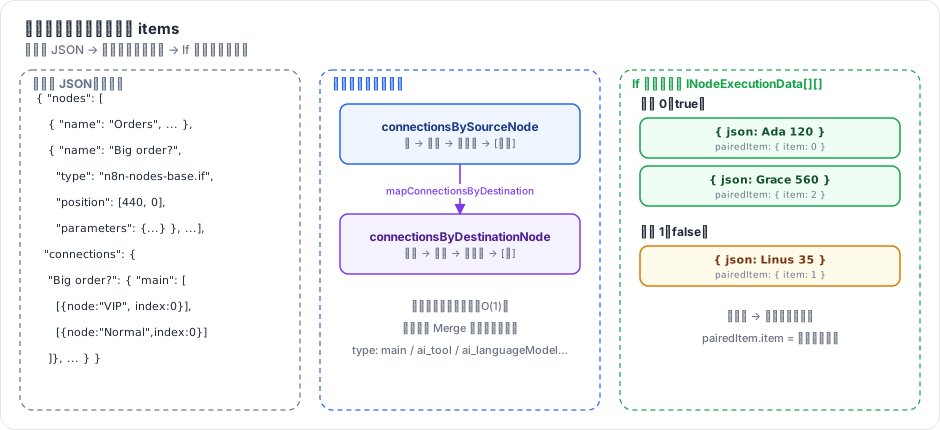
图 4-1:左边是保存的 JSON;中间是 connections 的两种索引方向;右边是 If 节点的一次运行结果:两个输出,各自是一个 item 数组,每个 item 用 pairedItem 记住自己来自哪个输入 item。
2. n8n 是怎么做的
2.1 节点:INode
// packages/workflow/src/interfaces.ts:1739-1757(节选)
export interface INode {
	id: string;
	name: string;
	typeVersion: number;
	type: string;
	position: [number, number];
	disabled?: boolean;
	notes?: string;
	retryOnFail?: boolean;
	maxTries?: number;
	waitBetweenTries?: number;
	alwaysOutputData?: boolean;
	executeOnce?: boolean;
	onError?: OnError;
	continueOnFail?: boolean;
	parameters: INodeParameters;
	credentials?: INodeCredentials;
几个要点:
name是主键。连接、表达式$('Name')、运行数据都用名字引用节点,所以同一工作流里节点名必须唯一。重命名节点时,n8n 要同步改连接和所有引用它的表达式(Workflow.renameNode)。id是 UUID,主要用于前端和 Webhook 路径。type+typeVersion决定用哪个实现。节点类型可以有多个版本(If 有 v1、v2……),老工作流里的节点保持老版本行为,不会因为升级 n8n 而改变。position不只是画布坐标,还会影响执行顺序(第 7 章)。retryOnFail、onError、alwaysOutputData、executeOnce这些是 节点设置,对所有节点类型通用,由引擎而不是节点自己实现(第 8 章)。parameters是一棵任意 JSON 树,其中以=开头的字符串是表达式(第 6 章)。
2.2 连接:以源节点为键
// packages/workflow/src/interfaces.ts:115-124
export interface IConnection {
	// The node the connection is to
	node: string;

	// The type of the input on destination node (for example "main")
	type: NodeConnectionType;

	// The output/input-index of destination node (if node has multiple inputs/outputs of the same type)
	index: number;
}
整张图的结构是:
connections[源节点名][连接类型][源节点的输出序号] = IConnection[](目标列表)例如 If 节点的两个输出分别连向 VIP 和 Normal:
"Big order?": {
  "main": [
    [{ "node": "VIP",    "type": "main", "index": 0 }],
    [{ "node": "Normal", "type": "main", "index": 0 }]
  ]
}
为什么按 源节点 索引?因为执行是向前走的:一个节点跑完,引擎要立即知道“我的第 k 个输出要送给谁”。按源节点索引时,这是一次 O(1) 查找。
但很多场景需要反向查找:“Merge 有几个输入?分别来自谁?”、“$('Webhook') 是不是当前节点的祖先?”。所以 Workflow 构造时会生成一份反向索引:
// packages/workflow/src/workflow.ts:146
this.connectionsByDestinationNode = mapConnectionsByDestination(this.connectionsBySourceNode);
仓库的 AGENTS.md 专门提醒了这一点:“workflow.connections is indexed by source node. To find parent nodes, use mapConnectionsByDestination() to invert it first.” 图遍历函数统一放在 packages/workflow/src/common/ 下(getParentNodes、getChildNodes 等)。
连接类型 不只有 main:
// packages/workflow/src/interfaces.ts:2974-2988
export const NodeConnectionTypes = {
	AiAgent: 'ai_agent',
	AiChain: 'ai_chain',
	AiDocument: 'ai_document',
	AiEmbedding: 'ai_embedding',
	AiLanguageModel: 'ai_languageModel',
	AiMemory: 'ai_memory',
	AiOutputParser: 'ai_outputParser',
	AiRetriever: 'ai_retriever',
	AiReranker: 'ai_reranker',
	AiTextSplitter: 'ai_textSplitter',
	AiTool: 'ai_tool',
	AiVectorStore: 'ai_vectorStore',
	Main: 'main',
} as const;
main 承载数据流;ai_* 承载“能力”:一个 Chat Model 节点通过 ai_languageModel 连到 Agent,不是把数据传给 Agent,而是把 一个模型对象 提供给 Agent(第 16 章)。同一套 connections 结构同时表达了这两种关系。
2.3 Item:INodeExecutionData
// packages/workflow/src/interfaces.ts:1853-1872(节选)
export interface INodeExecutionData {
	json: IDataObject;
	binary?: IBinaryKeyData;
	error?: NodeApiError | NodeOperationError;
	pairedItem?: IPairedItemData | IPairedItemData[] | number;
	...
}json:这一条数据本身,必须是对象(不能是数组或字符串)。binary:文件附件(图片、PDF),按属性名索引,实际内容存在二进制数据服务里。pairedItem:血缘。“我是由输入的第几个 item 产生的”:
// packages/workflow/src/interfaces.ts:1790-1794
export interface IPairedItemData {
	item: number;
	input?: number; // If undefined "0" gets used
	sourceOverwrite?: ISourceData;
}
为什么所有数据都是数组?这是 n8n 最核心的设计决策之一:
- 隐式循环。HTTP Request 节点收到 3 个 item,就发 3 次请求;表达式
{{ $json.email }}对每个 item 分别求值。用户不用写循环。 - 统一接口。每个节点的签名都是“item 数组进,item 数组出”,任何两个节点都能连。
- 分支即分组。If 节点不需要“跳转”,它只是把输入数组分成两组,分别放到两个输出上。某个输出为空数组时,下游节点就不执行。
2.4 运行数据:IRunData 与 ITaskData
一个节点在一次执行里可能运行多次(循环、多次触发),所以运行数据是“节点名 → 运行记录数组”:
// packages/workflow/src/interfaces.ts:3453-3456
export interface IRunData {
	// node-name: result-data
	[key: string]: ITaskData[];
}// packages/workflow/src/interfaces.ts:3605-3610(节选)
export interface ITaskData extends ITaskStartedData {
executionTime: number;
executionStatus?: ExecutionStatus;
data?: ITaskDataConnections;
inputOverride?: ITaskDataConnections;
error?: ExecutionError;ITaskStartedData 里有 startTime、executionIndex(全局执行序号)和 source:这次运行的每个输入来自哪个节点的哪个输出的哪次运行。
// packages/workflow/src/interfaces.ts:3629-3633
export interface ISourceData {
	previousNode: string;
	previousNodeOutput?: number; // If undefined "0" gets used
	previousNodeRun?: number; // If undefined "0" gets used
}pairedItem(item 级血缘)+ source(运行级血缘)一起,就能从任意一个 item 一路追溯到触发它的源头。第 6 章的 $('Node').item 就靠这个。
2.5 执行状态:IRunExecutionData
// packages/workflow/src/run-execution-data/run-execution-data.v1.ts:34-63(节选)
export interface IRunExecutionDataV1 {
	version: 1;
	startData?: { startNodes?: StartNodeData[]; destinationNode?: IDestinationNode; runNodeFilter?: string[]; ... };
	resultData: {
		error?: ExecutionError;
		runData: IRunData;
		pinData?: IPinData;
		lastNodeExecuted?: string;
		...
	};
	executionData?: {
		contextData: IExecuteContextData;
		nodeExecutionStack: IExecuteData[];
		metadata: { [key: string]: ITaskMetadata[] };
		waitingExecution: IWaitingForExecution;
		waitingExecutionSource: IWaitingForExecutionSource | null;
	};
	...
waitTill?: Date;resultData:已经发生的事(每个节点的运行记录、错误)。executionData:还没发生的事(执行栈、等待区、节点上下文)。waitTill:执行在等待,什么时候恢复。
executionData 让执行可以 在任意节点边界暂停并恢复:把这个对象存进数据库,过三天读出来,交给一个新的 WorkflowExecute 继续跑。注意它带有 version 字段,说明 n8n 已经对这个格式做过一次版本升级(v0 → v1),旧数据在读取时迁移。
3. 从零实现
3.1 类型
mini-n8n 的 packages/workflow/src/interfaces.ts 保留了上面所有字段的核心子集,名字一一对应:
// code/mini-n8n/packages/workflow/src/interfaces.ts(节选)
export interface IConnection {
	node: string;
	type: NodeConnectionType;
	index: number;
}

/** outputIndex -> list of destinations */
export type NodeInputConnections = Array<IConnection[] | null>;

/** Indexed by SOURCE node name (like n8n). */
export interface IConnections {
	[sourceNode: string]: INodeConnections;
}

export interface INodeExecutionData {
	json: IDataObject;
	pairedItem?: IPairedItemData | IPairedItemData[] | number;
	error?: ExecutionErrorJSON;
}
IRunExecutionData 也一样分成 startData / resultData / executionData,并提供 createRunExecutionData() 工厂函数填默认值。
3.2 反向索引与图遍历
// code/mini-n8n/packages/workflow/src/graph.ts
export function mapConnectionsByDestination(connections: IConnections): IConnections {
	const result: IConnections = {};
	for (const [sourceNode, byType] of Object.entries(connections)) {
		for (const [type, outputs] of Object.entries(byType)) {
			outputs.forEach((destinations, outputIndex) => {
				for (const destination of destinations ?? []) {
					const byDestType = (result[destination.node] ??= {});
					const inputs = (byDestType[destination.type] ??= []);
					while (inputs.length <= destination.index) inputs.push([]);
					(inputs[destination.index] ??= []).push({
						node: sourceNode,
						type: type as NodeConnectionType,
						index: outputIndex,
					});
				}
			});
		}
	}
	return result;
}反转后,IConnection.node 变成了 源节点,index 变成了源节点的 输出序号;外层数组的下标变成了目标节点的 输入序号。这和 n8n 的 mapConnectionsByDestination 语义相同。
getConnectedNodes() 是一个按层次的广度优先遍历:传入正向索引得到子孙,传入反向索引得到祖先。type 参数支持 'main'、某个 AI 类型、'ALL' 和 'ALL_NON_MAIN'(后者在第 16 章用来找 Agent 的所有子节点)。
3.3 Workflow 类
// code/mini-n8n/packages/workflow/src/workflow.ts(节选)
export class Workflow {
	nodes: Record<string, INode> = {};
	connectionsBySourceNode: IConnections;
	connectionsByDestinationNode: IConnections;
	...
	constructor(params: WorkflowParameters) {
		for (const node of params.nodes) this.nodes[node.name] = node;
		this.connectionsBySourceNode = params.connections;
		this.connectionsByDestinationNode = mapConnectionsByDestination(params.connections);
		this.settings = { executionOrder: 'v1', ...params.settings };
		...
	}

	getStartNode(destinationNode?: string): INode | undefined {
		const candidates = destinationNode
			? [destinationNode, ...this.getParentNodes(destinationNode)].map((n) => this.nodes[n])
			: Object.values(this.nodes);
		const enabled = candidates.filter((n) => n && !n.disabled);
		const trigger = enabled.find((n) => this.isTriggerNode(n));
		if (trigger) return trigger;
		...
	}
}| 方面 | n8n | mini-n8n |
|---|---|---|
INode 字段 | 20+ 个(含遥测标签、强制自定义操作等) | 15 个核心字段 |
| 二进制数据 | binary + 二进制数据服务(文件系统 / S3) | 不支持(JSON 足以演示所有机制) |
| 执行数据格式 | 带 version,有 v0→v1 迁移 | 单一版本 |
| 节点上下文 | executionData.contextData | 同名字段,v0.1 用于 Loop Over Items |
| 起始节点选择 | __getStartNode:按 STARTING_NODE_TYPES 和触发器判断 | 触发器优先,否则选无 main 输入的节点 |
4. 运行与验证
examples/inspect-graph.ts 加载第 3 章的订单工作流,打印两种索引和遍历结果:
cd code/mini-n8n && npx tsx examples/inspect-graph.ts真实输出:
bySource["Big order?"] = {"main":[[{"node":"VIP","type":"main","index":0}],[{"node":"Normal","type":"main","index":0}]]}
byDestination["Merge"]  = {"main":[[{"node":"VIP","type":"main","index":0}],[{"node":"Normal","type":"main","index":0}]]}
parents of Summary: [ 'Merge', 'VIP', 'Normal', 'Big order?', 'Orders', 'Start' ]
children of Orders (depth 1): [ 'Big order?' ]
start node: Start
两行 JSON 长得几乎一样,但含义完全不同:第一行说“If 的输出 0 去 VIP 的输入 0,输出 1 去 Normal 的输入 0”;第二行说“Merge 的输入 0 来自 VIP 的输出 0,输入 1 来自 Normal 的输出 0”。
再看一次运行的数据(--json 输出整个 resultData),If 节点的记录如下(真实输出,startTime 是毫秒时间戳):
{
  "startTime": 1791447436187,
  "executionIndex": 2,
  "executionTime": 2,
  "executionStatus": "success",
  "source": [{ "previousNode": "Orders", "previousNodeOutput": 0, "previousNodeRun": 0 }],
  "data": {
    "main": [
      [
        { "json": { "id": 1, "customer": "Ada", "amount": 120 }, "pairedItem": { "item": 0 } },
        { "json": { "id": 3, "customer": "Grace", "amount": 560 }, "pairedItem": { "item": 2 } }
      ],
      [
        { "json": { "id": 2, "customer": "Linus", "amount": 35 }, "pairedItem": { "item": 1 } }
      ]
    ]
  }
}
Grace 在 true 分支里排第 2 位(下标 1),但她的 pairedItem.item 是 2:她来自输入的第 3 个 item。Merge 的 source 是两个元素的数组,对应两个输入:
[{"previousNode":"VIP","previousNodeOutput":0,"previousNodeRun":0},{"previousNode":"Normal","previousNodeOutput":0,"previousNodeRun":0}]5. 练习
- 巩固:手写一个工作流 JSON:Manual Trigger → Code(输出 2 个 item)→ 两个并行的 Set 节点 → Merge。只写
nodes和connections,然后用 mini-n8n 的 CLI 运行它。 - 扩展:给 mini-n8n 的
Workflow增加renameNode(oldName, newName):同时更新nodes、两份连接索引。(进阶:同时改写其他节点参数里$('oldName')形式的表达式。) - 读源码:阅读
packages/workflow/src/common/get-parent-nodes.ts(或同目录下的实现),说明 n8n 的depth参数和 mini-n8n 的实现在“菱形依赖”(A→B、A→C、B→D、C→D)下返回的顺序是否一致。
6. 延伸阅读
packages/workflow/src/interfaces.ts:n8n 几乎所有核心类型都在这一个文件里(3000+ 行),用编辑器的大纲视图浏览。packages/workflow/src/run-execution-data/:执行数据格式的版本与迁移。packages/workflow/src/common/:图遍历工具函数。