第 21 章 记忆、Chat Trigger 与流式响应
本章目标:读完你能搭一个完整的聊天机器人链路:用户在网页里打字 → Chat Trigger 启动执行 → Agent 读取会话记忆、调用工具 → 答案逐字流回浏览器;并理解记忆按会话隔离的方式、流式数据如何穿过引擎和 HTTP。前置:第 12、18、19 章。对应代码:mini-n8n v0.4 的
memory/buffer-window.ts、nodes/chat-trigger.ts、webhooks/webhook-helpers.ts(streaming 分支)、editor/src/components/ChatPanel.vue
1. 问题与概念
聊天是 Agent 最常见的入口。一次聊天消息在系统里的旅程:
三个要点:
- 会话(session):同一个用户的多条消息共享一段历史,不同用户互不干扰。区分它们的是 Chat Trigger 输出的
sessionId,记忆节点用它作为键。 - 一条消息 = 一次执行:每条消息都是一次独立的工作流执行。“对话”的连续性完全靠记忆子节点。
- 流式:模型生成一个词,就立刻送到浏览器,而不是等整个执行结束。数据要穿过三层:模型 → Agent(
sendChunk)→ 生命周期钩子 → HTTP 响应。
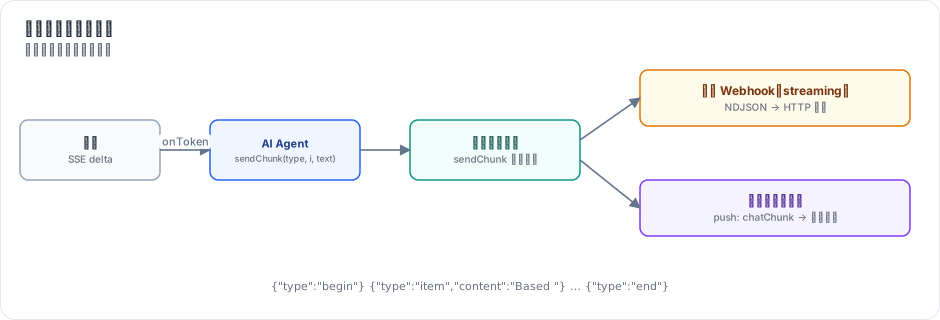
图 21-1:模型的每个 token 通过 onToken 回调到达 Agent;Agent 调用 sendChunk;sendChunk 钩子由创建执行的一方注册——生产 Webhook 写进 HTTP 响应(NDJSON),编辑器里的手动执行则通过推送发给标签页。
2. n8n 是怎么做的
2.1 Simple Memory:进程内的会话缓存
// packages/@n8n/nodes-langchain/nodes/memory/MemoryBufferWindow/MemoryBufferWindow.node.ts:22-72(节选)
class MemoryChatBufferSingleton {
	private static instance: MemoryChatBufferSingleton;
	private memoryBuffer: Map<string, { buffer: BufferWindowMemory; created: Date; last_accessed: Date }>;
	...
	async getMemory(sessionKey: string, memoryParams: BufferWindowMemoryInput): Promise<BufferWindowMemory> {
		await this.cleanupStaleBuffers();

		let memoryInstance = this.memoryBuffer.get(sessionKey);
		if (memoryInstance) {
			memoryInstance.last_accessed = new Date();
		} else {
			const newMemory = new BufferWindowMemory(memoryParams);
			memoryInstance = { buffer: newMemory, created: new Date(), last_accessed: new Date() };
			this.memoryBuffer.set(sessionKey, memoryInstance);
		}
		return memoryInstance.buffer;
	}

	private async cleanupStaleBuffers(): Promise<void> {
		const oneHourAgo = new Date(Date.now() - 60 * 60 * 1000);
		for (const [key, memoryInstance] of this.memoryBuffer.entries()) {
			if (memoryInstance.last_accessed < oneHourAgo) {
				await this.memoryBuffer.get(key)?.buffer.clear();
				this.memoryBuffer.delete(key);
			}
		}
	}
}一个进程级单例,sessionKey → 记忆 的 Map,一小时没访问就清理。“Window” 指只保留最近 K 轮(参数 Context Window Length)。
它的局限也很明显:进程重启就丢;队列模式下多个 worker 各有一份,同一个会话的消息落到不同 worker 上就“失忆”。所以 n8n 还提供 Postgres、Redis、MongoDB 等持久化记忆节点(nodes/memory/ 下)。Simple Memory 适合开发和单进程部署。
Session Key 参数默认是 {{ $json.sessionId }}:记忆节点的参数在 Agent 的输入 item 上求值(第 16 章的 SupplyDataContext),而 Agent 的输入来自 Chat Trigger。
2.2 Chat Trigger:两个 Webhook
// packages/@n8n/nodes-langchain/nodes/trigger/ChatTrigger/ChatTrigger.node.ts:379-396(节选)
webhooks: [
	{
		name: 'setup',
		httpMethod: 'GET',
		responseMode: 'onReceived',
		path: CHAT_TRIGGER_PATH_SUFFIX,
		ndvHideUrl: true,
	},
	{
		name: 'default',
		httpMethod: 'POST',
		responseMode: '={{$parameter.options?.["responseMode"] ?? ($parameter.availableInChat ? "streaming" : "lastNode") }}',
		path: CHAT_TRIGGER_PATH_SUFFIX,
		ndvHideMethod: true,
		ndvHideUrl: isPublicChatTriggerDisabled() ? true : '={{ !$parameter.public }}',
	},
],同一个路径,GET 返回托管的聊天页面(公开聊天,public 参数开启时),POST 接收消息并启动执行。POST 的响应模式是第 12 章的四种之一,聊天场景首选 streaming。节点描述里给 AI 工作流构建器的提示(第 141 行起的 responseModeBuilderHint)把规则写得很清楚:lastNode 模式下最后一个节点必须输出 { output: '...' },streaming 模式下 Agent 直接把回复流给聊天窗口。
编辑器里还有一个 “Open chat” 面板:它不走生产 URL,而是触发一次 手动执行,消息作为 Chat Trigger 的数据,画布照常显示执行过程(packages/cli/src/chat/ 下的聊天执行管理)。
2.3 流式:sendChunk 钩子写进 HTTP 响应
第 17 章看到 Agent 在流式模式下调用 ctx.sendChunk('begin' | 'item' | 'end', itemIndex, text)。sendChunk 只是调用生命周期钩子;真正写 HTTP 的处理函数是 WorkflowRunner 注册的:
// packages/cli/src/workflow-runner.ts:633-638
if (data.streamingEnabled) {
	lifecycleHooks.addHandler('sendChunk', (chunk) => {
		data.httpResponse?.write(JSON.stringify(chunk) + '\n');
		if (data.httpResponse) flushResponse(data.httpResponse);
	});
}
每个块是一行 JSON(NDJSON),flushResponse 确保它立刻发出,而不是被缓冲。块的结构是 { type, content, metadata: { nodeName, itemIndex, runIndex } };metadata 让客户端区分多个 Agent 的输出(一个工作流里可以有几个 Agent 先后流式输出)。
Agent 怎么知道“有没有人在听”?ctx.isStreaming() 检查是否注册了 sendChunk 处理函数。没人听时(定时触发、lastNode 模式),Agent 走普通的 invoke。
3. 从零实现
3.1 记忆
// code/mini-n8n/packages/nodes-ai/src/memory/buffer-window.ts(节选)
const sessions = new Map<string, ChatMessage[]>();

export class BufferWindowMemory implements ChatMemory {
	constructor(readonly sessionKey: string, private readonly windowSize: number) {}

	async loadMessages(): Promise<ChatMessage[]> {
		return (sessions.get(this.sessionKey) ?? []).slice(-this.windowSize * 2);
	}

	async saveContext(input: string, output: string): Promise<void> {
		const history = sessions.get(this.sessionKey) ?? [];
		history.push({ role: 'user', content: input }, { role: 'assistant', content: output });
		sessions.set(this.sessionKey, history);
	}
}
一轮 = 一问一答两条消息,所以窗口是 K * 2 条。Agent 在拼消息时把历史放在 system 之后、本轮用户消息之前(第 18 章)。
3.2 Chat Trigger
// code/mini-n8n/packages/nodes-ai/src/nodes/chat-trigger.ts(节选)
webhooks: [
	{ name: 'default', httpMethod: 'GET', path: '={{ $parameter.path }}', responseMode: 'onReceived' },
	{ name: 'default', httpMethod: 'POST', path: '={{ $parameter.path }}', responseMode: '={{ $parameter.responseMode }}' },
],
...
async webhook(this: IWebhookFunctions): Promise<IWebhookResponseData> {
	const req = this.getRequestObject();
	if (req.method === 'GET') {
		return { webhookResponse: chatPage(String(this.getNodeParameter('title', 'Chat'))), webhookResponseContentType: 'text/html; charset=utf-8' };
	}
	const body = (typeof req.body === 'string' ? JSON.parse(req.body || '{}') : req.body) as IDataObject;
	return {
		workflowData: [[{ json: { sessionId: body.sessionId ?? 'default', action: body.action ?? 'sendMessage', chatInput: body.chatInput ?? '' } }]],
	};
},
GET 返回一个内嵌的单文件聊天页面:它生成随机 sessionId,用 fetch 发送消息,读取 NDJSON 流并把 item 块的文字逐个追加到气泡里。路径参数为空时,Webhook 路径退回到节点的 webhookId(编辑器添加带 Webhook 的节点时生成一个随机 ID)。
3.3 流式 Webhook
executeWebhook 增加 streaming 分支:
// code/mini-n8n/packages/cli/src/webhooks/webhook-helpers.ts(节选)
if (webhook.responseMode === 'streaming') {
	// chunks (Agent tokens) are queued as NDJSON lines until the HTTP response picks them up
	const queue: string[] = [];
	let wake: (() => void) | undefined;
	let streamedItems = 0;
	const enqueue = (line: string) => { queue.push(line); wake?.(); };
	const executionId = await deps.executionService.runWorkflow(workflowData, node.name, result.workflowData[0], mode, pushRef, {
		streamTo: (chunk) => {
			if (chunk.type === 'item') streamedItems++;
			enqueue(`${JSON.stringify(chunk)}\n`);
		},
	});
	...
	void deps.activeExecutions.getPostExecutePromise(executionId).then((run) => {
		// nothing was streamed (no Agent, or streaming off): send the final answer as one item
		if (!streamedItems) enqueue(`${JSON.stringify({ type: 'item', content: lastNodeText(run) })}\n`);
		done = true;
		wake?.();
	});
	const stream = async (write: (line: string) => void) => {
		for (;;) {
			while (queue.length) write(queue.shift()!);
			if (done) return;
			await new Promise<void>((r) => (wake = r));
			wake = undefined;
		}
	};
	return { executionId, reply: { statusCode: 200, headers: { 'content-type': 'application/x-ndjson; charset=utf-8' }, stream } };
}
WorkflowRunner 看到 streamTo 就注册 sendChunk 处理函数(和 n8n 一样只在需要时注册,所以 isStreaming() 能判断有没有人在听)。一个小的生产者–消费者队列把“引擎产生块”和“HTTP 写出块”解耦:块可能在响应开始之前就产生了。如果整个执行都没有流式输出(例如工作流里没有 Agent),最后把结果作为一个块发出,客户端不需要区分两种情况。
3.4 编辑器里的聊天面板
手动执行时,hookFunctionsPush 也注册了 sendChunk,把块变成 chatChunk 推送消息发给标签页。聊天面板(ChatPanel.vue)把属于自己发起的执行的块拼成回答。
踩坑记录(真实遇到):第一版聊天面板在发送第二条消息后一直显示 “…”。原因是 推送比 HTTP 响应先到:面板在 POST /rest/workflows/:id/chat 返回之后才知道 executionId,而对于很快的执行,所有 chatChunk 和 executionFinished 推送在此之前就到了,被当作“不认识的执行”丢弃。修复是按执行 ID 缓存早到的消息,拿到 ID 后再应用。同样的竞态也让画布在聊天执行后卡在 “Executing…”:执行状态 store 收到 executionFinished 时还不认识这个执行。修复方式相同(finishedEarly)。第一条消息没有触发这个问题,第二条才触发,正说明它取决于时序——这类 bug 只有用真实浏览器反复跑才容易暴露。
| 方面 | n8n | mini-n8n |
|---|---|---|
| Simple Memory | 进程单例,1 小时清理,LangChain BufferWindowMemory | 进程内 Map,不清理 |
| 持久化记忆 | Postgres / Redis / MongoDB / Zep… | 无(第 16 章练习) |
| 记忆裁剪 | 按 token(maxTokensFromMemory) | 按轮数 |
| Chat Trigger | 公开聊天页(@n8n/chat 组件)、鉴权、初始消息、文件上传、Chat Hub | 内嵌单文件页面 |
| 流式协议 | NDJSON 块,带节点名和运行序号 | 相同格式 |
4. 运行与验证
服务端集成测试(packages/cli/test/ai.test.ts)激活一个 Chat Trigger(streaming)→ Agent(Mock 模型 + 计算器)的工作流,POST /webhook/support:
✓ chat > streams the agent answer as NDJSON from the production chat URL
✓ chat > answers with JSON in lastNode mode
✓ chat > the editor chat runs a manual execution and pushes the streamed tokens
第一个测试断言响应头是 application/x-ndjson,最后一块是 end,所有 item 块拼起来正好是 Based on the tools: Calculator returned 437.。
浏览器端的端到端测试(e2e/ai.e2e.mjs,真实输出):
✓ sub-nodes added from the node creator were connected to the Agent with AI connections
✓ chat answer streamed into the panel: "Based on the tools: Calculator returned 87."
✓ canvas shows the trigger, the Agent and its 3 sub-nodes as executed
✓ Simple Memory: the third message remembers the second ("Your name is Ada.")
✓ the model node shows 2 runs (ask for tool, then answer)
✓ the Calculator NDV shows the arguments chosen by the model as its input
✓ public chat page (streaming webhook): "Based on the tools: Calculator returned 84."
✓ no errors in the browser console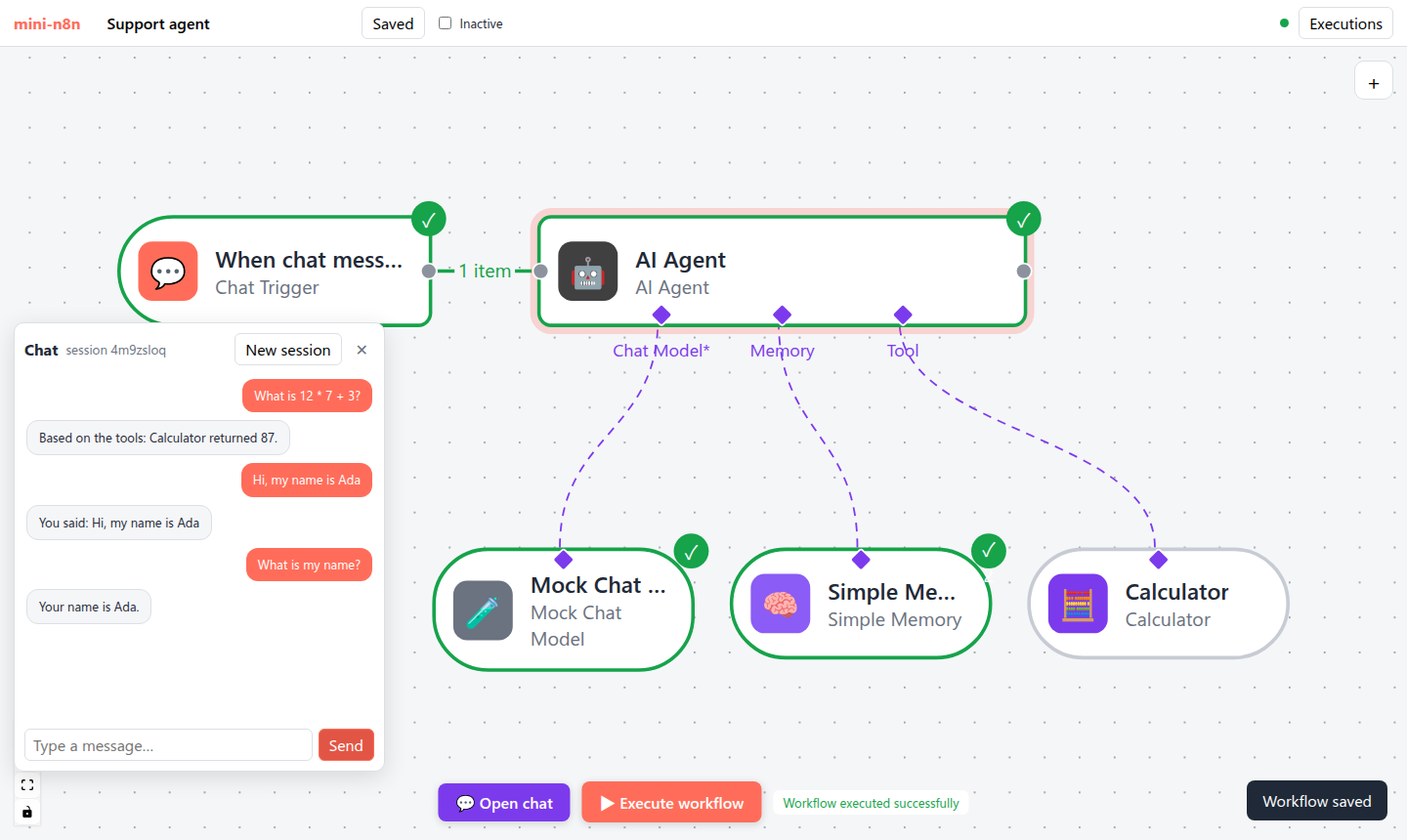
图 21-2:编辑器聊天面板里的三轮对话。第二轮说 “my name is Ada”,第三轮问 “What is my name?”,Agent 从 Simple Memory 里读到了上一轮。第三轮没有调用工具,所以 Calculator 是灰色的。
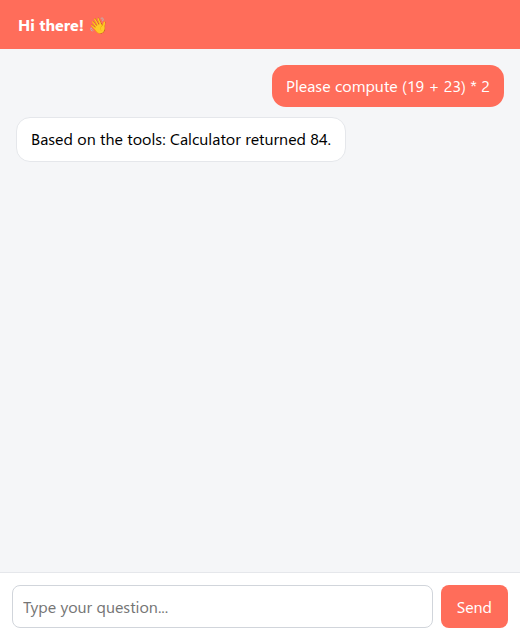
图 21-3:工作流激活后,GET /webhook/<id> 返回的公开聊天页。回答是通过 NDJSON 流逐词显示出来的。
5. 练习
- 巩固:用 curl 体验流式:
curl -N -X POST localhost:5678/webhook/<id> -H 'content-type: application/json' -d '{"sessionId":"a","chatInput":"What is 6 * 7?"}',观察每一行到达的时间(给 Mock Chat Model 设置 100ms 的 Delay per token)。 - 扩展:给 Simple Memory 加上 n8n 的过期清理:一小时没访问的会话自动删除;写一个用假时钟的测试。
- 读源码:阅读 n8n 的
ChatTrigger.node.ts中responseMode为responseNodes的分支和Chat.node.ts,说明“一个工作流里多次向聊天窗口回复”是怎么实现的。
6. 延伸阅读
packages/@n8n/nodes-langchain/nodes/memory/:所有记忆节点。packages/@n8n/nodes-langchain/nodes/trigger/ChatTrigger/:Chat Trigger 与托管聊天页。packages/frontend/@n8n/chat/:n8n 的可嵌入聊天组件(可以单独用 npm 安装到任何网站)。