第 5 章 节点类型系统:description 驱动一切
本章目标:读完你能写一个自定义节点,理解
description如何同时驱动画布、参数面板和引擎,以及 n8n 如何管理节点版本和按需加载 500 多个节点。前置:第 4 章。对应代码:mini-n8n v0.1 的packages/nodes-base/、packages/workflow/src/node-helpers.ts、examples/custom-node.ts
1. 问题与概念
n8n 有 500 多个节点,前端却没有为每个节点写一个参数表单。秘密在于:每个节点类型都用一份声明式的 description 描述自己,前端、引擎、文档生成、AI 工作流构建器都读这一份描述。
一个节点类型 = 一份描述 + 若干行为方法:
description是 数据:名字、图标、有几个输入输出、有哪些参数、参数在什么条件下显示。- 行为方法决定节点的 种类:普通节点实现
execute;AI 子节点实现supplyData;触发器实现trigger、poll或webhook。
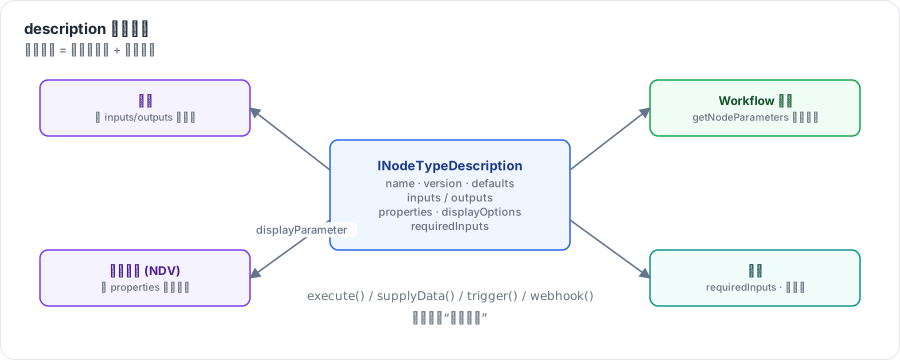
图 5-1:同一份 description,画布用它画出端口,参数面板用它渲染表单并按 displayOptions 显示/隐藏字段,Workflow 构造时用它填默认值,引擎用 inputs 和 requiredInputs 决定调度。
2. n8n 是怎么做的
2.1 INodeType:一个接口,多种角色
// packages/workflow/src/interfaces.ts:2568-2579(节选)
export interface INodeType {
	description: INodeTypeDescription;
	supplyData?(this: ISupplyDataFunctions, itemIndex: number): Promise<SupplyData>;
	execute?(this: IExecuteFunctions, response?: EngineResponse): Promise<NodeOutput>;
	onMessage?(context: IExecuteFunctions, data: INodeExecutionData): Promise<NodeOutput>;
	poll?(this: IPollFunctions): Promise<INodeExecutionData[][] | null>;
	trigger?(this: ITriggerFunctions): Promise<ITriggerResponse | undefined>;
	webhook?(this: IWebhookFunctions): Promise<IWebhookResponseData>;
	methods?: { loadOptions?: ...; listSearch?: ...; credentialTest?: ...; ... };
注意 execute 的第二个参数 response?: EngineResponse 和返回值里的 NodeOutput:Agent 节点可以返回一个“请帮我执行这些工具”的请求,引擎执行完再把结果作为 response 传回来。这是第 19 章的主角,这里先留个印象。
方法用 this 而不是参数接收上下文(this: IExecuteFunctions),所以节点代码里到处是 this.getInputData()、this.getNodeParameter(...)。引擎调用时用 nodeType.execute.call(context) 绑定 this。
2.2 INodeTypeDescription
// packages/workflow/src/interfaces.ts:3108-3119(节选)
export interface INodeTypeDescription extends INodeTypeBaseDescription {
	version: number | number[];
	defaults: NodeDefaults;
	inputs: Array<NodeConnectionType | INodeInputConfiguration> | ExpressionString;
	requiredInputs?: string | number[] | number; // Ony available with executionOrder => "v1"
	inputNames?: string[];
	outputs: Array<NodeConnectionType | INodeOutputConfiguration> | ExpressionString;
	outputNames?: string[];
	properties: INodeProperties[];
	credentials?: INodeCredentialDescription[];
	maxNodes?: number; // How many nodes of that type can be created in a workflow
	polling?: true | undefined;
两个值得注意的设计:
inputs/outputs可以是 表达式字符串。AI Agent 的输入端口取决于参数“是否需要输出解析器”“是否启用备用模型”,所以它的inputs是一段={{ ... }}表达式,在运行时根据参数计算(packages/@n8n/nodes-langchain/nodes/agents/Agent/V3/AgentV3.node.ts第 36 行起)。requiredInputs告诉 v1 执行顺序下的引擎:“至少有几个输入有数据我才能跑”。Merge 节点写的是:ts// packages/nodes-base/nodes/Merge/v3/actions/versionDescription.ts:107 requiredInputs: '={{ $parameter["mode"] === "chooseBranch" ? [0, 1] : 1 }}',“选择分支”模式必须两个输入都到齐,其他模式有一个输入就能跑。第 7 章会看到引擎如何使用它。
2.3 参数:INodeProperties 与 displayOptions
properties 是参数定义数组。常见类型:
type | 表单控件 | 例子 |
|---|---|---|
string / number / boolean | 输入框 / 数字框 / 开关 | URL、超时 |
options / multiOptions | 下拉框 | HTTP 方法、操作类型 |
collection | “添加选项”的可选字段组 | HTTP 节点的 Options |
fixedCollection | 可重复的结构化行 | Query 参数列表 |
resourceLocator | 按列表/ID/URL 选择资源 | 选一个 Google Sheet |
filter / assignmentCollection | 条件编辑器 / 字段赋值编辑器 | If v2 的条件、Set v3 的字段 |
notice | 只读提示 | “请连接一个输出解析器” |
displayOptions 让字段按条件显示:
// packages/workflow/src/node-helpers.ts:419-449(节选)
export function displayParameter(nodeValues, parameter, node, nodeTypeDescription, nodeValuesRoot?, displayKey = 'displayOptions') {
	if (!parameter[displayKey]) {
		return true;
	}
	const { show, hide } = parameter[displayKey];
	...
	if (show) {
		// All the defined rules have to match to display parameter
		for (const propertyName of Object.keys(show)) {
			const values = getPropertyValues(nodeValues, propertyName, node, nodeTypeDescription, nodeValuesRoot);
			if (values.some((v) => typeof v === 'string' && v.charAt(0) === '=')) {
				return true;
			}
			if (!checkConditions(show[propertyName]!, values)) {
				return false;
			}
		}
}规则:show 里 所有 条件都满足才显示;hide 里 任一 条件满足就隐藏。有一个细节:如果被依赖的参数是表达式(以 = 开头),值在设计时无法确定,就一律显示。条件里还可以用 @version 按节点版本显示字段,用 _cnd 写 gte、lt 等比较(Agent V3 的 promptType 字段就用了 { '@version': [{ _cnd: { gte: 3.1 } }] })。
同一套规则在前后端都要执行:前端用它决定显示哪些字段;Workflow 构造时用它填默认值并 丢弃隐藏字段的值:
// packages/workflow/src/workflow.ts:108-117
// Add default values
const nodeParameters = NodeHelpers.getNodeParameters(
	nodeType.description.properties,
	node.parameters,
	true,
	false,
	node,
	nodeType.description,
);
node.parameters = nodeParameters !== null ? nodeParameters : {};
所以保存的工作流 JSON 里通常只有“非默认值”,加载后引擎看到的是完整参数。也因此 getNodeParameter 本身不处理默认值,取不到就报错:
// packages/core/src/execution-engine/node-execution-context/node-execution-context.ts:537-543
const value = get(node.parameters, parameterName, fallbackValue);

if (value === undefined) {
	throw new UserError(`Could not get parameter "${parameterName}"`, {
		extra: { parameterName },
	});
}
取到值以后,交给 workflow.expression.getParameterValue(...) 解析表达式(第 555 行)——这是第 6 章的入口。
2.4 版本
节点行为一旦改变,老工作流就可能坏掉。n8n 的规则是:改变行为就加版本,老节点保持老版本。两种做法(见 packages/nodes-base/AGENTS.md 的 Versioning 一节):
- 轻量版本:
version: [3, 3.1, 3.2],同一个类,在代码里按this.getNode().typeVersion分支,在displayOptions里用@version控制字段。 - 完整版本:继承
VersionedNodeType,每个大版本一个独立实现:
// packages/nodes-base/nodes/Set/Set.node.ts:7-31(节选)
export class Set extends VersionedNodeType {
	constructor() {
		const baseDescription: INodeTypeBaseDescription = {
			displayName: 'Set',
			name: 'set',
			...
			defaultVersion: 3.5,
		};
		const nodeVersions: IVersionedNodeType['nodeVersions'] = {
			1: new SetV1(baseDescription),
			2: new SetV1(baseDescription),
			3: new SetV2(baseDescription),
			...
			3.5: new SetV2(baseDescription),
		};
		super(nodeVersions, baseDescription);
	}
}
新建节点时用 defaultVersion;加载老工作流时按节点上保存的 typeVersion 取对应实现。
2.5 声明式节点
很多 SaaS 集成只是“把参数拼成 HTTP 请求”。n8n 允许这类节点 不写 execute,而在属性上声明路由规则(routing、requestDefaults),由 RoutingNode 统一执行。加载节点类型时,如果节点没有 execute,就自动补一个:
// packages/cli/src/node-types.ts:119-125
if (shouldAssignExecuteMethod(versionedNodeType)) {
	versionedNodeType.execute = async function (this: ExecuteContext) {
		const routingNode = new RoutingNode(this, versionedNodeType);
		const data = await routingNode.runNode();
		return data ?? [];
	};
}
同一个函数里还有一段很有意思的逻辑:请求 n8n-nodes-base.slackTool 这种 以 Tool 结尾、但并不存在 的类型时,n8n 会以 slack 节点为蓝本 动态合成 一个工具节点(第 128–158 行)。这就是“任何节点都能当 AI 工具”的实现方式,第 20 章细讲。
2.6 加载:500 个节点怎么启动不慢
packages/cli/src/load-nodes-and-credentials.ts 的 LoadNodesAndCredentials 在启动时扫描节点包。对内置包使用 懒加载:构建时预先生成两个 JSON——dist/types/nodes.json(所有节点的 description,发给前端)和 dist/known/nodes.json(节点名 → 源文件路径)——启动时只读这两个文件:
// packages/core/src/nodes-loader/lazy-package-directory-loader.ts:7-13
override async loadAll() {
	try {
		this.known.nodes = await this.readJSON('dist/known/nodes.json');
		this.known.credentials = await this.readJSON('dist/known/credentials.json');

		this.types.nodes = await this.readJSON('dist/types/nodes.json');
		this.types.credentials = await this.readJSON('dist/types/credentials.json');
真正第一次用到某个节点时才 require 它的源文件:
// packages/core/src/nodes-loader/directory-loader.ts:242-256(节选)
getNode(nodeType: string) {
	const { nodeTypes, known: { nodes: knownNodes } } = this;
	if (!(nodeType in nodeTypes) && nodeType in knownNodes) {
		const { sourcePath } = knownNodes[nodeType];
		this.loadNodeFromFile(sourcePath);
	}
	...
3. 从零实现
3.1 接口
mini-n8n v0.1 的 INodeType 只有 description 和 execute;supplyData 等方法在后面的版本加入:
// code/mini-n8n/packages/workflow/src/interfaces.ts(v0.1)
export interface INodeType {
	description: INodeTypeDescription;
	execute?(this: IExecuteFunctions): Promise<INodeExecutionData[][] | null>;
}
inputs / outputs 和 n8n 一样,既可以是数组,也可以是一个表达式字符串。字符串由 normalizeConnectionList 求值,作用域里只有 $parameter:
// code/mini-n8n/packages/workflow/src/workflow.ts(节选)
export function normalizeConnectionList(list: INodeTypeDescription['inputs'], parameters: IDataObject): INodeInputConfiguration[] {
	const raw = typeof list === 'string' ? (evaluateDescriptionExpression(list, parameters) as INodeTypeDescription['inputs']) : list;
	if (!Array.isArray(raw)) return [];
	return raw.map((entry) => (typeof entry === 'string' ? { type: entry as INodeInputConfiguration['type'] } : entry));
}
为什么不用更“自然”的函数 (parameters) => [...]?因为描述要通过 REST 接口发给前端,函数无法 JSON 序列化;字符串可以,前端用同一个 n8n-workflow(mini-n8n 里是 @mini-n8n/workflow)求值即可。这正是 n8n 选择表达式字符串的原因。
3.2 一个完整的节点:If
// code/mini-n8n/packages/nodes-base/src/nodes/If.node.ts(节选)
export const If: INodeType = {
	description: {
		name: 'n8n-nodes-base.if',
		displayName: 'If',
		group: ['transform'],
		version: 1,
		defaults: { name: 'If', color: '#408000' },
		inputs: ['main'],
		outputs: ['main', 'main'],
		outputNames: ['true', 'false'],
		properties: [conditionProperties, { displayName: 'Combine', name: 'combinator', type: 'options', default: 'and', options: [...] }],
	},
	async execute(this: IExecuteFunctions) {
		const items = this.getInputData();
		const trueItems: INodeExecutionData[] = [];
		const falseItems: INodeExecutionData[] = [];
		items.forEach((item, i) => {
			const conditions = (this.getNodeParameter('conditions', i) as { values?: Condition[] }).values ?? [];
			const combinator = this.getNodeParameter('combinator', i) as string;
			const results = conditions.map(evaluateCondition);
			const pass = combinator === 'or' ? results.some(Boolean) : results.every(Boolean);
			(pass ? trueItems : falseItems).push({ json: item.json, pairedItem: { item: i } });
		});
		return [trueItems, falseItems];
	},
};
三个要点,几乎所有节点都遵守:
- 按 item 取参数:
getNodeParameter('conditions', i)。条件里的{{ $json.amount }}会针对第 i 个 item 求值。 - 返回二维数组:
[trueItems, falseItems],下标就是输出序号。 - 写上
pairedItem:告诉引擎“这个输出 item 来自第 i 个输入 item”。
3.3 displayOptions 与默认值
// code/mini-n8n/packages/workflow/src/node-helpers.ts(节选)
export function displayParameter(parameters: INodeParameters, property: Pick<INodeProperties, 'displayOptions'>): boolean {
	const { show, hide } = property.displayOptions ?? {};
	if (show) {
		for (const [name, allowed] of Object.entries(show)) {
			if (!allowed.includes(parameters[name])) return false;
		}
	}
	if (hide) {
		for (const [name, denied] of Object.entries(hide)) {
			if (denied.includes(parameters[name])) return false;
		}
	}
	return true;
}
getNodeParameters() 用它填默认值、丢弃隐藏字段;Workflow 构造函数对每个已知类型的节点调用一次,和 n8n 一样:
// code/mini-n8n/packages/workflow/src/workflow.ts(节选)
for (const node of params.nodes) {
	// Fill in default values of parameters (n8n does the same in its Workflow constructor)
	const type = this.tryGetNodeType(node);
	if (type) node.parameters = getNodeParameters(type.description.properties, node.parameters ?? {});
	this.nodes[node.name] = node;
}
3.4 注册表
// code/mini-n8n/packages/core/src/node-types.ts(节选)
export class NodeTypes implements INodeTypes {
	private readonly types: Record<string, INodeType> = {};
	register(type: INodeType): this {
		this.types[type.description.name] = type;
		return this;
	}
	getByNameAndVersion(name: string): INodeType {
		const type = this.types[name];
		if (!type) throw new UserError(`Unrecognized node type: ${name}`);
		return type;
	}
}
v0.1 内置 12 个节点:Manual Trigger、Edit Fields (Set)、If、Merge、Code、HTTP Request、No Operation、Wait、Split Out、Aggregate、Stop and Error、Loop Over Items。节点类型名沿用 n8n 的 n8n-nodes-base.*,方便对照,但 参数结构是简化过的,不能直接导入 n8n 导出的工作流。
| 方面 | n8n | mini-n8n |
|---|---|---|
| 节点行为方法 | execute、supplyData、trigger、poll、webhook、methods | v0.1 只有 execute,后续版本逐步加入 |
inputs 动态化 | 表达式字符串 | 表达式字符串(只提供 $parameter) |
| 版本 | 轻量版本 + VersionedNodeType | 只有一个版本 |
| 声明式节点 | routing + RoutingNode | 不支持 |
displayOptions | show/hide、@version、_cnd 比较、表达式值一律显示 | 只支持 show/hide 的等值匹配 |
| 加载 | 懒加载 + 预生成的 JSON 清单 | 启动时全部 import |
4. 运行与验证
examples/custom-node.ts 定义了一个 Change Case 节点(带一个只在 mode=custom 时显示的字段),注册后运行:
cd code/mini-n8n && npx tsx examples/custom-node.ts真实输出:
parameters after defaults: { field: 'text', mode: 'upper' }
separator visible for mode=upper? false
success [ { text: 'HELLO MINI N8N' }, { text: 'WORKFLOW ENGINE' } ]
第一行说明:节点在 JSON 里的 parameters 是 {},构造 Workflow 后填上了 field 和 mode 的默认值;separator 因为不可见,没有出现。
5. 练习
- 巩固:仿照 Change Case 写一个
Filter节点:只保留满足条件的 item(只有一个输出),并正确设置pairedItem。 - 扩展:给 mini-n8n 的
displayParameter加上“依赖的参数是表达式时一律显示”的规则,并写一个测试。 - 读源码:打开
packages/nodes-base/nodes/If/目录,找出 If 节点有几个大版本,最新版本的条件参数是什么type。
6. 延伸阅读
packages/nodes-base/AGENTS.md:官方的节点开发规范(结构、版本、凭证、安全)。- n8n 文档:Creating nodes → Choose your node building approach(声明式 vs 编程式)。
packages/workflow/src/node-helpers.ts:getNodeParameters、displayParameter的完整实现。