第 10 章 生命周期钩子与实时推送
本章目标:读完你能解释“引擎不知道数据库和浏览器”是如何靠钩子做到的,说清 n8n 的推送如何在单机、队列模式、多 main 下都把消息送到正确的浏览器标签页,并实现一个 SSE 推送。前置:第 3、9 章。对应代码:mini-n8n v0.2 的
packages/core/src/execution-lifecycle-hooks.ts、packages/cli/src/execution-lifecycle-hooks.ts、packages/cli/src/push.ts
1. 问题与概念
同一个引擎要在很多地方运行:
- 编辑器里的手动执行:要把每个节点的进度推给浏览器。
- 生产 Webhook / 定时任务:要写数据库、统计次数,不需要推送。
- 队列模式的 worker:没有浏览器连接,进度要转发给持有连接的 main 进程。
- 单元测试、CLI:什么都不要,或者打印到终端。
如果引擎里写死“执行完写数据库、推 WebSocket”,就没法复用。n8n 的做法是 生命周期钩子:引擎只在 4 个时刻(执行前后、节点前后)调用钩子,具体做什么由创建执行的那一方挂上去。
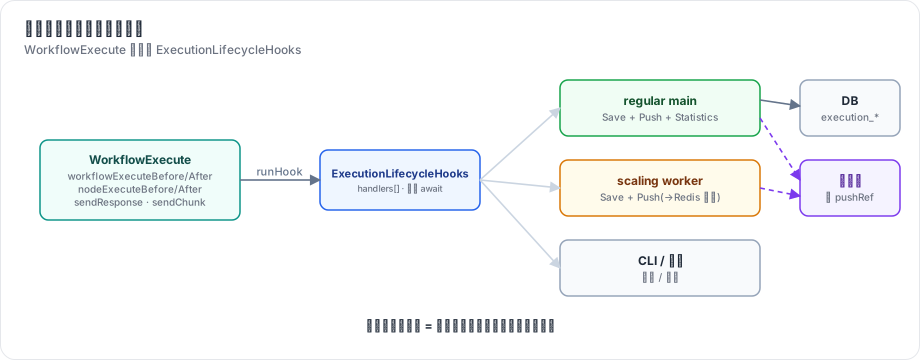
图 10-1:引擎只认识 ExecutionLifecycleHooks。服务端按场景挂不同的处理函数组:regular main 挂“保存 + 推送 + 统计”,worker 挂“保存 + 通过 Redis 转发”,CLI 挂“打印”。
推送的第二个问题是 送给谁。用户可能开了三个编辑器标签页,只有点击“执行”的那个标签页应该看到进度。n8n 用 pushRef 标识每个标签页的推送连接:前端连接时带上它,触发执行时在请求头里带上它,执行数据里记住它,钩子按它推送。
2. n8n 是怎么做的
2.1 钩子类
// packages/core/src/execution-engine/execution-lifecycle-hooks.ts:91-133(节选)
export class ExecutionLifecycleHooks {
	readonly handlers: ExecutionLifecycleHookHandlers = {
		nodeExecuteAfter: [],
		nodeExecuteBefore: [],
		nodeFetchedData: [],
		sendResponse: [],
		workflowExecuteAfter: [],
		workflowExecuteBefore: [],
		workflowExecuteResume: [],
		sendChunk: [],
	};
	...
	async runHook(hookName, parameters) {
		const hooks = this.handlers[hookName];
		for (const hookFunction of hooks) {
			...
			await typedHookFunction.apply(this, parameters);
		}
	}
}
整个类不到 140 行。几点设计:
- 处理函数 串行
await,按注册顺序执行。保存和推送的先后可控;代价是一个慢的处理函数会拖慢整个执行(所以推送是“发出即返回”,不等浏览器确认)。 - 处理函数里的
this是钩子对象本身,可以拿到executionId、mode、workflowData。 - 除了 4 个生命周期钩子,还有 3 个“通道”钩子:
sendResponse(Respond to Webhook 节点回复 HTTP 请求)、sendChunk(流式响应,第 21 章)、nodeFetchedData(统计)。节点通过它们和外部通信,同样不需要知道外部是谁。
2.2 按场景组装
第 3 章看过 regular main 的组装函数。同一个文件里还有为 worker、队列模式的 main、子工作流准备的版本:
packages/cli/src/execution-lifecycle/execution-lifecycle-hooks.ts
  getLifecycleHooksForSubExecutions()    子工作流
  getLifecycleHooksForScalingWorker()    队列模式 worker
  getLifecycleHooksForScalingMain()      队列模式 main
  getLifecycleHooksForRegularMain()      单进程(第 988 行)
它们只是把 hookFunctionsSave、hookFunctionsPush、hookFunctionsSaveProgress、hookFunctionsStatistics 等组合不同而已。例如 worker 上没有前端连接,但手动执行的进度仍要推给编辑器——worker 依然挂 hookFunctionsPush,由推送层决定通过 Redis 转发(见 2.4)。
2.3 推送层:一个接口,两种传输
packages/cli/src/push/ 下:
| 文件 | 作用 |
|---|---|
abstract.push.ts | 连接表(pushRef → connection)、sendTo、心跳 |
websocket.push.ts | WebSocket 实现(默认) |
sse.push.ts | Server-Sent Events 实现(Content-Type: text/event-stream,第 18 行) |
index.ts | Push 服务:选择后端,决定直接发还是经 Redis 转发 |
// packages/cli/src/push/abstract.push.ts:79-94
private sendTo({ type, data }: PushMessage, pushRefs: string[], asBinary: boolean = false) {
	if (pushRefs.length === 0) return;
	...
	const stringifiedPayload = jsonStringify({ type, data }, { replaceCircularRefs: true });

	for (const pushRef of pushRefs) {
		const connection = this.connections[pushRef];
		assert(connection);
		this.sendToOneConnection(connection, stringifiedPayload, asBinary);
	}
}
消息是 { type, data } 结构,类型定义在 @n8n/api-types 的 push/ 目录下,前后端共享。WebSocket 是双向的(前端也能发消息,例如协作编辑的心跳);SSE 只能服务端到客户端,但更简单、能穿过更多代理。
2.4 多进程:经 Redis 转发
// packages/cli/src/push/index.ts:180-188
send(pushMsg: PushMessage, pushRef: string, asBinary: boolean = false) {
	if (this.shouldRelayViaPubSub(pushRef)) {
		this.relayViaPubSub(pushMsg, pushRef, asBinary);
		return;
	}

	this.backend.sendToOne(pushMsg, pushRef, asBinary);
}// packages/cli/src/push/index.ts:219-223
private shouldRelayViaPubSub(pushRef: string) {
const { isWorker, isMultiMain } = this.instanceSettings;
return isWorker || (isMultiMain && !this.hasPushRef(pushRef));
}两种情况要转发:当前进程是 worker(没有任何浏览器连接);或者有多个 main,而这个 pushRef 的连接在别的 main 上。转发就是往 Redis 的命令通道发布一条 relay-execution-lifecycle-event,每个 main 收到后检查自己是否持有这个 pushRef,持有就推送(第 225–233 行,handleRelayExecutionLifecycleEvent)。
转发路径还有个保护:nodeExecuteAfterData 太大(超过 MAX_PUBSUB_PAYLOAD_BYTES)时直接丢弃(第 244–259 行),因为前端已经从 nodeExecuteAfter 拿到了 item 数量,可以先显示占位,执行结束后再拉完整数据。第 3 章说的“推送拆成数量 + 数据两条”在这里体现出第二个好处:大数据可以安全丢弃。
2.5 前端
前端 usePushConnection(packages/frontend/editor-ui/src/app/composables/usePushConnection/)按 type 分发给 handlers/ 下的处理函数。连接断开后自动重连;执行开始时如果连接还没建立,前端会在执行结束后通过 REST 拉取完整执行数据补上。
3. 从零实现
3.1 钩子
mini-n8n 的钩子类在 v0.1 就有了(packages/core/src/execution-lifecycle-hooks.ts),和 n8n 结构相同:处理函数数组、按顺序 await。
3.2 服务端的处理函数组
// code/mini-n8n/packages/cli/src/execution-lifecycle-hooks.ts(节选)
function hookFunctionsPush(hooks: ExecutionLifecycleHooks, push: Push, data: IWorkflowExecutionDataProcess) {
	const { pushRef } = data;
	if (!pushRef) return;
	const executionId = hooks.executionId;
	hooks.addHandler('workflowExecuteBefore', () => {
		push.send({ type: 'executionStarted', data: { executionId, workflowId: data.workflowData.id, mode: data.executionMode, startedAt: new Date().toISOString() } }, pushRef);
	});
	hooks.addHandler('nodeExecuteBefore', (nodeName) => {
		push.send({ type: 'nodeExecuteBefore', data: { executionId, nodeName } }, pushRef);
	});
	hooks.addHandler('nodeExecuteAfter', (nodeName, taskData) => {
		const itemCount = (taskData.data?.main ?? []).map((o) => o?.length ?? 0);
		push.send({ type: 'nodeExecuteAfter', data: { executionId, nodeName, itemCount, data: taskData } }, pushRef);
	});
	hooks.addHandler('workflowExecuteAfter', (run) => {
		if (run.status === 'waiting') push.send({ type: 'executionWaiting', data: { executionId } }, pushRef);
		else push.send({ type: 'executionFinished', data: { executionId, workflowId: data.workflowData.id, status: run.status } }, pushRef);
	});
}

export function getLifecycleHooksForRegularMain(data, executionId, deps): ExecutionLifecycleHooks {
	const hooks = new ExecutionLifecycleHooks(data.executionMode, executionId);
	hookFunctionsSave(hooks, deps.db, data);
	hookFunctionsPush(hooks, deps.push, data);
	return hooks;
}
没有 pushRef(生产执行)就不挂推送处理函数——和 n8n 的 if (!pushRef) return; 一样。
WorkflowRunner.runMainProcess 再额外挂一个 sendResponse 处理函数,把 Respond to Webhook 的回复交给等待中的 HTTP 请求(第 12 章):
// code/mini-n8n/packages/cli/src/workflow-runner.ts(节选)
const hooks = getLifecycleHooksForRegularMain(data, executionId, { db, push });
hooks.addHandler('sendResponse', (response) => activeExecutions.resolveResponsePromise(executionId, response));
3.3 SSE 推送
// code/mini-n8n/packages/cli/src/push.ts(节选)
export class Push {
	private readonly connections = new Map<string, ServerResponse>();

	add(pushRef: string, res: ServerResponse) {
		this.connections.get(pushRef)?.end();
		this.connections.set(pushRef, res);
		res.writeHead(200, { 'content-type': 'text/event-stream', 'cache-control': 'no-cache', connection: 'keep-alive' });
		res.write(': connected\n\n');
		const heartbeat = setInterval(() => res.write(': ping\n\n'), 30_000);
		res.on('close', () => { ... });
	}

	/** Send to one tab (pushRef) or to all tabs */
	send(msg: PushMessage, pushRef?: string) {
		for (const l of this.listeners) l(msg, pushRef);
		const payload = `data: ${JSON.stringify(msg)}\n\n`;
		if (pushRef) this.connections.get(pushRef)?.write(payload);
		else for (const res of this.connections.values()) res.write(payload);
	}
}
SSE 协议非常简单:响应头 text/event-stream,每条消息是 data: <文本> 加一个空行;以冒号开头的行是注释,用作心跳,防止代理因为空闲断开连接。路由用 Fastify 的 reply.hijack() 接管原始响应:
// code/mini-n8n/packages/cli/src/server.ts(节选)
app.get('/rest/push', (req, reply) => {
	const { pushRef } = req.query as { pushRef?: string };
	if (!pushRef) return reply.code(400).send({ message: 'pushRef is required' });
	reply.hijack();
	push.add(pushRef, reply.raw);
});
onMessage(listener) 让测试不用开 HTTP 连接也能断言推送了什么。
| 方面 | n8n | mini-n8n |
|---|---|---|
| 钩子 | 8 种(含 workflowExecuteResume、sendChunk、nodeFetchedData) | 5 种(v0.4 加 sendChunk) |
| 传输 | WebSocket(默认)/ SSE | SSE |
| 节点完成消息 | nodeExecuteAfter(数量)+ nodeExecuteAfterData(数据,二进制帧) | 一条 nodeExecuteAfter,带数量和数据 |
| 多进程 | worker / 多 main 经 Redis 转发 | v1.0 实现 worker 转发 |
| 鉴权 | 推送连接需要登录 Cookie,按用户过滤 | v1.0 加入 |
4. 运行与验证
examples/server-demo.sh 第一步用 curl -N 打开一个 pushRef=demo-tab 的 SSE 连接,之后用同一个 push-ref 触发执行。最后打印这个“标签页”收到的消息(真实输出):
== 7. what the editor tab received over SSE
executionStarted
testWebhookReceived
nodeExecuteBefore    Webhook
nodeExecuteAfter     Webhook
nodeExecuteBefore    Total
nodeExecuteAfter     Total
executionFinished    success
workflowActivated
注意脚本里还有一次 生产 Webhook 调用(第 5 步),它产生了执行,但这个标签页没有收到它的任何节点消息:生产执行没有 pushRef。workflowActivated 是广播消息(不带 pushRef),所有标签页都会收到。
单元测试断言了消息的精确顺序(packages/cli/test/server.test.ts 的第一个测试):
'executionStarted', 'nodeExecuteBefore', 'nodeExecuteAfter', 'nodeExecuteBefore', 'nodeExecuteAfter', 'executionFinished'5. 练习
- 巩固:在浏览器开发者工具的控制台里执行
new EventSource('/rest/push?pushRef=t1').onmessage = (e) => console.log(e.data),然后用 curl 带push-ref: t1触发一次执行,观察输出。 - 扩展:把推送拆成 n8n 的两条消息:
nodeExecuteAfter只带itemCount,nodeExecuteAfterData带数据;当数据超过 1 MB 时只发第一条,并在executionFinished后让客户端通过GET /rest/executions/:id拉取。 - 读源码:阅读
packages/cli/src/push/websocket.push.ts,找出它如何检测“死连接”(提示:ping / pong)。
6. 延伸阅读
packages/core/src/execution-engine/execution-lifecycle-hooks.ts:钩子类。packages/cli/src/push/:推送层。packages/@n8n/api-types/src/push/:所有推送消息的类型定义。- MDN:Using server-sent events。