第 24 章 子工作流与等待/恢复
本章目标:读完你能把一个大工作流拆成几个可复用的子工作流;并理解一个执行怎样“停下来几天、再接着跑”:Wait 节点到期后由 WaitTracker 恢复,子工作流在等待时它的父执行也跟着等待,子执行结束后再把结果交给父执行。前置:第 7、8、23 章。对应代码:mini-n8n v1.0 的
nodes-base/src/nodes/ExecuteWorkflow.node.ts、cli/src/wait-tracker.ts、cli/src/workflow-runner.ts
1. 问题与概念
前面的版本里已经有两种“暂停”:
- 第 8 章的 Wait 节点:65 秒以内在进程里睡;更长的等待把执行写进数据库,状态为
waiting,记下waitTill。可是 v0.5 里没有人去恢复它——getWaitingExecutions()查询早就写好了,却没有调用方。 - 第 23 章的人工审批:执行停在
WAIT_INDEFINITELY(3000 年),等人打开链接。
平台化之后还有第三种:子工作流在等待。比如“处理订单”工作流调用“申请退款审批”子工作流,子工作流停下来等经理批准。这时父执行该怎么办?
| 方案 | 问题 |
|---|---|
| 父执行在内存里等着 | 可能等几天;进程重启就丢了;在队列模式下还占着一个 worker 的并发槽 |
| 父执行直接失败 | 子工作流的设计目的就是复用,不能因为它要等就不能用 |
| 父执行也进入等待,子执行结束后再恢复父执行 | n8n 的做法,也是本章要实现的 |
三个概念:
- Execute Workflow 节点:调用另一个已保存的工作流,子工作流从 “When Executed by Another Workflow” 触发器开始。子执行是一个独立的执行(mode 为
integrated),在执行数据里记下它的父执行parentExecution。 - WaitTracker:每隔一段时间查一次数据库,把接下来 70 秒内到期的等待执行挑出来,给每个设一个定时器,到点就恢复。
- 恢复父执行:子执行结束时,把它最后一个节点的输出写进父执行栈顶那个节点(就是 Execute Workflow 节点)的输入,再恢复父执行。恢复时这个节点以禁用状态运行,于是它把这份输入原样传下去——看起来就像它刚刚调用完子工作流。
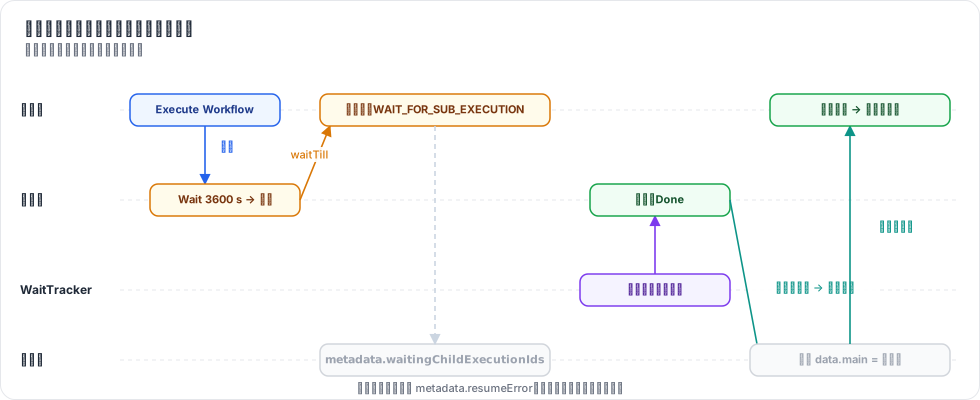
图 24-1:子执行等待时,父执行以 WAIT_FOR_SUB_EXECUTION(2999-12-31)停下并记下子执行 ID;WaitTracker 恢复子执行;子执行结束时给父执行打补丁并恢复它。
2. n8n 是怎么做的
2.1 子执行等待,父执行也等待
调用子工作流的入口在所有执行上下文的基类里:
// packages/core/src/execution-engine/node-execution-context/base-execute-context.ts:207
// If a sub-workflow execution goes into the waiting state
if (result.waitTill) {
	this.setMetadata({
		waitingChildExecutionIds: [
			...(this.executeData.metadata?.waitingChildExecutionIds ?? []),
			result.executionId,
		],
	});
	// then put the parent workflow execution also into the waiting state,
	// but do not use the sub-workflow `waitTill` to avoid WaitTracker resuming the parent execution at the same time as the sub-workflow
	await this.putExecutionToWait(WAIT_FOR_SUB_EXECUTION);
}
注释说明了为什么不用子执行的 waitTill:否则 WaitTracker 会在同一时刻把父子两个都恢复,父执行拿不到子执行的结果。WAIT_FOR_SUB_EXECUTION 是一个遥远的日期(packages/workflow/src/constants.ts:9,2999-12-31),WaitTracker 永远不会主动恢复它。
metadata 是执行栈条目(IExecuteData)上的字段,会随执行一起存进数据库。记下 waitingChildExecutionIds,是为了恢复时确认“来打补丁的确实是我在等的那个子执行”。
Execute Workflow 节点(packages/nodes-base/nodes/ExecuteWorkflow/ExecuteWorkflow/ExecuteWorkflow.node.ts)有两种模式:once 把所有条目交给一次子执行;each 对每个条目调用一次。选项 “Wait For Sub-Workflow Completion”(:351)关掉时,节点不等子执行,直接把输入传下去。它传给子执行的 parentExecution 是 { executionId, workflowId, shouldResume }(:403 起)。
2.2 WaitTracker
// packages/cli/src/wait-tracker.ts:81
private startTracking() {
	// Poll every 60 seconds a list of upcoming executions
	this.mainTimer = setInterval(() => {
		void this.getWaitingExecutions();
		void this.resumeParentsOfFinishedSubExecutions();
	}, 60000);
	...
}
查询本身在执行仓库里:
// packages/@n8n/db/src/repositories/execution.repository.ts:766
async getWaitingExecutions() {
	// Find all the executions which should be triggered in the next 70 seconds
	const waitTill = new Date(Date.now() + 70000);
	const where: FindOptionsWhere<ExecutionEntity> = {
		waitTill: LessThanOrEqual(waitTill),
		status: 'waiting',
	};
	...
每 60 秒查一次“70 秒内到期的”,两个窗口有 10 秒重叠,保证不漏;已经设过定时器的执行不会重复设(getWaitingExecutions() 里检查 this.waitingExecutions[executionId])。到点后 startExecution()(:145)从数据库读出完整的执行数据,交给 WorkflowRunner.run(),并带上 expectedStatus: 'waiting'——如果另一个进程已经恢复了它,这一步会抛出 ExecutionAlreadyResumingError,被安静地忽略。
两个细节:
- 只有 leader 跑 WaitTracker(
init()里的isLeader)。多 main 部署时,只有一个实例负责轮询,避免重复恢复。 startExecution()结束时检查shouldRestartParentExecution(parentExecution)(:191),如果是要恢复父执行的子执行,就调用resumeParentExecution()(:212):等子执行结束,给父执行打补丁,再“认领”父执行。
2.3 给父执行打补丁
// packages/cli/src/workflow-helpers.ts:448 updateParentExecutionWithChildResults(节选)
if (parent?.status !== 'waiting') return false;
...
const waitingChildExecutionIds = nodeExecutionStack[0].metadata?.waitingChildExecutionIds;
if (childExecution && waitingChildExecutionIds?.length && !waitingChildExecutionIds.includes(childExecution.executionId)) {
	return false;
}
...
if (subworkflowError) {
	nodeExecutionStack[0].metadata = { ...nodeExecutionStack[0].metadata, resumeError: subworkflowError, ... };   // :533
} else if (lastExecutedNodeData?.data) {
	// Copy the sub workflow result to the parent execution's Execute Workflow node inputs   // :537
	// so that the Execute Workflow node returns the correct data when parent execution is resumed
	// and the Execute Workflow node is executed again in disabled mode.
	...
}
子执行失败时写入 resumeError;引擎的 runNode() 在检查 node.disabled 之前 先检查它,于是被禁用的节点也会报错,父执行以错误结束,而不是假装成功。
3. 从零实现
3.1 类型
// packages/workflow/src/interfaces.ts
export interface IRunExecutionData {
	...
	/** Set on a sub-workflow execution: who started it, and whether to resume that parent when it ends */
	parentExecution?: RelatedExecution;   // :360
}
export interface RelatedExecution { executionId: string; workflowId: string; shouldResume?: boolean }
export const WAIT_INDEFINITELY = new Date('3000-01-01T00:00:00.000Z');        // :371
export const WAIT_FOR_SUB_EXECUTION = new Date('2999-12-31T00:00:00.000Z');   // :373
export interface ExecuteWorkflowResult { executionId: string; data?: INodeExecutionData[]; waitTill?: string }
executeWorkflow() 原来直接返回子工作流的输出(INodeExecutionData[]),现在返回 ExecuteWorkflowResult:子执行等待时没有 data,只有 waitTill。
3.2 父执行跟着等待
ExecuteContext.executeWorkflow()(packages/core/src/execute-context.ts:182)照搬 n8n:
const result = await this.additionalData.executeWorkflow(workflowId, items, { executionId, workflowId: this.workflow.id ?? '', nodeName }, { waitForSubWorkflow: options.waitForSubWorkflow ?? true });
if (result.waitTill) {
	const waiting = (this.executeData.metadata?.waitingChildExecutionIds as string[] | undefined) ?? [];
	this.setMetadata({ waitingChildExecutionIds: [...waiting, result.executionId] });
	await this.putExecutionToWait(WAIT_FOR_SUB_EXECUTION);
}
return result;
服务器端的 WorkflowRunner.runSubWorkflow()(cli/src/workflow-runner.ts:136)启动子执行时带上 parentExecution。子执行结束得太快(状态不是 waiting)就直接返回输出;进入等待就返回 { executionId, waitTill }。
Execute Workflow 节点(ExecuteWorkflow.node.ts:10)很薄:once 模式调用一次;each 模式逐条调用。子执行在 each 模式下等待时,我们直接报错——n8n 为此在一个等待里收集多个子执行 ID,逻辑复杂得多,我们裁掉了。
3.3 恢复父执行
子执行(被 WaitTracker 或等待 Webhook 恢复的那一段)结束时,runMainProcess() 的收尾代码检查它是否有要恢复的父执行(workflow-runner.ts:250):
const parent = run.data.parentExecution;
if (data.executionData && parent?.shouldResume && run.status !== 'waiting') this.resumeParent(parent, executionId, run);
data.executionData 不为空,说明这是一次 恢复,不是首次运行——首次运行时父执行还在内存里等着 runSubWorkflow() 返回,不能去打补丁。
resumeParent()(:168)就是 n8n 的 updateParentExecutionWithChildResults() 加上“认领并恢复”:
const parent = db.executions.getWithData(parentExecution.executionId);
if (parent?.status !== 'waiting') return false;
const head = parent.data.executionData.nodeExecutionStack[0];
const waitingFor = (head?.metadata?.waitingChildExecutionIds as string[] | undefined) ?? [];
if (!head || !waitingFor.includes(childExecutionId)) return false;   // 父执行在等别的东西

if (run.status === 'error') {
	head.metadata = { ...head.metadata, resumeError: { message: `Sub-workflow execution ${childExecutionId} failed: ${run.data.resultData.error?.message}` } };
} else {
	head.data = { ...head.data, main: [lastNodeOutput(run)] };
}
db.executions.saveData(parent.id, parent.data);
if (!db.executions.claimWaiting(parent.id)) return false;   // 有人抢先恢复了
this.start({ executionMode: parent.mode, workflowData: ..., executionData: parent.data }, parent.id);引擎这边只加了几行:runNode() 先检查 metadata.resumeError(core/src/workflow-execute.ts:276),再处理禁用节点。
3.4 WaitTracker 与“认领”
cli/src/wait-tracker.ts 只有 60 行:
poll() {
	for (const execution of this.deps.db.executions.getWaitingExecutions(70)) {
		if (this.timers.has(execution.id)) continue;
		const delay = Math.max(new Date(execution.waitTill!).getTime() - Date.now(), 0);
		this.timers.set(execution.id, setTimeout(() => void this.resume(execution.id), delay));
	}
}

resume(executionId: string): boolean {
	this.timers.delete(executionId);
	const execution = db.executions.getWithData(executionId);
	if (!execution || !db.executions.claimWaiting(executionId)) return false;
	this.runner.start({ executionMode: execution.mode, workflowData: ..., executionData: execution.data }, executionId);
	return true;
}到期时间已经过去的执行(服务器停机期间到期的)delay 为 0,启动后第一次 poll() 就恢复。
“认领”是一条带条件的 UPDATE(cli/src/databases/db.ts:323):
claimWaiting(id: string): boolean {
	return this.db.prepare("UPDATE execution_entity SET status = 'running' WHERE id = ? AND status = 'waiting'").run(id).changes === 1;
}
两个定时器、两次点击审批链接、两个 main 实例同时恢复同一个执行,只有一个能把 waiting 改成 running。第 23 章的等待 Webhook 也改成了先认领再恢复。
3.5 裁剪了什么
| n8n 有 | mini-n8n | 说明 |
|---|---|---|
| leader 选举,只有 leader 跑 WaitTracker | 每个 main 都跑 | 靠 claimWaiting() 保证不重复恢复 |
补丁和认领失败时重试;定期扫描“子执行已结束但父执行还在等”的情况(resumeParentsOfFinishedSubExecutions) | 无 | 进程恰好在两步之间崩溃时,父执行会一直等 |
each 模式下多个子执行同时等待 | 报错 | 见 3.2 |
| 子工作流可以来自数据库、本地文件、URL、参数 | 只支持数据库里的工作流 ID |
4. 运行与验证
npx vitest run packages/cli/test/platform.test.ts --reporter=verbose真实输出:
 ✓ packages/cli/test/platform.test.ts > Execute Workflow > runs the sub-workflow and outputs what its last node returned
 ✓ packages/cli/test/platform.test.ts > Execute Workflow > passes the input on at once when it does not wait for the sub-workflow
 ✓ packages/cli/test/platform.test.ts > waiting and resuming > the WaitTracker resumes a parked execution when it is due, once
 ✓ packages/cli/test/platform.test.ts > waiting and resuming > a parent waits for a waiting sub-workflow and resumes with its result
 ✓ packages/cli/test/platform.test.ts > waiting and resuming > a parent fails on its Execute Workflow node when the resumed sub-workflow fails
测试不能真的等一小时,于是用一个小技巧“快进时间”:把数据库里 waitTill 改到过去,再调用一次 waitTracker.poll()。
第三个测试的断言值得一看:
expect(new Date(parked.waitTill!).getTime() - Date.now()).toBeGreaterThan(3500_000);   // Wait 3600 s:存进了数据库
ctx.waitTracker.poll();                                                                  // 70 s 内不到期:不设定时器
expect(ctx.db.executions.get(executionId)!.status).toBe('waiting');
makeDue(executionId);
ctx.waitTracker.poll();                                                                  // 到期:恢复
await until(() => ctx.db.executions.get(executionId)!.status === 'success');
expect(ctx.db.executions.getWithData(executionId)!.data.resultData.runData.Wait).toHaveLength(1);
expect(ctx.waitTracker.resume(executionId)).toBe(false);                                 // 第二次认领失败
第四个测试:父工作流 Manual → Number(n=7) → Call(子工作流) → After,子工作流 Start → Wait 3600 s → Done。先断言父执行的 waitTill 恰好是 WAIT_FOR_SUB_EXECUTION,栈顶的 waitingChildExecutionIds 是子执行 ID;子执行到期恢复后,父执行最终输出 { n: 7, done: true, parentDone: true }。
第五个测试把子工作流的最后一步换成 Stop and Error(“out of stock”),父执行以错误结束,错误信息是 Sub-workflow execution <子执行 ID> failed: out of stock。
4.1 踩坑记录
waitingChildExecutionIds没有存进数据库。第一次运行第四个测试,断言expected undefined to deeply equal [ '2' ]失败:父执行停下了,栈顶条目却没有metadata。原因:引擎创建ExecuteContext时传的是栈条目的 浅拷贝({ ...executionData, data: inputData },为了处理 “Execute Once” 时裁剪后的输入),setMetadata()改的是拷贝;引擎随后把原条目压回栈里存库。修复:创建上下文前先executionData.metadata ??= {},让拷贝和原条目共享同一个metadata对象,setMetadata()用Object.assign就地修改(workflow-execute.ts:305)。- (自查发现)v0.5 的 WaitTracker 是空的。写本章时重读第 8 章才发现:Wait 节点超过 65 秒会存库,
getWaitingExecutions()也写好了,但没有任何代码调用它——长等待的执行永远不会恢复。v0.5 的测试只覆盖了短等待,所以一直没暴露。
5. 练习
- 巩固:在编辑器里搭父子两个工作流,子工作流里放一个 120 秒的 Wait。手动执行父工作流,观察两个执行在执行列表里的状态;等两分钟(WaitTracker 每 60 秒轮询一次),再看一次。
- 扩展:实现
resumeParentsOfFinishedSubExecutions():在WaitTracker.poll()里找出 “栈顶在等子执行、而子执行已经结束” 的父执行并恢复它。写一个测试:先让子执行结束,再手动把父执行改成waiting,模拟“补丁之前进程崩溃”。 - 读源码:阅读 n8n 的
packages/cli/src/webhooks/waiting-webhooks.ts,找出等待 Webhook 恢复子执行之后,父执行是怎样被恢复的(提示:搜索resumeParentExecution)。
6. 延伸阅读
packages/cli/src/wait-tracker.ts:完整的 WaitTracker,包括重试和 leader 切换。packages/cli/src/workflow-helpers.ts:updateParentExecutionWithChildResults()的完整版本,包括动态凭证的标记。packages/cli/src/workflow-execute-additional-data.ts:executeWorkflow(),子执行是怎样被创建和运行的。